Most sales incentive disputes surface in the last few days of the month, when payouts are calculated and shared. The gaps behind them open much earlier, usually in the first week.
For brands running promoter and field sales programmes in consumer durables, mobile phones, cosmetics or FMCG, each dispute pulls sales, operations and finance into the same reconciliation exercise.
Preventing the next one starts with knowing where those gaps come from.

Four Gaps That Turn Into Month-End Disputes
Most disputes trace back to one of four gaps. Each one builds quietly through the month and only becomes visible when the payout is shared.
| Gap | During the month | At month-end |
|---|---|---|
| Different sales numbers | Promoter-reported sales, retailer sell-out files and approved records are kept separately | The promoter's count and the approved figure don't match |
| Unclear payout rules | Targets are shared, but slabs, weightages and qualifying KPIs are not explained | People can't work out what they should have earned |
| Late approvals | Attendance corrections, returns and late submissions wait for review | Exceptions are settled in a rush or pushed to the next cycle |
| No earnings visibility | Promoters see their target, but not what their achievement is worth | The first calculation they see is the final one |
How One Payout Turns Into Two Different Numbers
Here is how two of those gaps combine. The figures are illustrative.
A promoter at a consumer electronics store has a monthly sell-out target of ₹4,00,000, on a three-slab plan:
- Below 80% of target: no incentive
- 80% to 99%: ₹4,000
- 100% and above: ₹7,000
In the last week, the promoter's own count shows ₹4,05,000 in sales, so they expect the top slab.
| Promoter's count | Approved record | |
|---|---|---|
| Sales counted | ₹4,05,000 | ₹3,83,000 |
| Achievement | 101.25% | 95.75% |
| Slab | 100% and above | 80% to 99% |
| Incentive | ₹7,000 | ₹4,000 |
The ₹22,000 gap is returns processed late in the month. The approved record deducts them, while the promoter's count does not.
Both numbers follow their own logic. The dispute happens because the rule on returns was never visible, and the promoter saw the approved figure only after closure.
How 1View Keeps Incentive Numbers Visible
1View, 1Channel's app and portal for in-store programmes, keeps field and office teams on the same live data. For incentives, that covers:
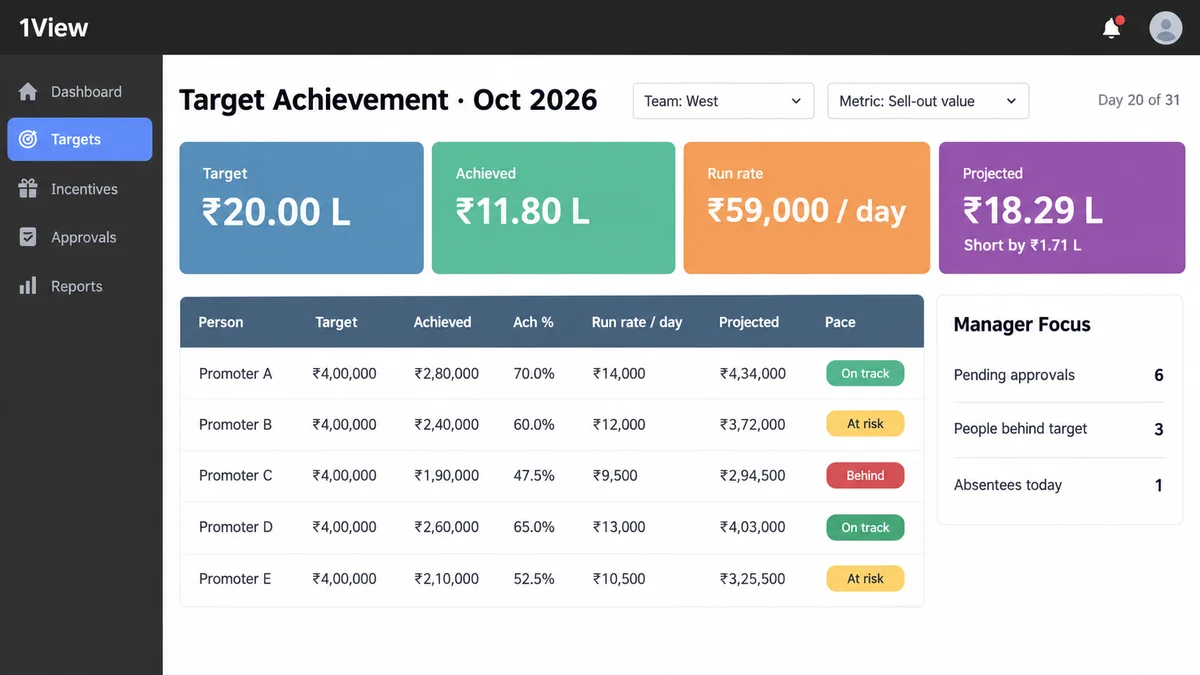
- Live targets: targets by person or store, in value, units or counts, with run rate and projected finish for managers.
- Weighted KPI scorecards: one score per role from any mix of KPIs, with results locked each month.
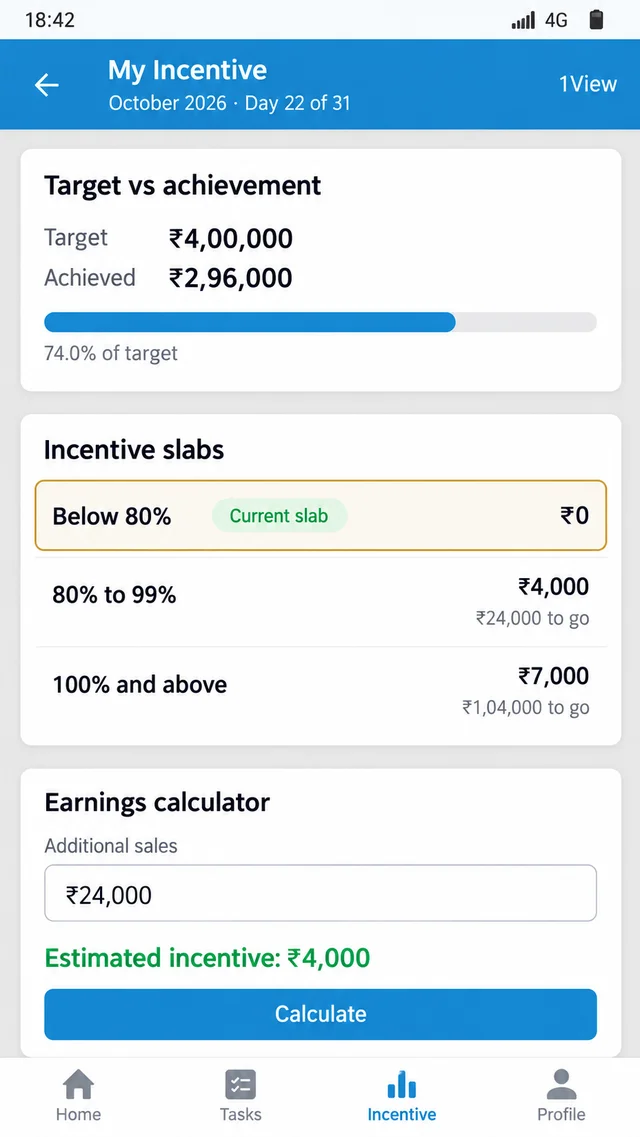
- Slab-based incentive plans: slabs on any KPI, plus an earnings calculator inside the app.
- One approvals inbox: pending approvals in one place on the portal and the app, with each manager's daily view flagging people behind target.
- Bulk uploads: targets and sell-out files uploaded in bulk, so everyone works from the same figures.
Make Incentive Payouts Visible Before the Month Closes
1View, 1Channel's field-force app, runs slab-based incentive plans on any KPI and tracks targets live by person or store. Promoters get an earnings calculator inside the app, and managers see run rate and projected finish for their team, so payouts are easier to understand before month-end.
Explore 1Channel's Sales Force Automation →What the Next Dispute Costs If Nothing Changes
Each dispute takes time from the people who should be closing the month. Area managers recheck records line by line, and finance holds payouts until the figures are agreed.
The bigger cost is trust. When promoters can't predict their own incentive, the plan stops working as motivation, and the resulting disengagement often shows up in the field before it shows up in sales.
Five Steps to Prevent the Next Month-End Dispute
- Publish the plan before the cycle starts. Share slabs, weightages, qualifying KPIs and the treatment of returns in writing before day one.
- Agree on one sales source. State whether incentives use promoter-reported sales, retailer sell-out files or approved records.
- Show progress during the month. Promoters should see their achievement and what it is worth while there is still time to act.
- Set a cutoff for exceptions. Attendance corrections, returns and late submissions should be approved by a fixed date, not on payout day.
- Lock the month and explain the result. Share the calculation behind each payout, using the same figures everyone saw during the month.
Questions will still come up. With these steps, they become questions about one agreed record rather than arguments between two.
Note: Software screens may vary based on your business structure and configured workflows.