A rep who sold fewer packs than planned can still top the value table. It happens whenever the price list rises after the incentive target was set.
In Ghana this is a familiar pattern in pharma. Most medicines are imported and the cedi has swung both ways, so price lists change faster than incentive plans.
The same drift hits any team paid on sales value, in pharma and healthcare, FMCG, cosmetics and personal care, and consumer durables.
This guide builds a free incentive sheet in EtherCalc that scores reps on units and on price-adjusted value. It then shows where a manual sheet stops coping.

Why Value-Only Incentives Drift When Prices Move
A value target is set against the price list of the day. If that list later rises by 10%, the same packs bring in 10% more value.
The rep's work has not changed, yet value achievement jumps, and so can their slab. A price cut does the reverse and quietly shrinks a payout.
Finance then handles two kinds of complaint: reps paid for a price rise they did nothing to earn, and reps who lost out to a price cut.
Here is how two reps on the same GHS 1,500 monthly pot fare under a value-only plan and under the sheet built below. Figures are illustrative.
| Rep | What happened | Value-only plan | Units plus adjusted value |
|---|---|---|---|
| Kwame, Accra | 380 of 400 units; value at 115% after a 10% price rise | 150% slab, GHS 2,250 | 50% slab, GHS 750 |
| Akosua, Kumasi | 420 of 400 units; value at 95% after a 5% price cut | 50% slab, GHS 750 | 100% slab, GHS 1,500 |
The rep who sold more units earned less under the value-only plan. That gap is what the sheet below closes.
What You Need Before You Start
- EtherCalc — a free web spreadsheet at ethercalc.net that opens in a browser with no sign-up or install.
- Targets per rep — a units target and a value target in GHS for the period.
- Actual sales — units and value sold, taken from distributor invoices or your sales report.
- Price change — how far the price list for each rep's range has moved since targets were set, as a percentage.
- Your plan rules — the slabs, the weight given to units and value, and each rep's incentive pot.
A standard EtherCalc sheet can be opened and edited by anyone who has its link. For real data, use rep codes instead of full names.
How to Build the Incentive Sheet in EtherCalc
The sheet below has one row per rep and thirteen columns. Each step adds a few columns, so you can check the numbers as you go.
Step 1: Create a Sheet and Add the Headers
Open ethercalc.net and choose Create spreadsheet. The new sheet opens at its own web address, so bookmark it before you type anything.
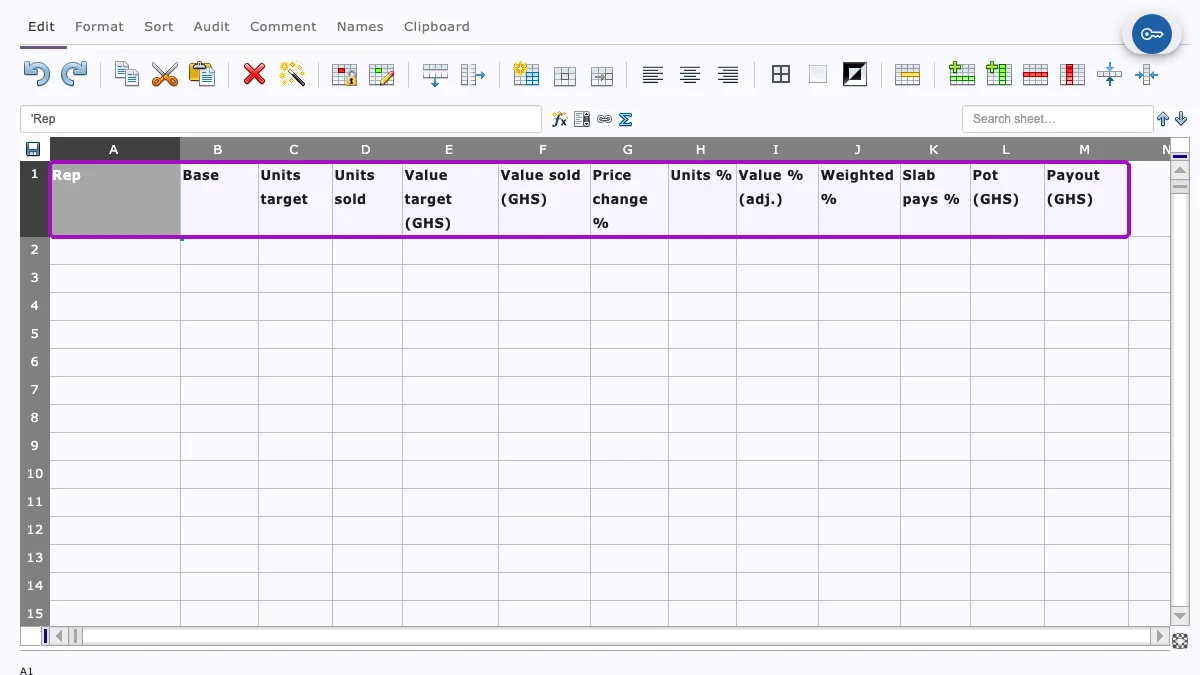
In row 1, type the thirteen headers from Rep to Payout (GHS), and bold the row so it stays readable.
Step 2: Enter Targets, Sales and the Price Change
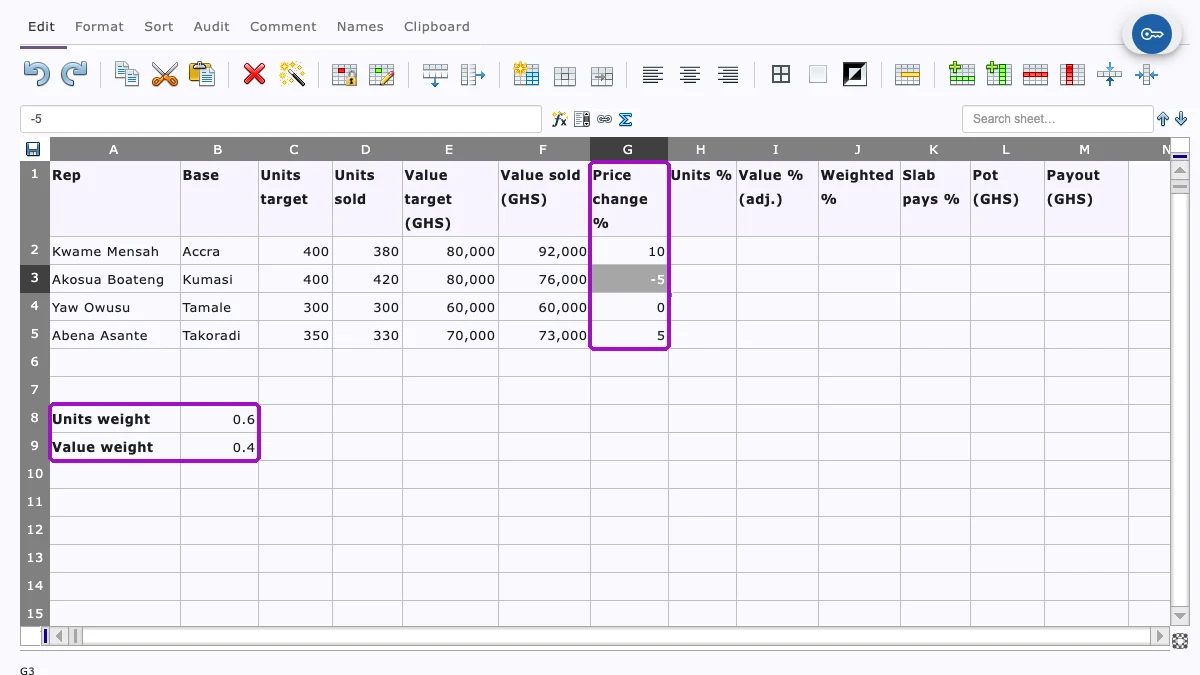
Fill one row per rep: base city, units target, units sold, value target and value sold. Format the two value columns with a thousands separator.
Type the price change as a plain number in column G: 10 for a 10% rise, -5 for a 5% cut, 0 if the list has not moved.
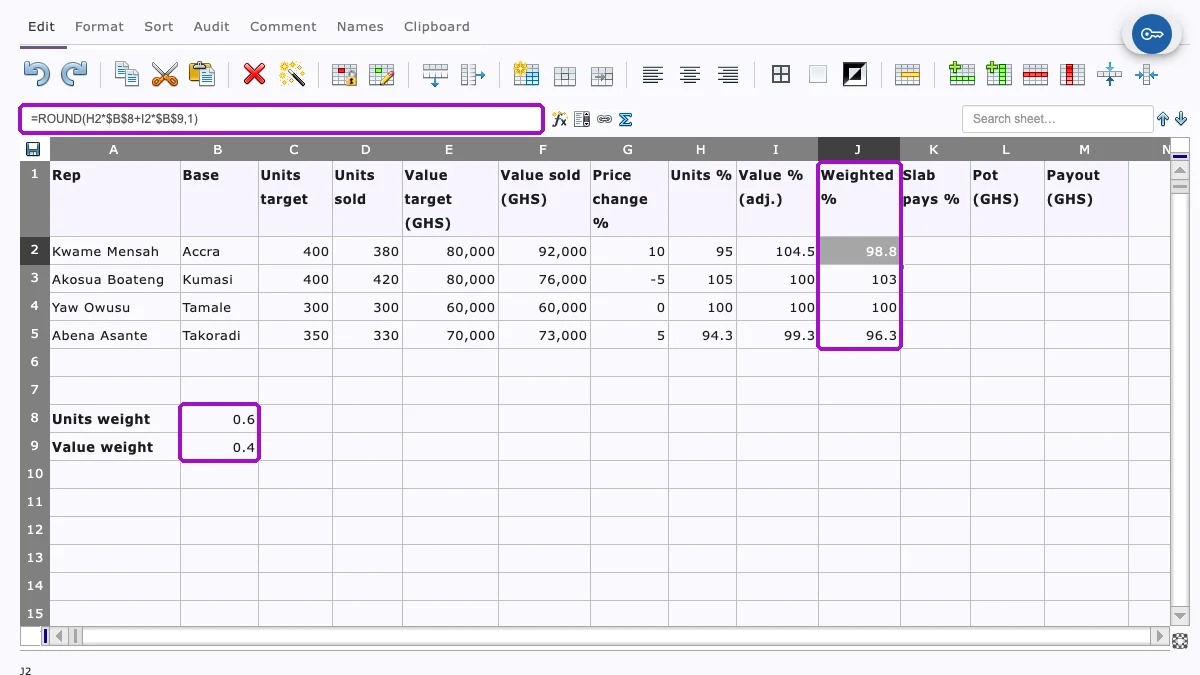
Below the table, put the weights in their own cells: 0.6 for units in B8 and 0.4 for value in B9. Changing them then updates every rep.
Step 3: Work Out Units and Price-Adjusted Value
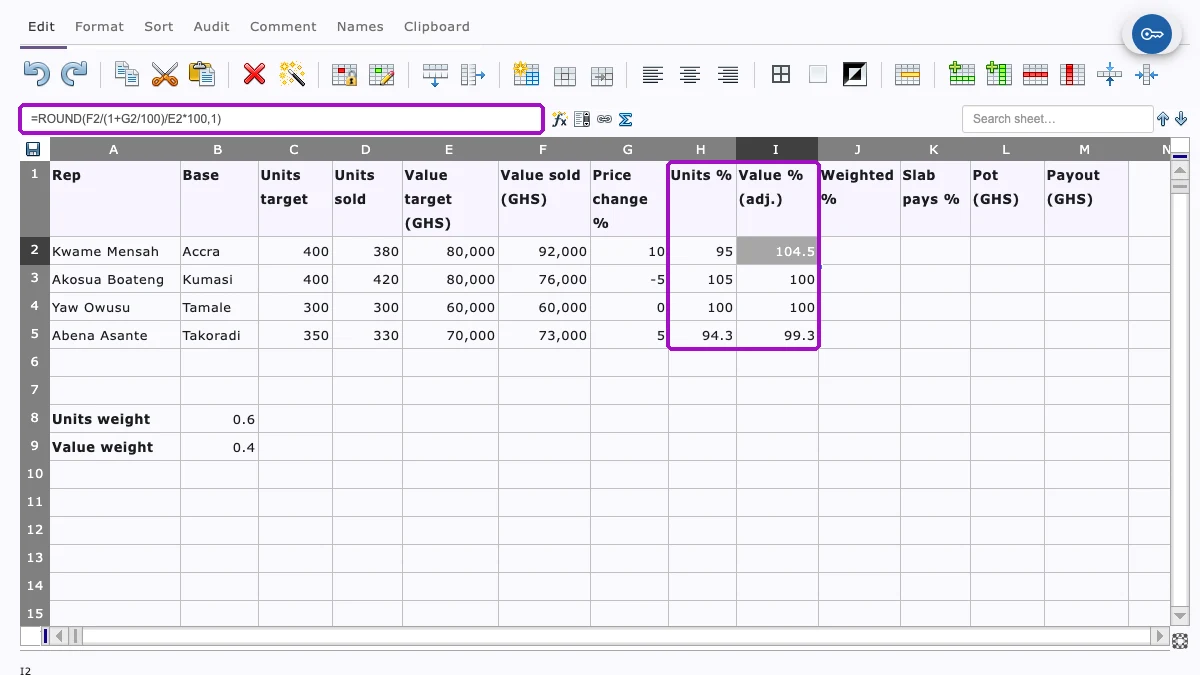
In H2, enter =ROUND(D2/C2*100,1) for units achievement. In I2, enter =ROUND(F2/(1+G2/100)/E2*100,1) for value achievement.
Dividing value sold by one plus the price change puts the sale back on the target's price list. Copy both formulas down to every rep.
Kwame's value achievement now reads 104.5% instead of 115%, while Akosua's rises from 95% to 100%.
Step 4: Combine Both Into One Weighted Score
In J2, enter =ROUND(H2*$B$8+I2*$B$9,1). The dollar signs keep the formula pointing at the two weight cells when you copy it down.
Kwame lands at 98.8%, Akosua at 103%, Yaw at 100% and Abena at 96.3%.
Units carry most of the score and the value part is already adjusted, so a price revision alone no longer lifts a rep into a higher slab.
Step 5: Apply the Slab and Work Out the Payout
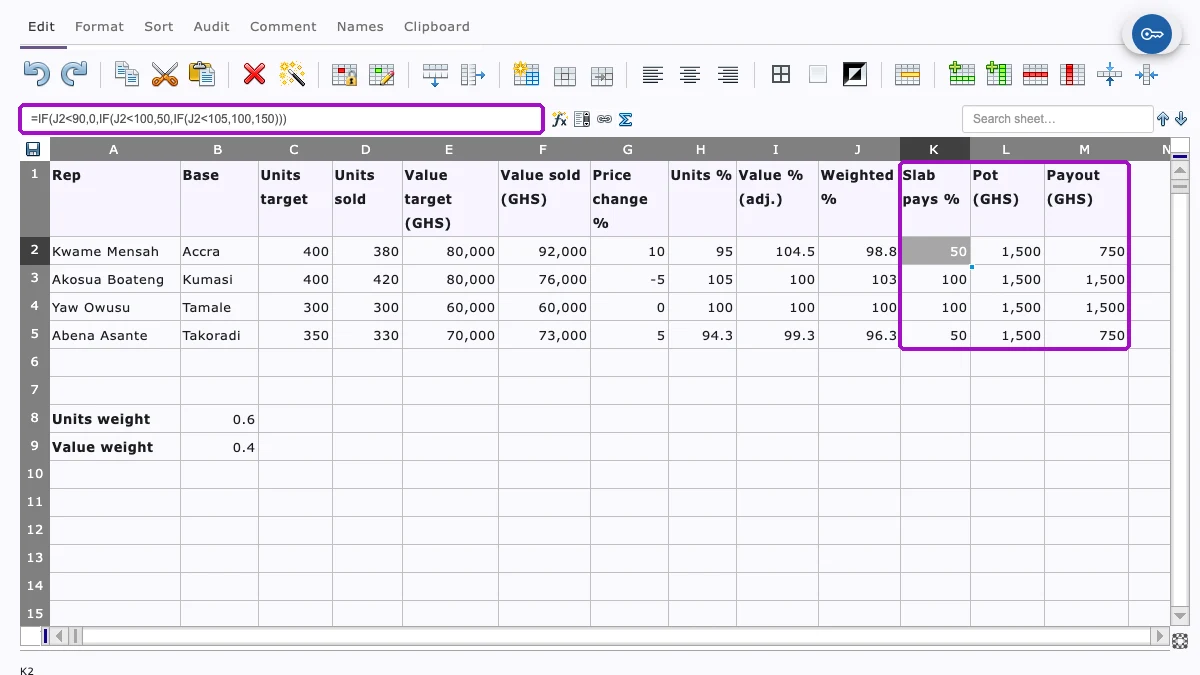
In K2, enter =IF(J2<90,0,IF(J2<100,50,IF(J2<105,100,150))). It returns the share of the pot each score earns, using these slabs:
| Weighted score | Share of pot paid |
|---|---|
| Below 90% | 0% |
| 90% to 99.9% | 50% |
| 100% to 104.9% | 100% |
| 105% and above | 150% |
Type each rep's pot in column L, here GHS 1,500, then enter =L2*K2/100 in M2 and copy it down.
Kwame and Abena each earn GHS 750. Akosua and Yaw each earn the full GHS 1,500, which matches the units they actually sold.
Where the Manual Sheet Falls Short
The sheet settles the price question for one month. Run it every month across a full team, and these limits start to show.
- Price changes are typed by hand — someone has to track every price list revision, and one missed update skews every row it touches.
- One figure per rep hides a mixed range — a rep selling repriced imports and stable local lines needs a blended change, which is close to guesswork.
- Sales are re-keyed — units and value are pasted in from invoices or reports, so the sheet is only as current as the last paste.
- Sharing is all or nothing — everyone with the link of a standard sheet can edit it, with no separate roles for finance, managers and reps.
- Reps see their number late — nobody knows their slab until finance shares the sheet, so disputes surface after payout.
- Results only — there is no eligibility rule, such as journey-plan adherence, unless you build more columns and keep them updated.
How 1Channel Runs Rep Incentives Without the Sheet
1Channel's field sales app keeps targets, scoring and incentives in one place, and each limit of the manual sheet has a direct counterpart.
| Manual sheet | With 1Channel |
|---|---|
| Price changes typed by hand | Targets can be set in value, units or counts, and KPI weights are set per plan, so value never has to carry the whole score |
| Sales pasted in from reports | Achievement is tracked live against each target, with run rate and projected finish |
| One link, full edit rights | Role-based logins on the app and the web portal |
| Reps wait for finance | An earnings calculator in the app shows the incentive earned so far, with details for each parameter |
| No eligibility rule | Incentives can be gated on journey-plan adherence, with an Eligible or Not eligible badge |
| Results can be edited later | KPI scorecards lock their results each month |
Slab-based plans can run on any KPI, and slab thresholds can differ from one KPI to the next. A quarterly view averages each month's achievement.
For a pharma team facing frequent price revisions, that means units can carry the weight they deserve, and every rep can check their slab before month-end.
Pay Reps for What They Sold, Not What Prices Did
See how targets, weighted scorecards and slab-based incentives work for field sales teams in Ghana.
Explore Sales Force Automation →Key Takeaways
- A value-only incentive pays for price changes as well as selling effort, in both directions.
- Dividing value sold by one plus the price change puts it back on the target's price list.
- Giving units the larger weight limits how far any price revision can move a rep's score.
- A free EtherCalc sheet handles this for a small team, but every price change and sales figure is typed by hand.
- Reps trust a plan more when they can see their own score before payout.
Note: Since the manual method was only tested once, consult a technical expert before running bulk operations.