Every FMCG brand in Vietnam pays for banners, standees and tent cards, yet few can say how many were still standing a week after installation.
The question matters most for FMCG, Cosmetics and Personal Care, Consumer Durables and Retail and Modern Trade teams, where one campaign can span hundreds of shops.
This post covers how 1Channel scores a display against a picture of success and how AI checks the photo before the rep leaves.
It also shows how a closed shop gets recorded with a reason.
Two worked examples show the scoring and the closed-shop flow in practice.
Scoring a Display Against a Picture of Success
A campaign starts in the admin portal with a store list and a POSM list, each uploaded as a plain-text file of codes.
Any code that does not match is listed back, so nothing is dropped silently.
Each campaign parameter carries a weight, a reference image of success and a short guideline. The rep sees the same reference and scoring rule before shooting.
Saigon Fresh Mart Co. ran a beverage launch across 120 minimarts in District 7 and Thu Duc, needing one tent card and one standee in every store.
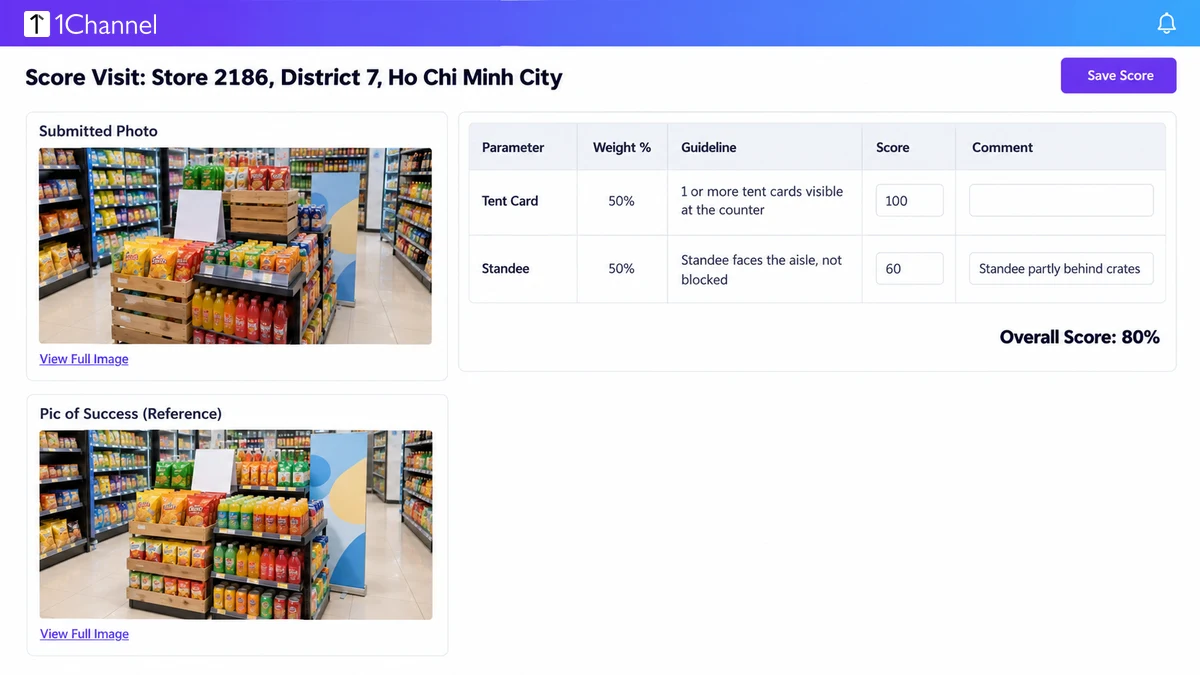
At store 2186, the reviewer compared the submitted photo with the reference and scored each parameter against its guideline.
| Parameter | Weight | Rule shown to the rep | Score |
|---|---|---|---|
| Tent card | 50% | 1 or more tent cards visible at the counter | 100 |
| Standee | 50% | Standee faces the aisle and is not blocked | 60 |
| Store score | 80% |
The tent card scored in full. The standee sat partly behind crates, so the reviewer scored it 60 and left a comment for the store team.
A store running two campaigns shows one scored line per campaign and parameter, so each can be judged on its own.
Letting AI Check the Photo Before the Rep Leaves
1Channel's AI image recognition reads POSM and promotional photos and scores how closely each display matches the approved layout.
When it is not confident in a photo, it prompts the rep to retake the shot on the same visit. The task closes only once the shot clears.
That moves the weak-photo conversation from a review queue days later to the shop floor, while the display can still be fixed.
Recording Why a Shop Could Not Be Done
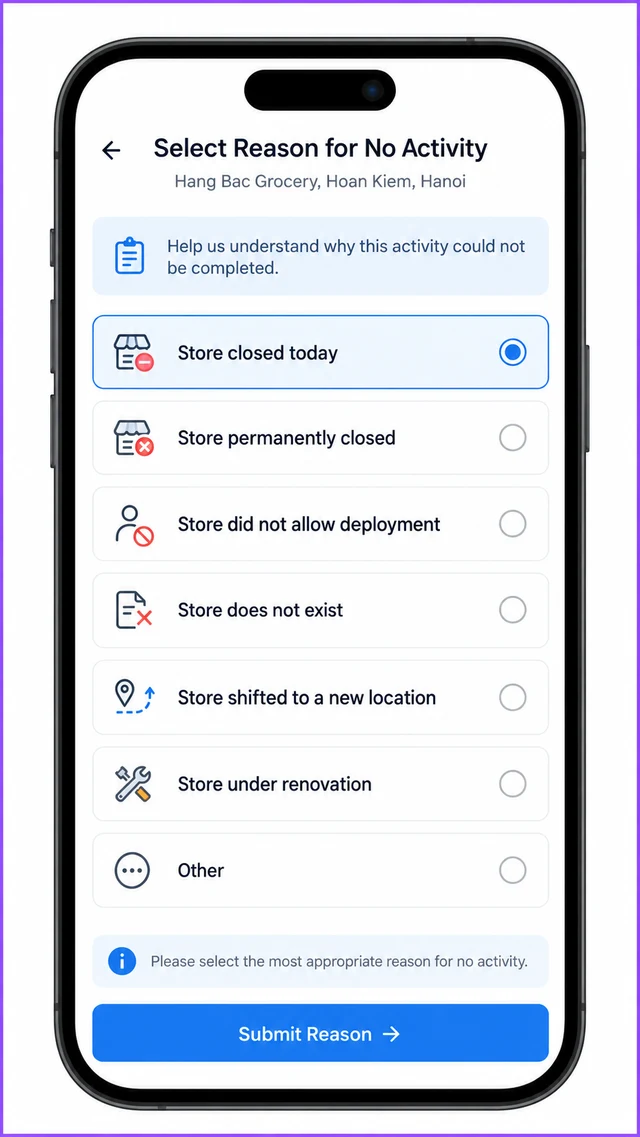
Some visits have nothing to execute. The rep ticks No activity to be done today and picks a reason from a fixed list.
- Store closed today
- Store permanently closed
- Store did not allow deployment
- Store does not exist
- Store shifted to a new location
- Store under renovation
- Other
The chosen reason shows on the task, and the visit closes without a photo.
A rep on a Hanoi tạp hóa route found a shop shuttered by mid-morning and selected Store closed today.
The manager saw a recorded reason instead of a missing score, which separates a closed shop from a skipped one.
How 1Channel Proves a Display Went Live
1Channel keeps the picture of success, the scored photo and the no-activity reason on one visit record.
A brand can then tell an executed display from one that was only marked done.
Campaign setup, AI retakes and closed-shop reasons all run from the same mobile app the field team already uses, on a cloud platform built for Vietnam's retail networks.
Proof a Display Is Actually Up
Score every POSM photo against a picture of success, retake weak shots on the spot, and record why a shop was skipped, all from one mobile app.
Explore POSM Tracking Software →Decision Checklist
- Does every campaign carry a reference image and a plain scoring rule? Reps and reviewers should judge against the same standard.
- Are store and POSM lists uploaded as code files? Unmatched codes should be reported back, not dropped.
- Is each parameter weighted? A weighted score shows which part of the display failed.
- Do weak photos get a retake on the same visit? A prompt in the shop beats a rejection days later.
- Is there a fixed reason list for skipped shops? A recorded reason separates closed from skipped.
- Are weights and guidelines treated as examples here? They are configured per campaign, not platform defaults.
Note: Software screens may vary based on your business structure and configured workflows.