A purchase claim submitted inside a B2B loyalty program rarely gets approved by a single person. Before a point lands in anyone's wallet, the claim typically clears two separate checkpoints, each held by a different stakeholder.
A hardware distributor submitting a claim under a building materials distributor management program sees the invoice sit in "Pending" until both checkpoints clear.
None of this happens by accident. It's configured screen by screen inside the platform's backend.
This piece walks through that configuration: the two-level chain itself, where one stage is enough instead, the automation engine behind it, and the screen that decides who approves what.
The Two-Level Approval Chain Behind a Purchase Claim
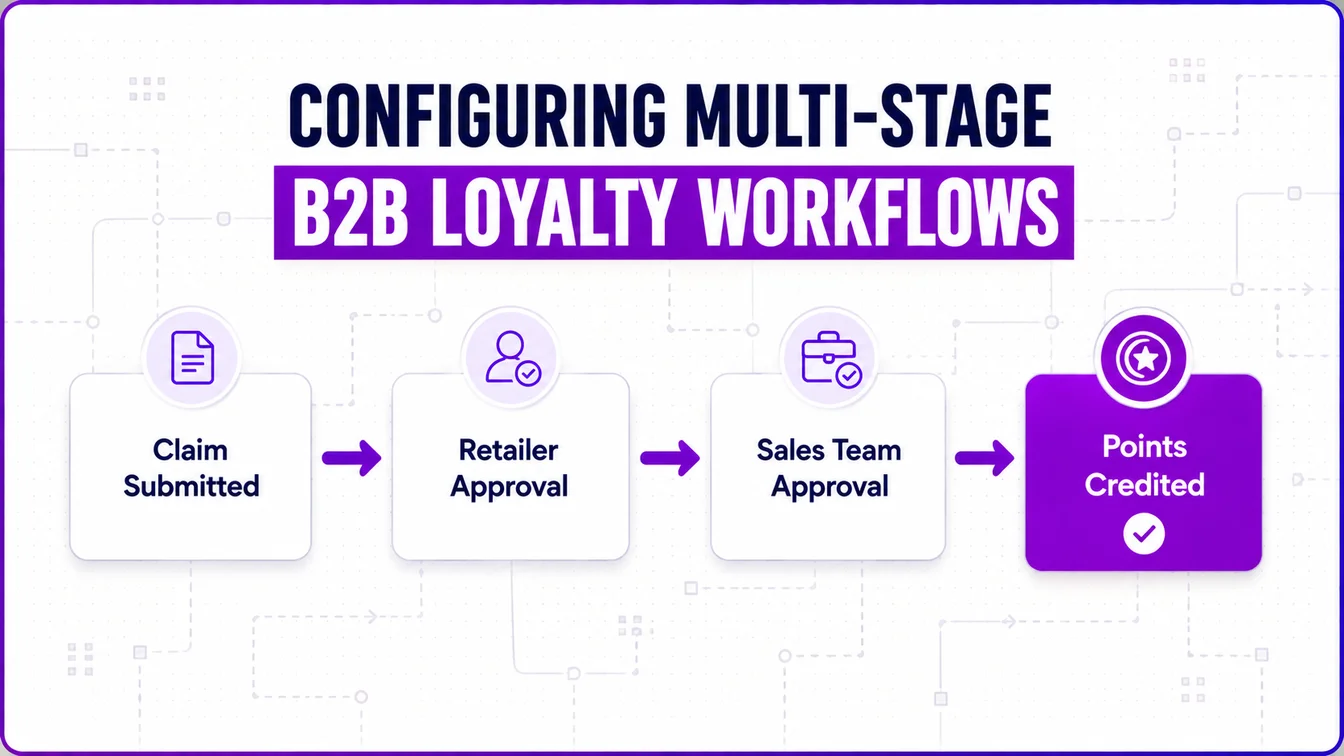
A partner submits a purchase entry with an invoice image, purchase value, and where it was bought. That single submission then moves through two checkpoints before any points are credited.
| Level | Approver | What They Review | Outcome |
|---|---|---|---|
| 1 | Retailer the purchase was tagged to | Invoice image, purchase value, partner details | Approve forwards to Level 2; reject ends the claim |
| 2 | Brand's sales team (Admin Portal) | Same claim, final sign-off | Approve triggers point credit; reject ends the claim |
Worked example: A distributor uploads an invoice for ₹42,000 against a bulk-material purchase.
The retailer they bought from opens the mobile app's Approvals queue, checks the invoice against the claimed amount, and approves.
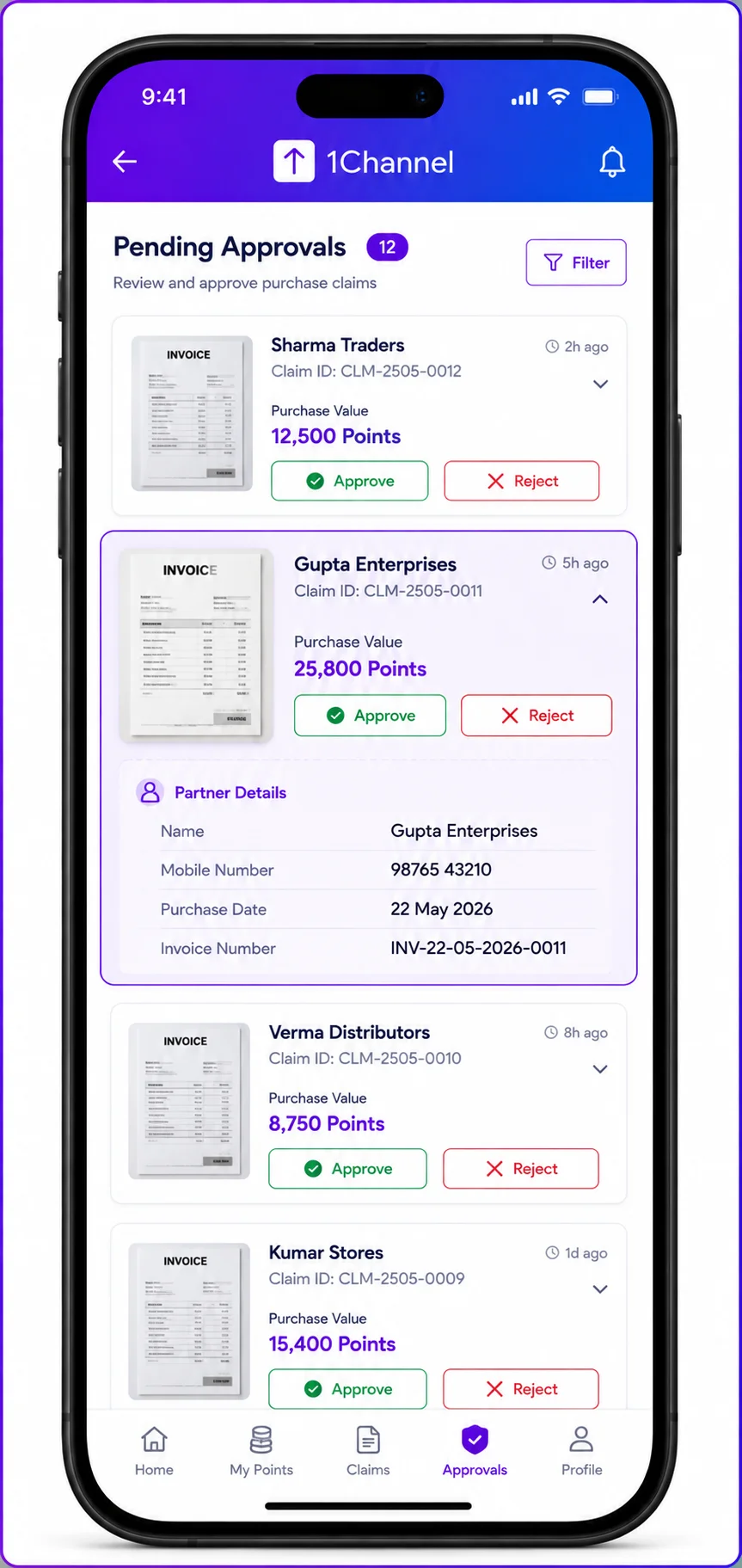
The claim then appears in the sales team's queue inside the Admin Portal. Once they sign off, points are calculated on the approved volume and credited to the distributor's wallet.
If either party rejects, the claim closes with no credit. There's no partial approval.
Whether this two-level gate applies at all is itself a setting, not a fixed rule. A program can configure direct, unapproved point credit instead, if that suits its risk tolerance better.
Not Every Approval Needs Two Stages
Purchase claims aren't the only thing routed through an approval step. Nominating a new partner into the program is a different, simpler process.
- Purchase claim approval: two stages, Retailer then Sales Team
- Nomination approval: one stage, Sales Team only
A nomination has no retailer to check against, since it isn't tied to a specific transaction. It's simply a request to let someone new into the program.
So the chain is shorter by design. The sales team reviews the nominee's details once, then either grants access with an app-download notification, or rejects it outright.
Matching approval depth to what's actually being verified keeps low-risk actions from getting stuck behind unnecessary sign-offs.
How the Workflow Automation Engine Drives It All
Every automated behavior around these approvals, point credit, retailer SMS, task creation, is configured as a workflow. None of it is hardcoded logic.
A workflow is a trigger paired with an action.
Trigger types:
- Event-based — fires the moment something changes, e.g. "purchase status changes to Approved"
- Schedule-based — runs on a cron-style cadence: start date/time, repeat frequency, optional end date
Action types a workflow can fire:
- Allocate points
- Send an SMS (from a configurable template)
- Send an email
- Create an approval task
- Trigger a webhook to an external system, e.g. pushing approved data into the brand's CRM
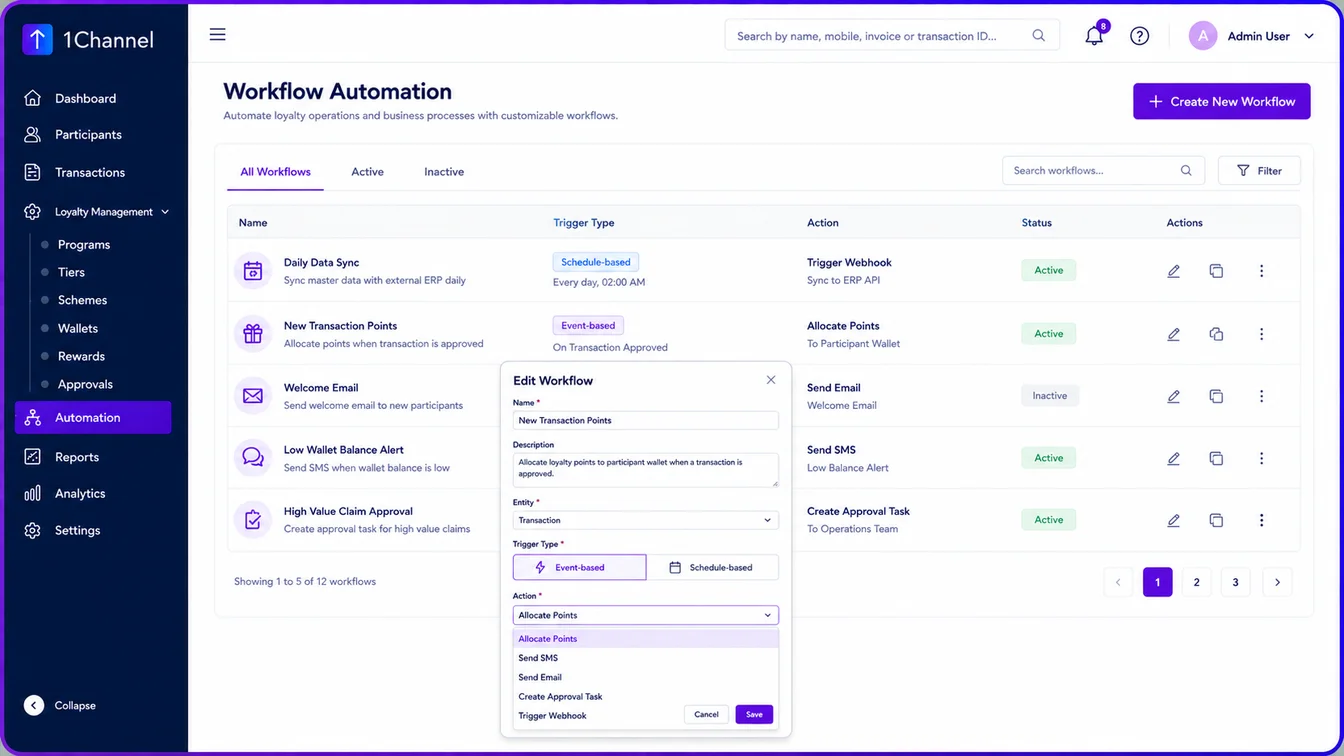
In practice, a single purchase claim can set off a small chain of these.
An SMS goes to the retailer when the claim first reaches their queue, then a second SMS to the distributor once the sales team gives final approval.
The point-allocation workflow fires last, only after that final approval clears.
Configuring Approval Routing, Not Just Running It
The approval chain itself is set up on a dedicated Approval Process Routing screen, separate from running day-to-day approvals.
Here, an admin defines, per approval type, which role sits at each level and whether that level is mandatory.
- Nomination Approvals: one row, approver role plus a required toggle
- Purchase Claim Approvals: two ordered rows, Level 1 approver role and Level 2 approver role, each independently required
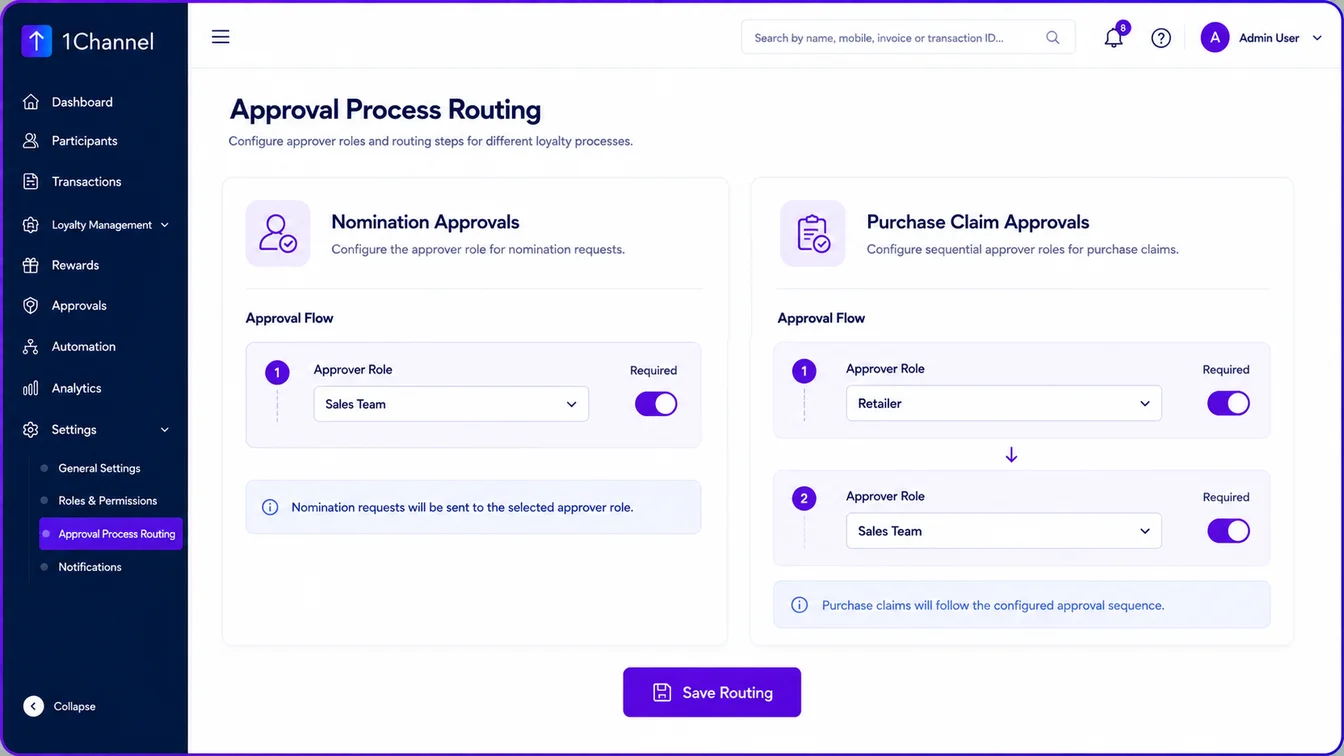
This is also where the sales-team roster and brand-side admin users get created in the first place. So the roles referenced in routing actually exist to be assigned.
Changing the chain (adding a step, dropping one, or reassigning who sits at Level 1) is a routing change on this screen. It isn't a request to engineering.
Running Multi-Stage Approval Workflows on 1Channel
Explore 1Channel Channel & Influencer Loyalty
1Channel's Channel & Influencer Loyalty platform configures approval routing, workflow triggers, and point allocation from the same backend, so a program's approval depth can match its actual risk, instead of a one-size-fits-all default.
Explore Channel & Influencer Loyalty →Conclusion
A claim moving through two approvers and a nomination clearing through one aren't running on different logic.
They're running through the same routing and workflow engine, just configured differently for what each action needs verified.
That's the real value of treating approval as configuration rather than code. A program can tighten a chain, loosen it, or reroute it as risk changes, without touching how the rest of the platform allocates points or fires notifications.
FAQs
1. What happens if a retailer rejects a purchase claim?
It closes there. The claim never reaches the sales team, and no points are credited.
2. Is the two-level approval mandatory for every purchase claim?
No, it's a configurable setting. A program can allow direct, unapproved point credit instead.
3. Does a nomination go through the same approval chain as a purchase claim?
No, a nomination has one stage, sales team only, since there's no retailer to verify a transaction against.
4. Can a workflow do more than allocate points?
Yes. The same engine can send SMS or email, create an approval task, or trigger a webhook to an external system.
5. What's the difference between an event-based and a schedule-based trigger?
An event-based trigger fires the instant a defined change happens, like a status update. A schedule-based trigger runs on a set cadence regardless of activity.
6. Who decides the approval routing? Is it fixed by the platform?
No. It's configured by the brand's admin team on the Approval Process Routing screen, including which roles approve and whether each level is required.
Note: Software screens may vary based on your business structure and configured workflows.