Field sales is no longer just about visiting stores and taking orders.
Today, every movement in the field from attendance to beat execution, store activities, order booking, expense claims, and end-of-day reporting is captured through a smart mobile application.
To understand how modern field execution works, let's step inside a field sales app and explore the real screens and practical features that drive daily operations on ground.
This walkthrough is based on actual application screen flows and explains how each module supports the daily journey of a field sales representative.
1. Dashboard: The Live Sales & Performance Hub
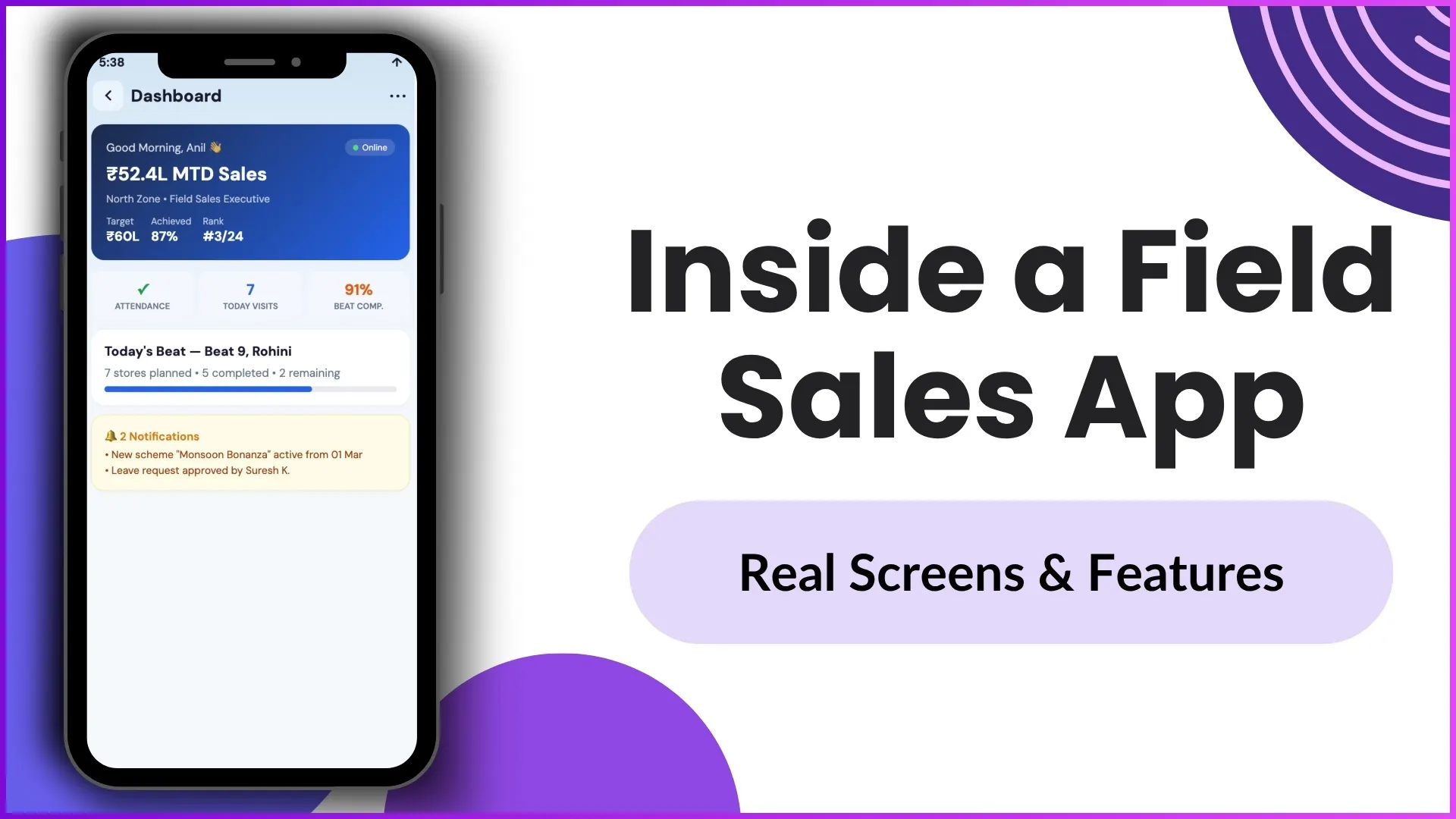
The dashboard acts as the command centre for every field executive.
The moment the rep logs in, they get a real-time snapshot of the day's performance and priorities.
What the dashboard shows
Live Sales Hero Card
The top section highlights the most important performance metrics.
Example:
- MTD Sales: ₹52.4L
- Target Achieved: 87%
- Team Rank: #3 out of 24
This immediately helps the rep understand where they stand in the month.
For example, if the monthly target is ₹60 lakh, the rep can instantly see how close they are to closing the gap.
Daily Pulse Metrics
Right below that, the app shows the three most critical daily indicators:
- Attendance marked
- 7 store visits planned
- 91% beat compliance
This section works like a quick morning checklist.
The rep doesn't need to ask the manager for today's plan — everything is visible on one screen.
Beat Progress Tracker
The dashboard also shows the assigned beat.
Example:
- Beat 9 – Rohini
- 7 stores planned
- 5 completed
- 2 remaining
A live progress bar gives real-time visibility into route completion.
This helps both the field rep and manager track productivity through the day.
Smart Notifications
The notification panel pushes proactive alerts.
Example:
- New Scheme Launch: Monsoon Bonanza
- Leave approval confirmation
This removes the need for constant phone calls from supervisors.
The rep remains updated in real time.
2. Attendance Screen: AI-Powered Verification
Attendance is one of the most critical compliance screens.
This app uses AI and GPS verification to eliminate fake attendance.
Face Validation & Liveness Check
The green success banner confirms:
- Face match confidence: 98%
- Liveness check: Passed
- No proxy detected
This ensures no one can mark attendance on behalf of another rep.
GPS & Location Verification
The screen captures exact coordinates.
Example:
- 28.5355°N, 77.2091°E
- Accuracy: ±8m
The app also checks whether the user is inside the assigned geofence.
This guarantees physical presence at the designated store or territory.
Tamper-Proof Audit Trail
The attendance screen logs:
- Timestamp: 8:52:14 AM
- Device: Samsung Galaxy A54
- Verified selfie
This creates a complete compliance trail for payroll and HR reporting.
3. Beat Plan: Optimized Route Execution
The beat plan screen tells the rep exactly where to go.
This removes confusion and improves route discipline.
Today's Beat Plan
Example:
- Beat 9 – Rohini
- Planned: 7
- Done: 5
- Pending: 2
Before leaving for the market, the rep already knows the day's expectations.
Optimized Route List
Stores are arranged in a sequential route.
Example:
- Sharma Kirana – Done
- Gupta Provision – Current
- Aggarwal Mart – Pending
Each store includes:
- distance from current location
- timestamp
- status
This ensures better route efficiency and lower travel time.
Live Visit Tracking
The current store is visually highlighted.
For example, Gupta Provision appears with a blue border.
Managers can instantly see where the rep is working right now.
This is extremely useful for live monitoring.
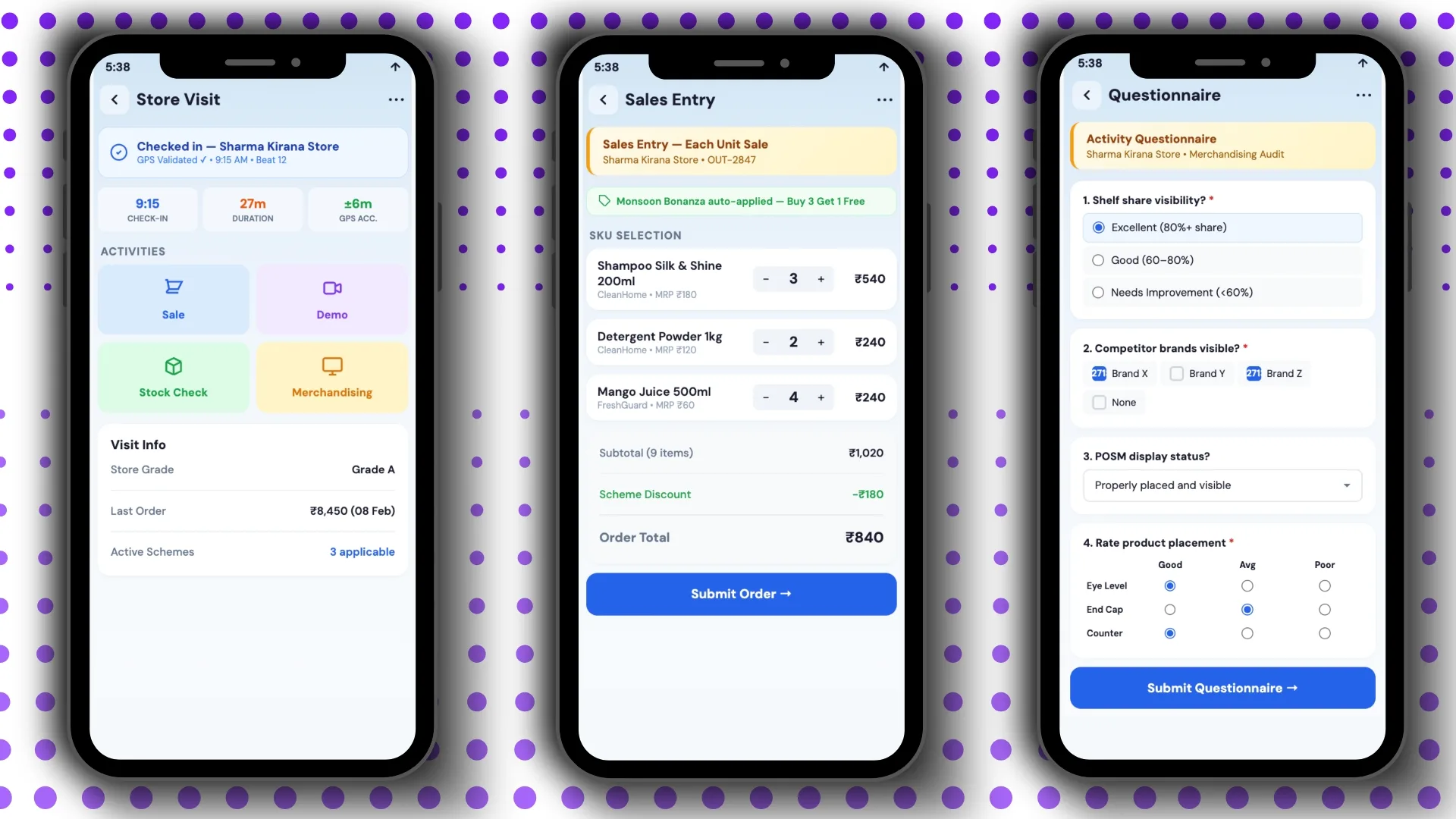
4. Store Visit Screen: The In-Store Activity Hub
Once the rep enters the store, this becomes the primary working screen.
GPS-Validated Check-In
Example:
- Store: Sharma Kirana Store
- Check-in time: 9:15 AM
- Duration: 27 minutes
- GPS accuracy: ±6m
This automatically validates the visit.
In-Store Activity Modules
The activities grid includes:
- Sale Entry
- Product Demo
- Stock Check
- Merchandising
This structured workflow ensures the rep doesn't miss any task during the visit.
For example, after completing the sale, they can immediately perform stock verification and merchandising checks.
Store Intelligence Panel
This section gives important selling context.
Example:
- Store Grade: A
- Last Order: ₹8,450
- Active Schemes: 3
This helps in smarter upselling.
For example, if the store is Grade A and usually places high-value orders, the rep can push premium SKUs.
5. Sales Entry: Quick Order Entry with Auto Schemes
This is one of the most conversion-focused screens.
Auto-Applied Trade Schemes
Example:
Monsoon Bonanza — Buy 3 Get 1 Free
The app automatically applies the scheme.
No manual calculation is required.
This reduces billing errors.
Quick SKU Order Entry
The screen provides tap-based quantity buttons.
Example:
- SKU A → 3 units
- SKU B → 2 units
Each line shows:
- brand
- MRP
- line total
This supports multi-brand ordering in one visit.
Instant Order Summary
Example:
- Subtotal: ₹1,020
- Scheme Discount: ₹180
- Final Total: ₹840
Everything updates in real time.
The rep simply taps Submit Order.
6. Questionnaire: Structured Field Data Capture
This screen replaces paper-based audits.
Dynamic Activity Questionnaire
Forms can be configured for:
- shelf share audit
- competitor visibility
- POSM checks
- product placement rating
This makes campaign-based data collection easier.
Multi-Format Input Types
The app supports:
- radio buttons
- checkboxes
- dropdowns
- rating matrix
Example:
Shelf visibility
- Yes
- No
Competitor brands
- Brand A
- Brand B
- Brand C
Placement rating
- 1 to 5
One-Tap Submission
Mandatory fields are validated before submission.
This ensures every store visit captures complete data.
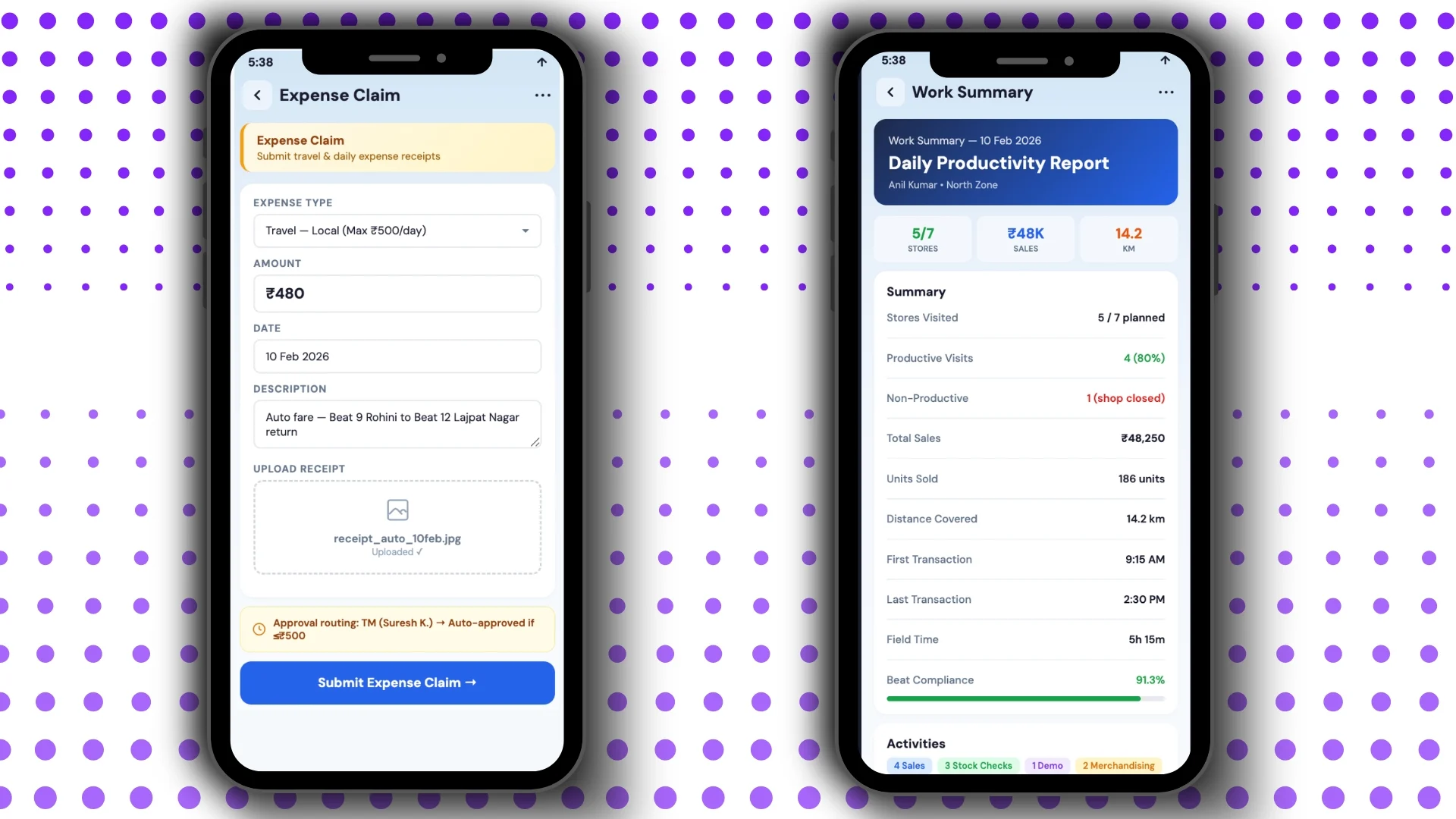
7. Expense Claim: Fully Digital Claims Workflow
Expense management becomes completely paperless.
Digital Claim Form
Example:
- Travel type
- Policy limit: ₹500/day
- Amount
- Date
- Description
Receipt Upload
Example:
receipt_auto_10feb.jpg — Uploaded ✓
The photo becomes proof for finance teams.
Smart Auto Approval
Example:
- Claims below ₹500 → auto approved
- Above ₹500 → sent to Territory Manager (Suresh K.)
This speeds up reimbursement.
8. Work Summary: Auto-Generated Daily Productivity Report
At the end of the day, the app automatically prepares the full work summary.
No manual reporting is needed.
Quick Day Snapshot
Example:
- 5/7 stores visited
- ₹48K sales
- 14.2 km travelled
These three numbers instantly summarize the day.
Detailed Work Metrics
Example:
- Productive visits: 4
- Non-productive: 1
- Sales: ₹48,250
- Units sold: 186
- Field time: 5h 15m
- Beat compliance: 91.3%
This helps managers analyze performance in detail.
Activity Breakdown
Example:
- 4 Sales
- 3 Stock Checks
- 1 Demo
- 2 Merchandising
The visual tags make reporting much easier.
How 1Channel Helps Streamline Every Field Visit
From attendance and beat planning to sales entry, audits, claims, and end-of-day reporting, 1Channel brings the complete field sales journey into one integrated mobile workflow.
It helps teams improve route compliance, reduce reporting errors, increase store productivity, and give managers complete real-time visibility.
Transform Field Sales Operations with Complete Mobile Workflow
1Channel Sales Force Automation provides comprehensive mobile app features including AI-powered attendance, GPS-validated store visits, auto-scheme sales entry, digital expense claims, structured questionnaires, and auto-generated daily reports for complete field force management.
Explore Sales Force Automation →FAQs
What are the most important screens in a field sales app?
Dashboard, attendance, beat plan, store visit, sales entry, questionnaire, expense claim, and work summary.
Can the app apply trade schemes automatically?
Yes, active schemes are detected and applied automatically during order entry.
Does the app track live store visits?
Yes, the current store and visit progress are tracked in real time using GPS validation.
How are daily reports generated?
The app auto-generates daily productivity summaries based on all field activities performed.
Is attendance secure?
Yes, it uses face verification, liveness detection, GPS validation, and device audit trail.