White Friday gives every electronics brand a fixed date, and each dark logo or chipped demo table in a store must be fixed before it.
In multi-brand outlets throughout Egypt, those repairs often start as a WhatsApp photo and end with nobody sure who checked the work.
The same race against the sale calendar runs through Consumer Durables and Electronics, Retail and Modern Trade, Cosmetics and Personal Care and FMCG.
This post follows one repair ticket through five steps, with worked examples from Cairo and Alexandria.

Why Store Repairs Miss the Sale Date
White Friday is Egypt's late-November sales event. Footfall peaks over a few days, so a brand wall left dark that week wastes its best exposure.
The usual chain is slow: a forwarded photo, a quote by phone, a crew with the wrong parts. Nobody can see which repairs are already late.
| Step | Owner | What gets recorded |
|---|---|---|
| 1. Raise | Promoter, merchandiser or brand team | Product, subject, priority, photos |
| 2. Approve and cost | Brand approvers, surveying rep | Approvals, rate cards, bill of quantities |
| 3. Execute | Field rep or vendor crew | Before and after photos, location, material |
| 4. Quality check | A reviewer not on site | Pass, fail or rework, with remarks |
| 5. Measure | Retail and trade marketing managers | Turnaround time by stage |
Step 1: Raise the Ticket in the Store
A ticket can start in the VisiMax app, on the portal or from the brand's own system through the partner API.
Each carries the product, a subject, a priority and photos of the fault.
A promoter short on time can dictate the issue in their own language. VisiMax transcribes the voice note into a clean English description on the ticket.
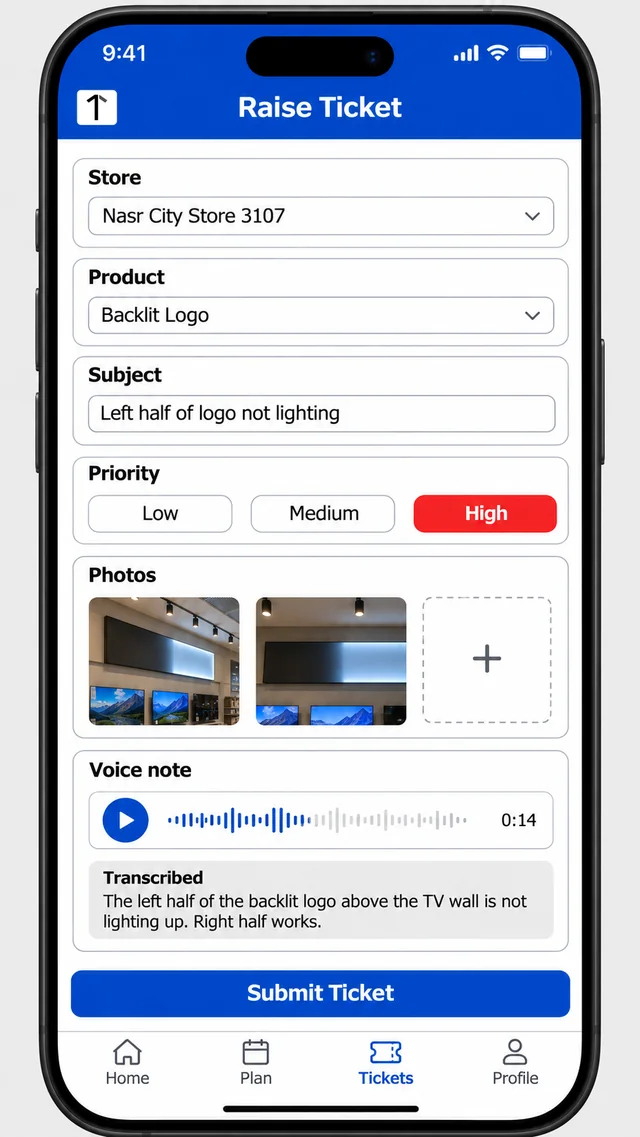
Store audits feed the same queue. Major and minor audit findings raise maintenance tickets on approval, with no retyping.
Step 2: Approve the Ticket, Then Cost the Recce
Approval levels are set per programme, on the ticket and again on the costed recce.
The recce is a site survey using element types with rate cards. It produces a bill of quantities with photos.
Approvers can approve, reject or send it back, and no crew goes out before the price is signed off.
Step 3: Execute With Before and After Photos
The field rep or a vendor crew does the work, with outside crews logged in to the same ticket.
Before and after photos, the job's location and the material used, drawn from the rep's own inventory, are all saved against the ticket.
Step 4: Pass the Quality Check Before Closing
A reviewer works through the execution review queue and marks each job pass, fail or rework, with remarks.
Validation and closure are separate stages, so a ticket never closes on the crew's word alone. Remarks can be tidied with one tap, kept in the author's meaning.
Step 5: Watch Turnaround Time by Stage
Turnaround time is tracked at every stage, so a delay shows up where it sits: approval, recce, execution or quality check.
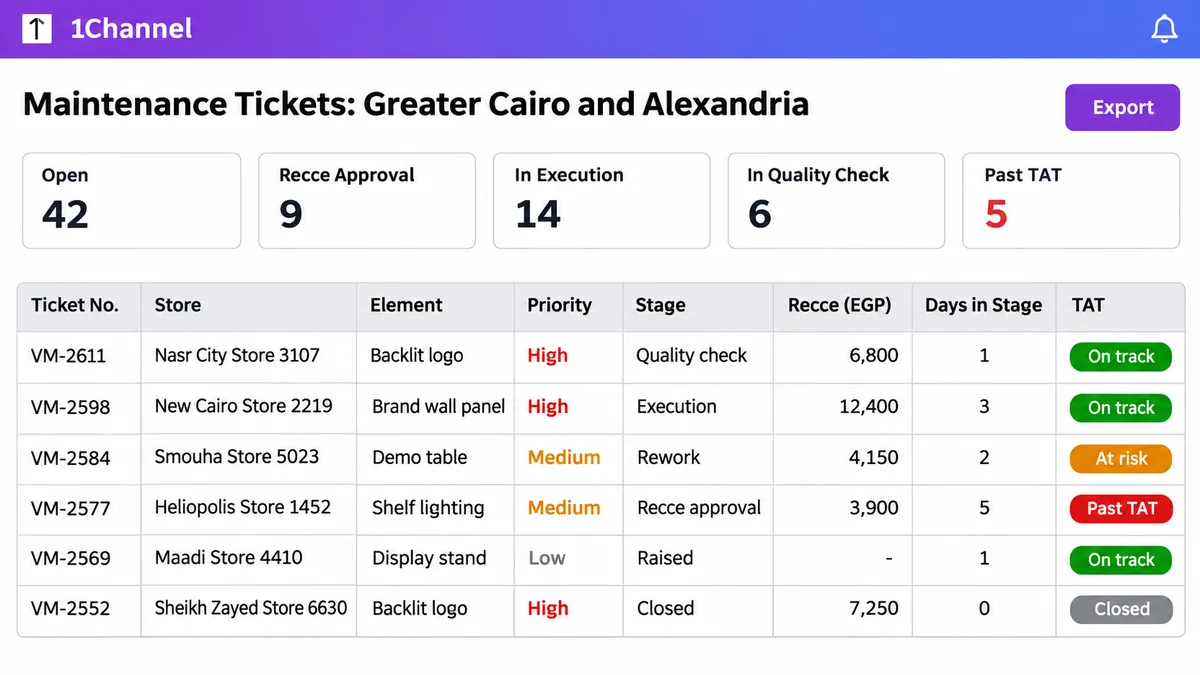
The ticket report, status summary and TAT dashboards show which jobs will miss the sale unless someone acts this week.
A Dark Brand Wall in a Nasr City Store
Ten days before White Friday, a promoter at a Nasr City electronics store in Cairo finds half the backlit logo on a TV brand wall unlit.
She records a voice note, attaches two photos and raises a high-priority ticket. The brand's retail team approves it the same afternoon.
The recce prices an LED strip and power unit at EGP 6,800. A vendor crew fits them two days later, with before and after photos.
QC passes the job, and the ticket closes with eight days to spare.
A Cracked Demo Table in Alexandria
At an Alexandria appliance dealer, a store audit flags a cracked demo table top. The finding raises a ticket on approval.
The crew replaces the top, but the after photo shows an exposed edge. QC marks it rework, and the ticket goes back to the crew.
The fix is redone within two days, and the TAT view shows where the extra time went for the vendor's next review.
How 1Channel Keeps Store Repairs on the Clock
VisiMax, 1Channel's app for retail maintenance, visual merchandising and store audits, carries each repair on one ticket from report to verified fix.
It works offline, and its 19 ready reports cover tickets, execution and coverage.
Track Store Repairs From Report to Verified Fix
See how tickets, costed recces, proof photos and quality checks keep in-store fixtures ready for the dates that matter.
Explore Retail Execution Software →Conclusion
White Friday does not wait for a vendor's quote. A repair needs an owner, a price and a clock from the moment it is reported.
Start ticketing fixture issues three weeks before the sale, and the late jobs surface while there is still time to close them.
Note: Software screens may vary based on your business structure and configured workflows.