Egyptian field teams get trained in four places: a classroom, a video call, a store aisle and a phone screen.
Across Egypt, a paper sign-in sheet covers the first of these at best, and it says nothing about who actually worked through a deck.
The gap matters most in FMCG, Retail and Modern Trade, Pharma and Healthcare and Consumer Durables and Electronics.
This post shows how each session type records attendance, what the rep sees in the app, and what managers read in the portal.

Why Sign-In Sheets Fall Short
A sheet proves a name was written, not that a rep learned anything. A WhatsApp photo of a half-full room proves even less.
Promoters and van crews rarely sit together, so most training happens in small groups, at one store or on one phone.
Around Ramadan the window is short. A range briefing must reach every promoter within days, and the brand needs to know who missed it.
How Each Session Type Marks Attendance
The admin portal schedules every session as one of four types, and each type follows its own attendance rule.
| Session type | Who marks it | How attendance is recorded |
|---|---|---|
| Classroom | The employee | The rep reaches the venue in the scheduled window and marks attendance, with a photo taken at that moment |
| Virtual | The employee | The meeting link shows in the app, and using it marks attendance and opens the call |
| In-Store | The trainer | The trainer teaches at the store, photographs the trainees and marks attendance from their own login |
| E-Learning | The system | Attendance is marked once time spent on the content passes a configurable minimum |
Setup follows the type. A classroom session asks for a venue, while a virtual one asks for a trainer and a meeting link.
What the Rep Sees in the App
The Trainings screen splits into Upcoming and Past. Each past card carries a green Attended or red Missed pill, plus its session type.
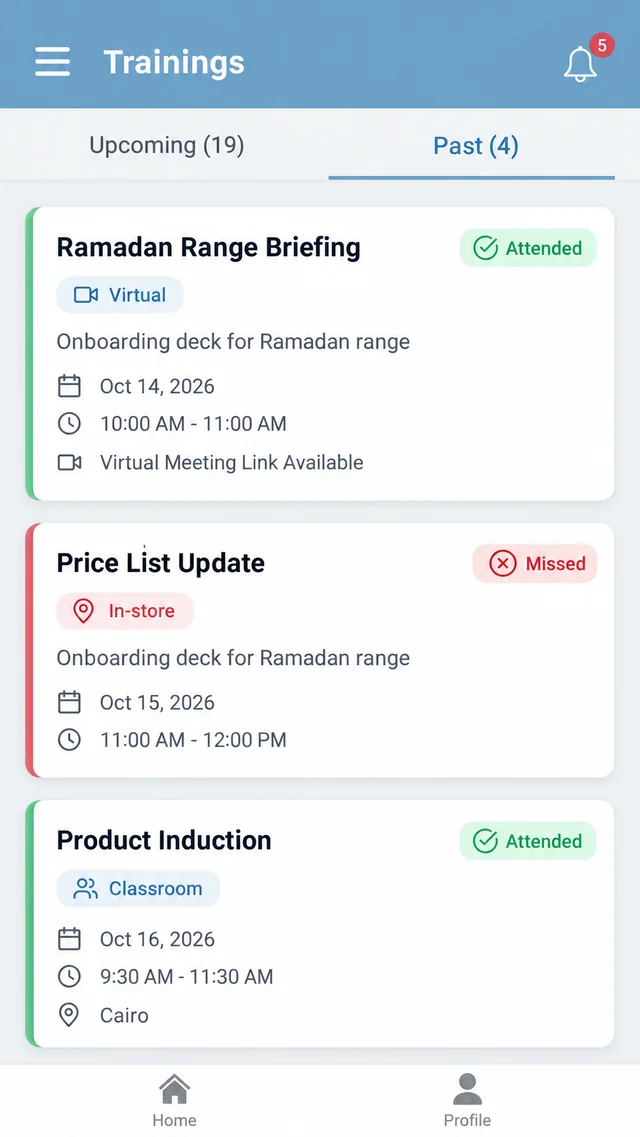
Virtual cards note that a meeting link is available, while classroom and in-store cards show a location.
An e-learning card in the Upcoming list picks up an Attended badge once the rep's time on the deck crosses the threshold.
What Managers Read in the Portal
Employee Progress lists every rep with module progress, certificates, badges and an attendance percentage. It filters by level and exports to CSV or Excel.
Analytics adds a Trainer Performance table with sessions conducted, students taught, average attendance, certificates issued and completion rate.
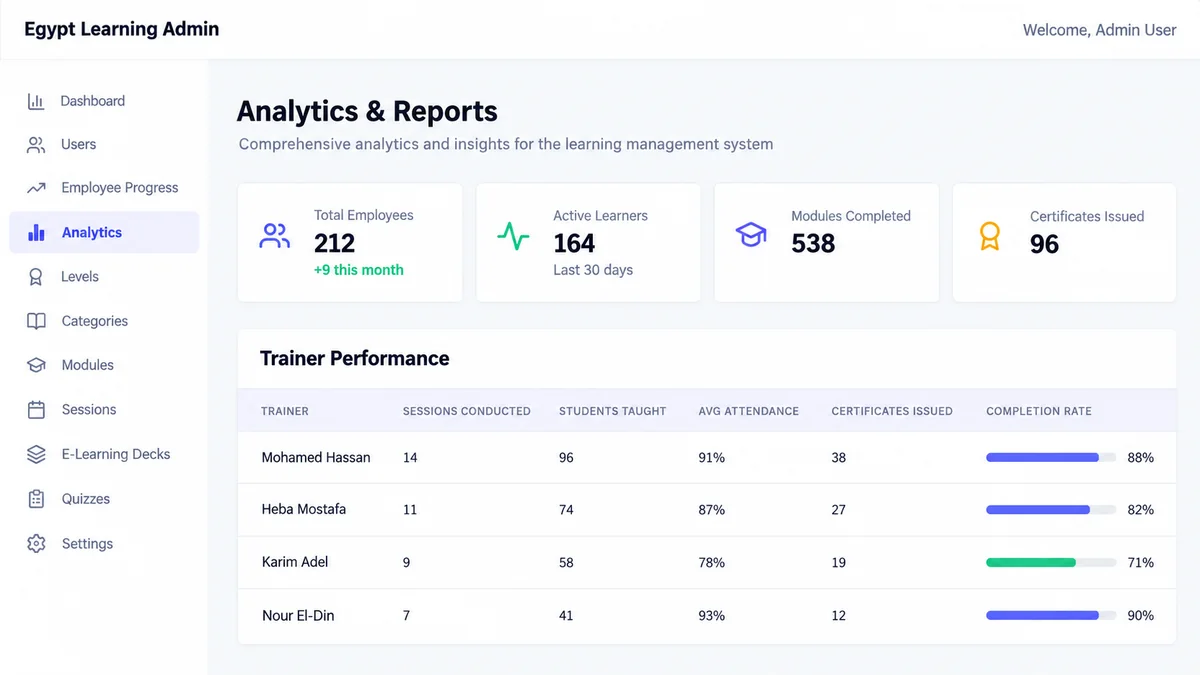
The main dashboard also compares attendance rate with a configurable target and labels the card Below Target when the figure slips.
A Ramadan Range Briefing for Cairo Promoters
A dairy brand schedules a Ramadan range briefing for 80 promoters across Greater Cairo supermarkets. Half join a virtual session, half get an e-learning deck.
Virtual attendees use the meeting link in the app, which marks them present as the call opens. Deck viewers count only after passing the minimum time.
Two days before the push, the manager scans Employee Progress and finds 11 promoters with no attendance recorded. Those 11 get a direct follow-up.
An In-Store Session at an Alexandria Wholesaler
A trainer visits a wholesaler's counter in Alexandria to walk two new reps through a price-list change at the store itself.
The reps cannot mark this one themselves. The trainer photographs them at the counter and marks attendance from the trainer login.
A third rep who was away that day shows a red Missed pill under Past. The gap is on record, so a make-up session can be scheduled.
How 1Channel Records Attendance for Every Session Type
1Channel's sales team LMS ties the session schedule, the attendance rule for each type, quizzes and level progress into one record.
Because each type marks attendance its own way, a manager reads one attendance figure per rep instead of reconciling sheets, chat photos and call logs.
See Training Attendance Tracked in One Portal
See how classroom, virtual, in-store and e-learning sessions each record attendance, and how managers follow progress by rep, level and trainer.
Explore Sales Team LMS →Implementation Snapshot
- Create categories and modules first, then schedule sessions under each module.
- Match the session type to the audience: classroom for induction, virtual for scattered teams, in-store for outlet-level coaching.
- Add the venue, or the trainer and meeting link, before the session goes live.
- Set the minimum time that counts as attendance for e-learning decks.
- Review Employee Progress and Trainer Performance each week against the attendance target.
Note: Software screens may vary based on your business structure and configured workflows.