A low-stock alert that arrives after the shelf is already empty has already cost the sale.
The gap matters most across FMCG, Pharma and Healthcare, Retail and Modern Trade, and Consumer Durables distribution.
A DMS can close that gap by watching stock levels itself and raising a reorder before a human notices the shortfall.
This post covers how threshold and check-frequency settings work, how approval routing fits the distribution hierarchy, and where an AI layer adds a second check.
Where Manual Stock Checks Fall Behind
A warehouse team checking stock once or twice a week works fine until demand moves faster than the checking cycle.
Ramadan is the clearest case. Core FMCG categories account for roughly three-quarters of Ramadan sales, concentrated into a few weeks.
A threshold set for ordinary months is already wrong by the time a stock-up promotion starts moving product.
The fix is not a faster manual count. It is a system that watches every SKU continuously and flags the moment it needs attention.
How Threshold and Check-Frequency Settings Work
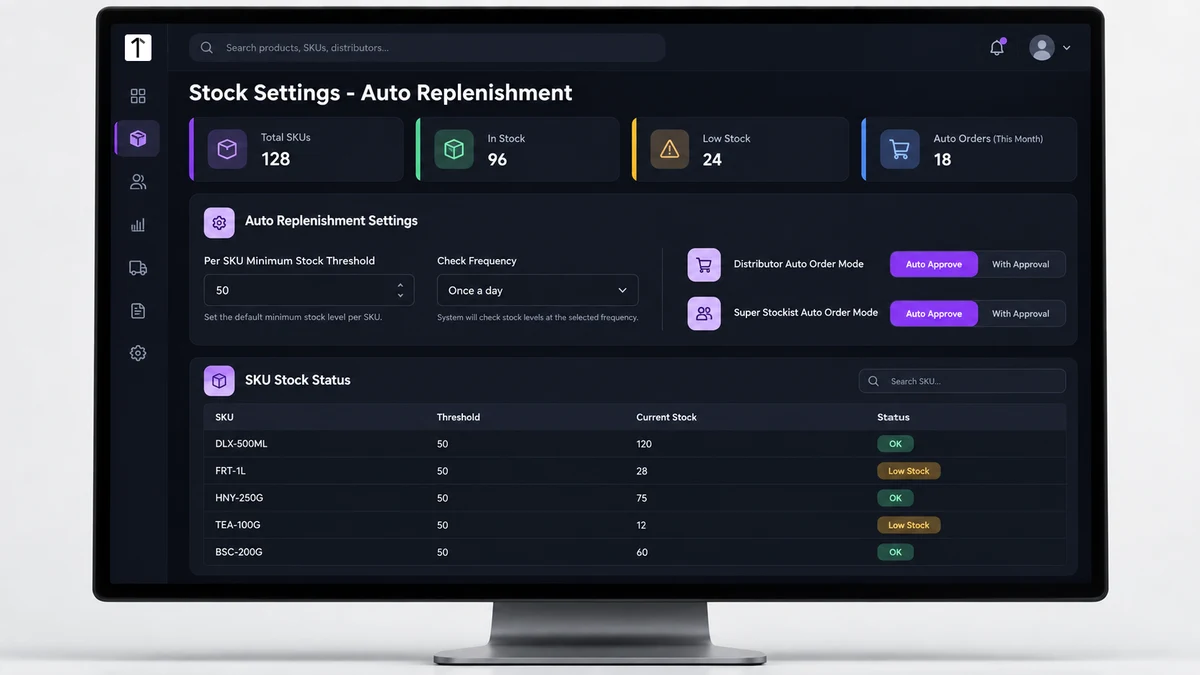
Every SKU gets its own minimum available-stock threshold, set once and left running in the background.
A check-frequency setting, commonly once a day, decides how often live stock is compared against that threshold.
Once stock falls below the line, the system raises a replenishment order on its own, without anyone opening a report first.
Two independent modes control what happens next: Distributor Auto Order Mode and Super Stockist Auto Order Mode.
Auto Approve places the order immediately. With Approval creates it as pending, waiting for a manager to release it.
Routing follows the distribution hierarchy itself. A distributor's auto-order goes to its super stockist; a super stockist's goes to the company.
A Modern Trade SKU on Auto Approve
Delta Fresh Distribution supplies Sunflower Oil 1L to a modern trade account in Greater Cairo, with a threshold of 500 units.
Check frequency is set to once a day, and Distributor Auto Order Mode is Auto Approve for this fast-moving SKU.
Stock drops to 480 units after a busy delivery run. The system raises a reorder worth EGP 24,000 before the next morning's check.
No one had to notice the dip. The threshold noticed it first.
A Baqala SKU That Waits for Approval
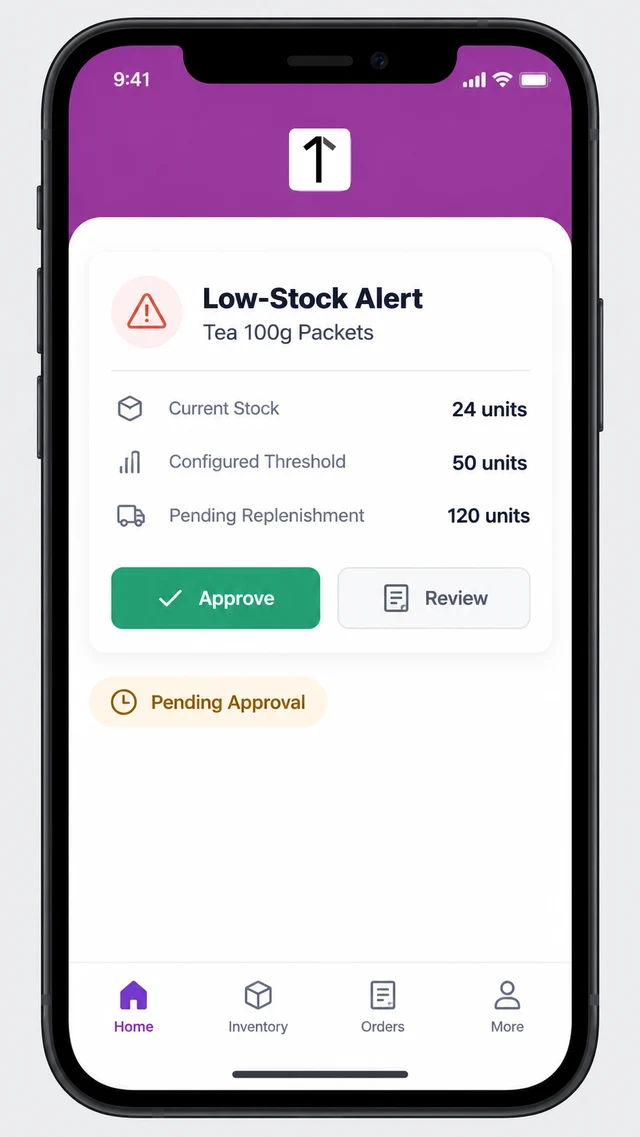
Nile View Trading supplies a slower-moving Tea 100g Packets line to baqala outlets across the Delta, at a threshold of 60 units.
Here, Distributor Auto Order Mode is set to With Approval, since order value on this SKU is smaller and more variable.
A low-stock alert reaches the field manager's phone the same day stock crosses the threshold, pending review before it becomes a real order.
The manager checks recent movement, confirms the quantity, and releases it. The order reaches the super stockist within the hour.
Where the AI Layer Adds a Second Check
Threshold and check-frequency settings are rules a person configures once. The AI layer sits on top of them.
It tracks the same stock thresholds but adds a predictive stock view, flagging SKUs likely to run out before the fixed threshold is even crossed.
Trend-based insight surfaces which products are moving faster than usual, and coverage-gap detection catches outlets a route has quietly stopped serving well.
None of this replaces the threshold rule. It is a second, earlier warning layered on the same data.
How 1Channel Turns Stock Thresholds Into Automatic Orders
1Channel configures the threshold, check-frequency and approval-mode settings above per SKU, with routing that follows the real distribution hierarchy.
The AI layer reads the same stock data continuously, surfacing a predictive view and low-stock alerts before a fixed threshold is even reached.
See Auto-Replenishment and AI Stock Alerts in Action
Walk through how threshold rules, approval routing and predictive stock alerts work together to keep a distribution network stocked without daily manual review.
Explore AI-Powered DMS →Common Mistakes to Avoid
- Setting one threshold for every SKU instead of sizing it to each product's real order lead time.
- Leaving check frequency at a weekly default when a fast-moving SKU needs a daily or twice-daily check.
- Turning on Auto Approve for high-value SKUs with no review step, so a bad order goes out unnoticed.
- Forgetting to raise thresholds ahead of Ramadan, then reacting to stock-outs the promotion itself created.
- Routing an auto-order to the company directly instead of the correct super stockist in the hierarchy.
Note: Software screens may vary based on your business structure and configured workflows.