A chiller placed in a warung is a brand's own asset standing on someone else's floor.
The register that lists it is only as current as the last time someone actually looked.
Indonesia's warung trade carries the largest share of FMCG retail, so that is where most brand chillers, ice boxes and display racks end up.
FMCG, Consumer Durables, Cosmetics and Personal Care, and Retail and Modern Trade brands all place equipment this way.
This post follows one rep through one warung visit, asset by asset, to show how a QR scan, a photo and a complaint keep that register honest.
Why the Asset List Drifts Away From the Shop
Equipment is usually placed once and then left with the shop for months.
In that time a chiller can be unplugged to save power, pushed into a back room or lent to a relative's stall down the road.
A shop can close or move and take a rack with it. None of this reaches the brand's list until someone stands in front of the asset.
Sending a separate auditor to thousands of small kiosks is rarely affordable. The rep who already visits each warung is the natural person to check.
One Warung Visit, Asset by Asset
Take Warung Bu Sari, a busy kiosk in Surabaya that rep Agus Setiawan visits every week.
The asset check sits inside the store visit in the field app, alongside check-in, stock and orders, so it needs no separate trip.
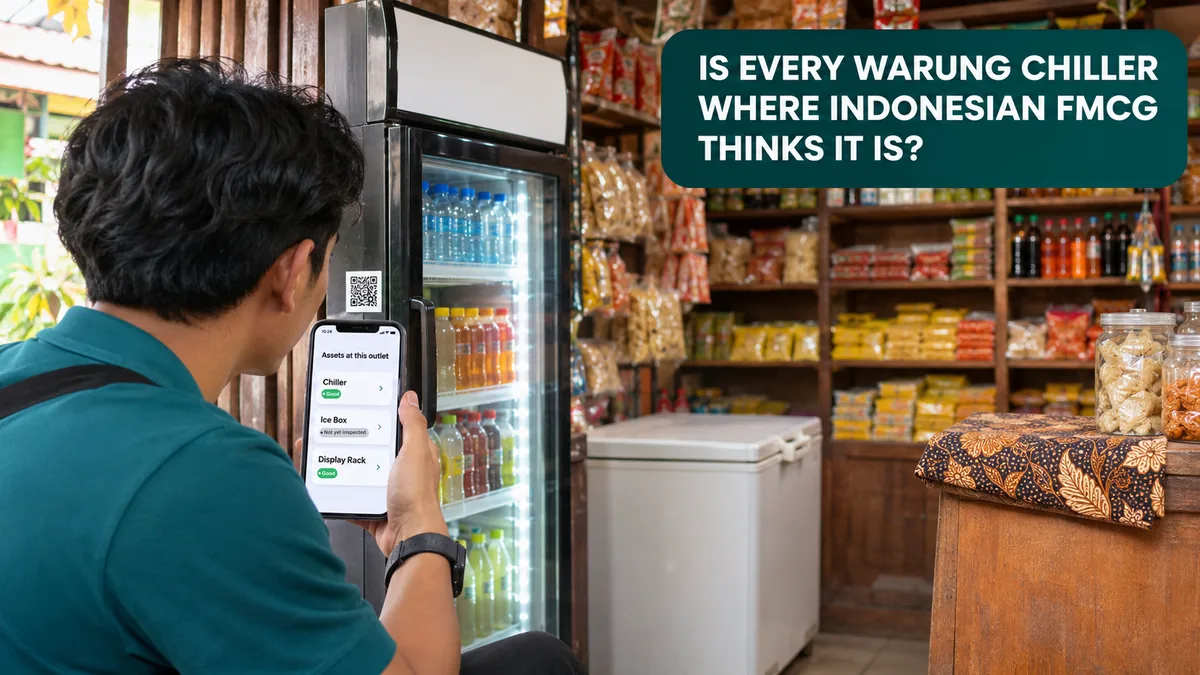
When Agus opens it, the app lists every asset placed at that outlet, each with its type, asset code and status chips.
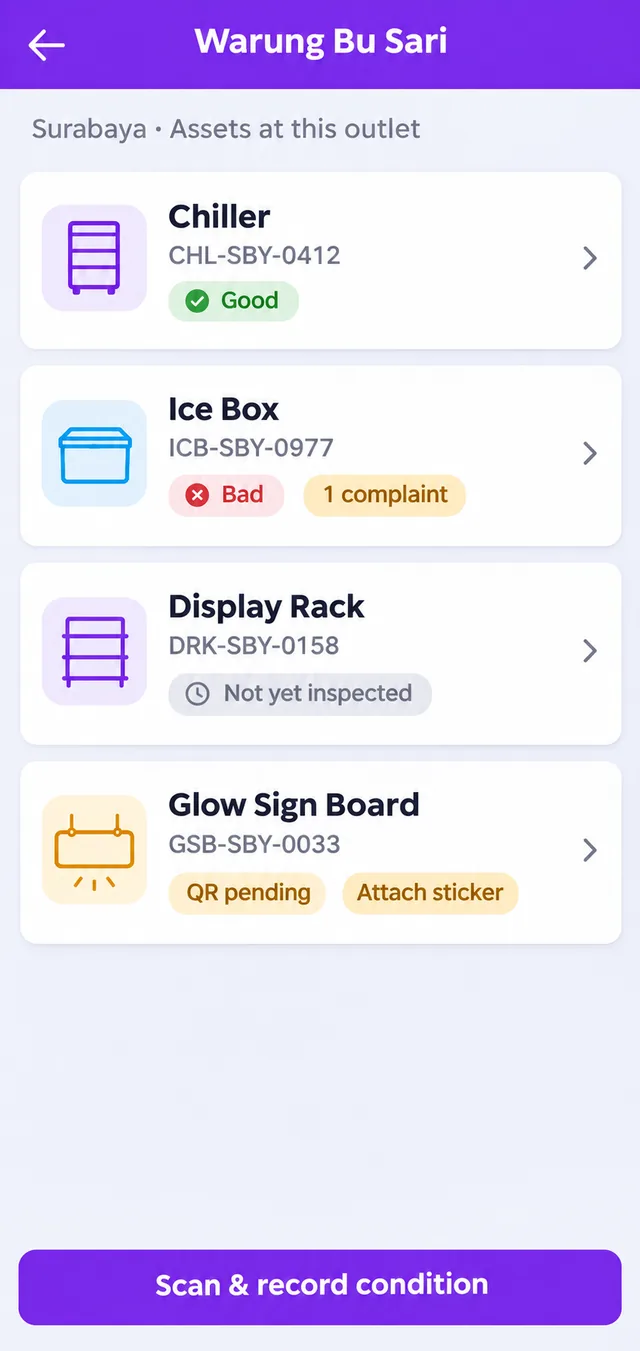
The chips tell Agus where to look first.
| Status Chip | What It Tells the Brand |
|---|---|
| Last condition, such as Good | The asset was found and recorded at the last check |
| Not yet inspected | No condition has been recorded for it yet |
| 1 complaint | A fault is open on this asset and still waiting |
| QR pending or Attach sticker | The asset still needs its QR sticker before it can be scanned |
The Chiller: Scanned and Recorded
Agus taps Scan and record condition and points the camera at the sticker on the chiller. The condition form opens only after that QR scan.
He marks it Good, takes the required photo in the app and saves. The record now carries a fresh condition and a photo from inside the shop.
Worked Example 1: A Cracked Ice Box
The ice box scans fine, but its lid is cracked and will not seal.
Agus marks it Bad, adds a short remark about the lid and takes the photo. Then he raises a complaint on the asset.
An asset can hold only one open complaint, so the next rep who scans it cannot log the same fault twice.
They will see its installed date, last condition and the open complaint ID on the asset detail screen instead.
Worked Example 2: A Display Rack That Is Not There
The display rack listed for Warung Bu Sari is nowhere in the shop. The owner says it went to her sister's stall nearby.
Agus does not guess a condition. He records This asset is not at the outlet.
The list stops pretending the rack is in place, and the trade marketing team now has one asset code to follow up on, not a vague suspicion.
Custody Before the Asset Reaches the Shop
Smaller pieces such as standees and racks often travel with field staff before they are installed.
Warehouse and custody tracks that stage: assets are received, allocated, deployed and returned, with stock in hand shown per person.
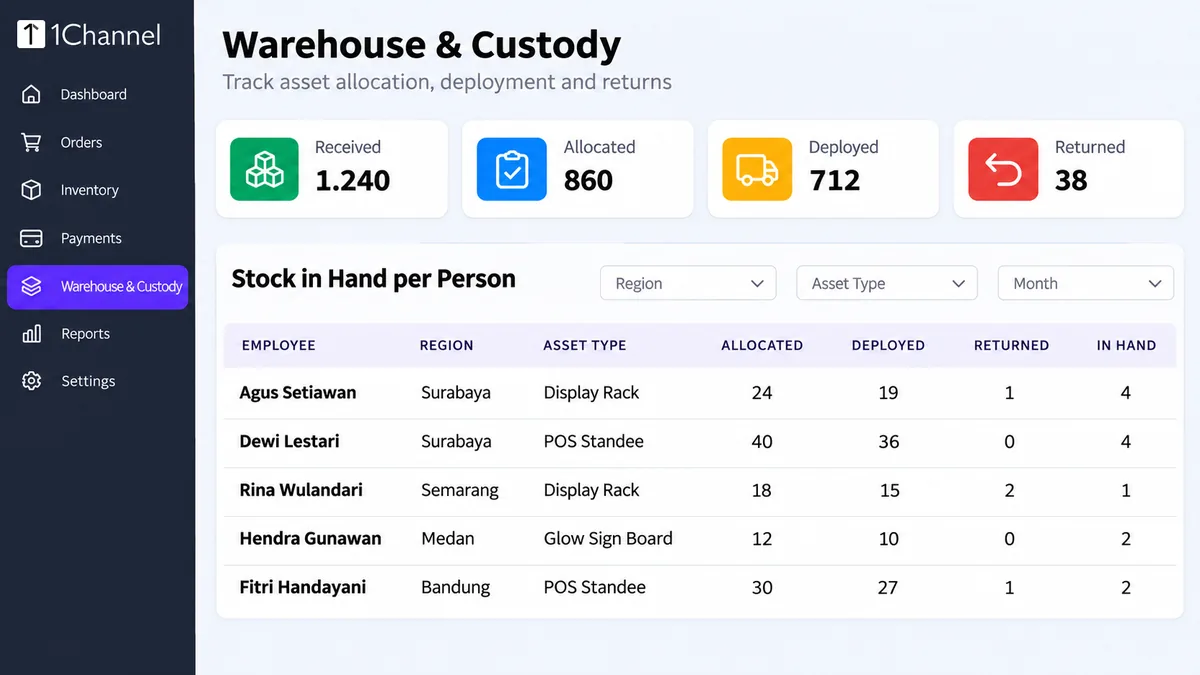
It is a separate feature from the outlet asset check. One covers equipment in a person's hands, the other covers equipment on a shop floor.
How 1Channel Puts the Asset Check Inside the Store Visit
1Channel's field app turns every routine warung visit into an asset check, with no extra trip and no separate auditor.
A condition is recorded only after the QR sticker is scanned, and every record carries a photo taken in the app.
Custody, condition and complaint records sit in one cloud platform, and the app is multi-language, configured to each client's requirement.
Know What Stands in Every Warung
Scan, photograph and flag each placed asset during the visits your reps already make.
Built for brands selling across Indonesia.
Explore the Retail Merchandising App →Common Mistakes to Avoid
- Trusting the placement record — a signed delivery months ago says nothing about where the asset is today.
- Leaving assets without stickers — the condition form opens only after a QR scan, so an unstickered chiller cannot be checked properly.
- Marking a missing asset as Bad — record it as not at the outlet, so condition reports and missing equipment stay separate.
- Ignoring Not yet inspected chips — these are the assets nobody has looked at, and the likeliest to have drifted.
- Booking separate audit trips — the rep's weekly visit can carry the check at no extra travel.
Note: Software screens may vary based on your business structure and configured workflows.