Tools to plan campaigns, deploy POSM, audit stores, and manage outlets across your retail network
Manage merchandising campaigns, store audits, outlet visits, and field team execution
Track POSM deployment, proof of execution, photo validation, and campaign reporting
Plan campaigns, upload store and POSM lists, and follow outlet coverage from one dashboard
Photo proof at outlet level, reference image comparison, exception reasons, and audit scoring
Multi-level L1/L2/L3 audits, auditor performance tracking, and quality scoring
Outlet classification, norms by class, outlet detail reports, and campaign store lists
Manage field sales teams with mobile attendance, route plans, outlet visits, and real-time reporting
Enterprise loyalty platform for channel partners, retailers, and distributors with points, rewards, and automated incentives
Manage leads, customers, pipelines, follow-ups, and sales reporting in one platform
Train sales teams with sessions, quizzes, certifications, gamification, and mobile learning
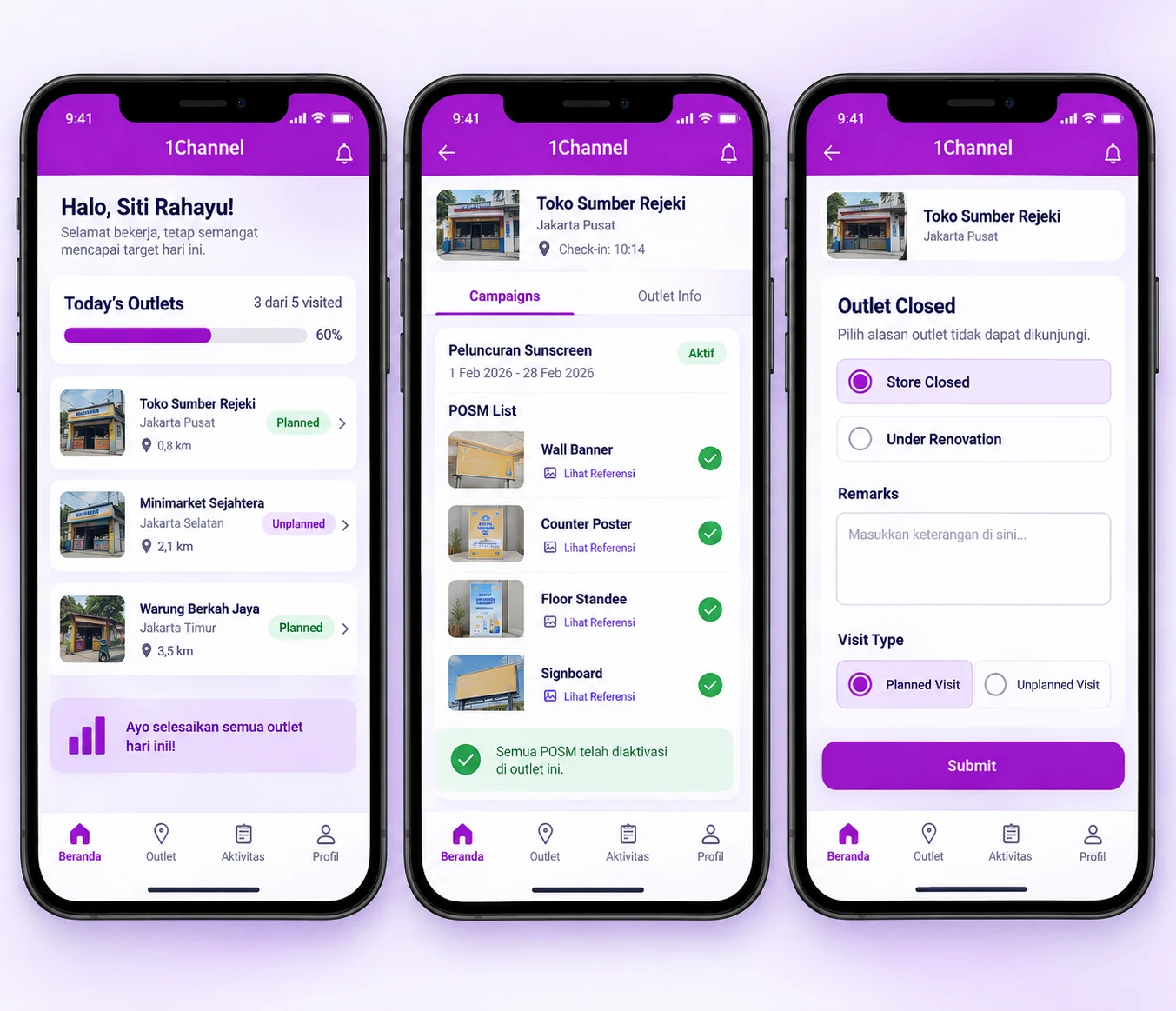
The day starts on the outlet list. The user opens an outlet, checks in and goes to the Campaigns section, where each campaign lists its POSM items with a reference image. Photos are taken in the app, and once every required photo is in, the user submits and the campaign is marked with a green tick. If the outlet cannot be worked, the user ticks the no-activity box, selects a reason such as store closed or under renovation, and finishes the task without photos.
Our recognitions constantly motivate us to push the envelope of excellence and empower our customers with winning ideas each day.
Open an outlet and its Campaigns section lists what is running there, with the dates and the POSM items each campaign needs.
Features:
Why It Matters:
The brief sits on the outlet screen itself, so the person on site works from the same campaign details the office set up.
Each POSM item comes with a reference picture of a correct display, so the user has a target before picking up the camera.
Features:
Why It Matters:
The user judges the display against a picture and a stated rule, not against a verbal instruction passed down from a supervisor.
Photos are taken with the camera inside the app, one set for each POSM item a campaign calls for.
Features:
Why It Matters:
Each outlet visit ends with photographs filed against the campaign, so a reviewer has something concrete to check in the portal's campaign audit.
When there is nothing to execute at an outlet, the user records why instead of leaving the task open.
Features:
Why It Matters:
An outlet without photos comes with a stated reason, not an unexplained gap in the campaign.
Route visits and visits outside the route go through the same app, each tracked as planned or unplanned.
Features:
Why It Matters:
A stop that comes up mid-route still counts, and managers can see how much of the day followed the plan and how much did not.
The app lists the day's outlets, and each stop opens into that outlet's campaigns and visit tasks.
Features:
Why It Matters:
The user works from one list for the day, with merchandising tasks attached to each stop instead of kept in a separate document.
Companies running merchandising campaigns across distributed retail outlets in Indonesia need field execution they can verify, not paperwork they have to chase. Each outlet visit carries its photos and status, so the office reviews evidence instead of a bare log entry.
Benefits:
At 1Channel, we celebrate every step of our new customers journey, market of geography, or higher customer satisfaction score to become the preferred Field Sales CRM leader.