A field sales representative in Johor Bahru spends RM 85 on toll charges and fuel driving between retail outlets. Another rep in Penang pays RM 42 for a working lunch with a distributor. A third rep in Kuching covers RM 120 for overnight parking during a two-day market activation. Each of these expenses is legitimate, documented somewhere between crumpled receipts, screenshots of e-wallet transactions, and hastily typed WhatsApp messages to managers.
Three weeks later, finance is still chasing missing receipts. Two claims have been rejected for exceeding daily limits that the reps did not know existed. One reimbursement is stuck because the approving manager was on leave and the claim sat unactioned in an email thread. The reps are frustrated, the finance team is overworked, and management has no clear picture of how much field operations actually cost.
This is not an edge case. For Malaysian businesses running field sales teams across Peninsular Malaysia and East Malaysia, expense claim management is one of the most time-consuming, error-prone, and trust-eroding processes in daily operations. The solution is not hiring more accountants. It is building a structured, cloud-based expense claim workflow that captures, validates, approves, and processes claims automatically.
Table of Contents
Why Expense Management Breaks Down in Field Sales
Field sales is fundamentally different from office work. Reps operate across multiple locations, often visiting 8 to 15 outlets daily across cities like Shah Alam, Ipoh, or Kota Kinabalu. Every visit generates small but recurring expenses: fuel, tolls, parking, meals, mobile data top-ups, and occasionally accommodation for multi-day routes.
The challenge is not the complexity of individual claims. It is the volume, frequency, and fragmented nature of how these claims are captured. Consider what typically happens without automation:
- Receipts accumulate for days. A rep visiting outlets in Klang Valley collects 15 to 20 receipts per week. By the time they sit down to compile a claim, half the receipts are faded, lost, or missing context about which visit they relate to.
- Submissions happen in bulk. Instead of daily logging, reps submit a month's worth of claims at once. Finance receives a flood of unverified entries that take days to process.
- Policy limits are invisible. Many organisations have per-day or per-category expense limits, but reps only discover them when a claim is rejected, often weeks after the expense was incurred.
- Approval bottlenecks form. Claims pile up in a single manager's inbox. If that manager is travelling or handling quarterly reviews, reimbursements stall for everyone.
The downstream effect is predictable: reps stop trusting the system. Some inflate future claims to compensate for past rejections. Others stop claiming small expenses entirely, absorbing costs that the company should be covering. Neither outcome is acceptable.
Anatomy of an Automated Expense Claim Workflow
A well-designed expense claim workflow in a cloud-based SFA platform operates in five connected stages. Each stage eliminates a specific failure point from the manual process.
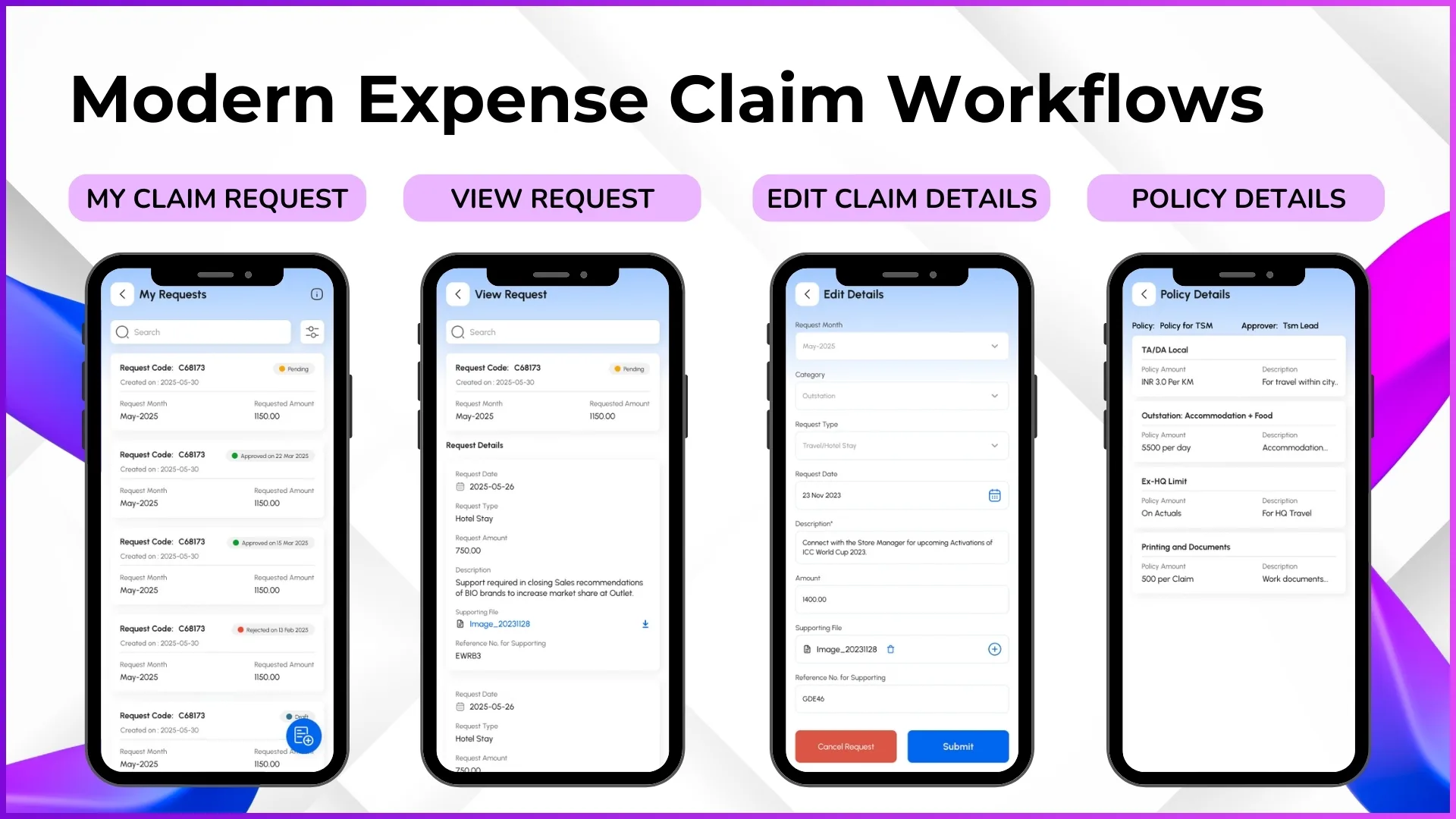
Stage 1: Real-Time Expense Capture
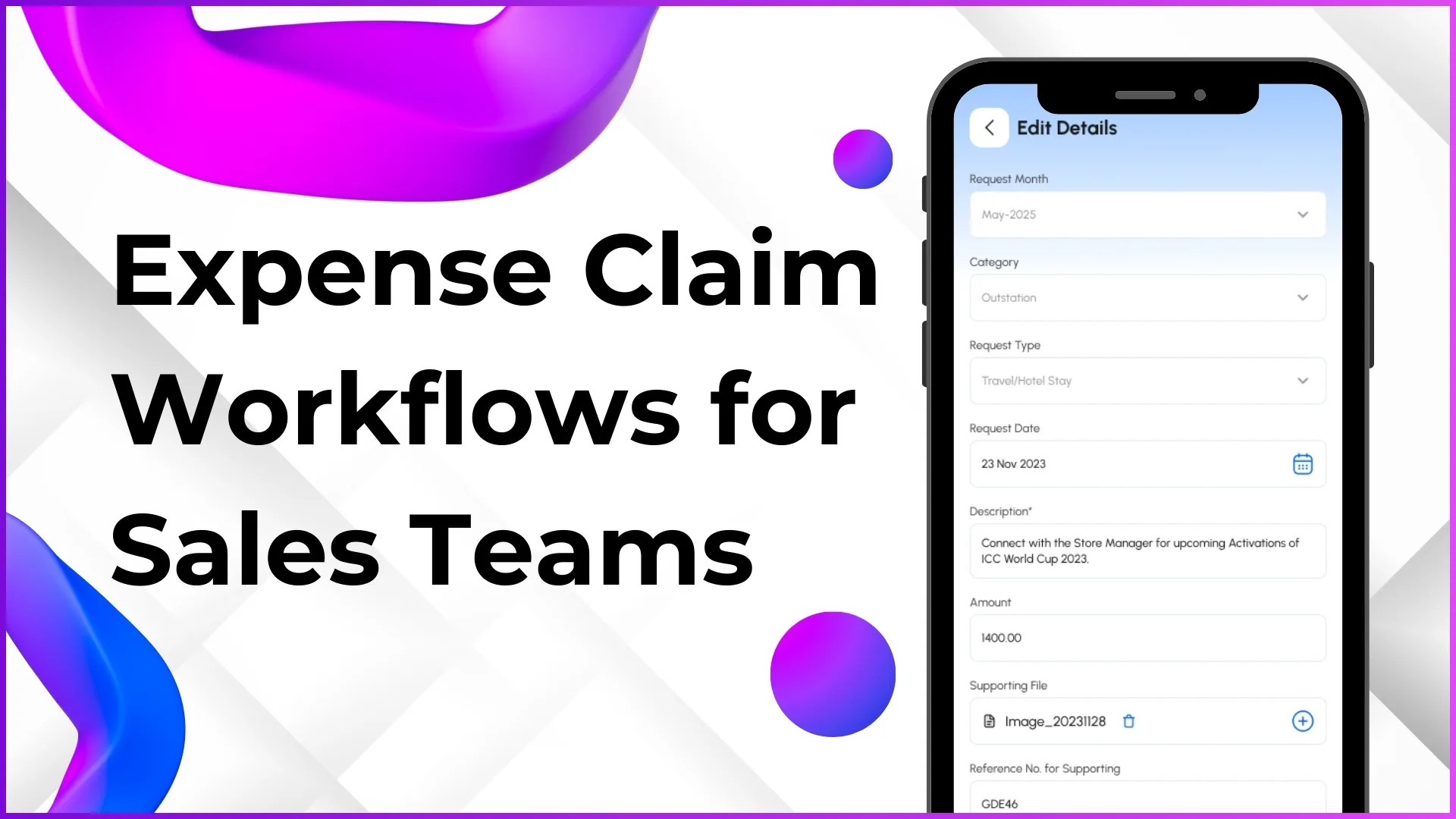
The rep logs each expense directly from the SFA mobile app immediately after it occurs. The app captures:
- Expense category (selected from pre-configured expense heads such as fuel, toll, meals, accommodation, or miscellaneous)
- Amount in MYR
- Date of expense (with configurable restrictions. For example, allowing entries only for the last 7 days to prevent backdating)
- Supporting document (photo of receipt, screenshot of e-wallet transaction, or digital invoice)
- GPS-tagged location at the time of submission
Because the entry happens on the same day as the expense, the rep does not need to remember details later. The GPS tag also links the claim to verified field activity, giving managers context that paper receipts never provide.
Stage 2: Automated Policy Validation
Before the claim even reaches a manager, the system checks it against the organisation's configured expense policies. These policies are set up in the admin portal under expense management settings and can include:
- Daily spending caps per category (e.g., RM 50 per day for meals, RM 150 per day for fuel)
- Monthly cumulative limits per employee
- Mandatory receipt attachment for claims above a threshold
- Blocked categories for specific roles (e.g., accommodation claims disabled for same-city reps)
If a claim violates a policy, the system flags it immediately at submission, not weeks later during a finance audit. The rep can correct the entry or add a justification note before submitting.
Stage 3: Hierarchy-Based Approval
Submitted claims route automatically to the rep's reporting manager based on the organisational hierarchy defined in the system. The approval screen shows the manager:
- Request code, date, and month
- Requestor name and role
- Claimed amount with category breakdown
- Attached receipts and GPS location
- Whether the rep was marked present (via AI-validated attendance) on the claimed date
This cross-referencing is critical. A manager reviewing a RM 95 fuel claim for Tuesday can instantly verify that the rep was indeed in the field that day, marked attendance from Subang Jaya at 8:47 AM, and completed 11 store visits. The claim has context. Approval takes seconds, not days.
For organisations that require multi-level approvals, the workflow can be configured to route high-value claims to additional approvers, a regional manager, a finance controller, or both, before final processing.
Stage 4: Finance Processing
Approved claims flow into a consolidated view for the finance team. Each entry arrives pre-categorised, policy-validated, and manager-approved. Finance no longer needs to:
- Chase reps for missing receipts
- Manually verify whether claimed dates match working days
- Cross-check amounts against policy limits
- Decode handwritten expense sheets
The finance team simply reviews the approved batch, processes reimbursements, and exports the data for payroll integration. What previously took 3 to 5 working days now takes hours.
Stage 5: Audit Trail and Analytics
Every claim, approval, rejection, and modification is logged with timestamps and user identifiers. This creates a complete audit trail that supports internal compliance reviews and financial reporting. Analytics dashboards aggregate expense data by team, region, category, and time period, giving management visibility into field operations costs.
What Makes Expense Management Different in Malaysia
Malaysian field sales operations have characteristics that make automated expense workflows particularly valuable:
Geographic spread and toll costs
Peninsular Malaysia's highway network means field reps frequently use tolled expressways, the PLUS highway between Kuala Lumpur and Johor alone has over 20 toll plazas. Reps covering multi-state territories accumulate significant toll expenses daily. An automated system captures these immediately via Touch 'n Go or RFID receipt photos, categorises them correctly, and validates them against the rep's beat plan for the day.
Multi-currency considerations for border regions
Reps operating near Singapore (Johor Bahru) or Thailand (Perlis, Kedah) may occasionally incur expenses in SGD or THB. A configurable expense system allows admins to set up multiple currency categories with conversion guidelines, preventing confusion during claim processing.
E-wallet and digital payment adoption
Malaysia has one of the highest e-wallet adoption rates in Southeast Asia. Reps increasingly pay via Touch 'n Go eWallet, GrabPay, or DuitNow rather than cash. An SFA expense module that accepts screenshot uploads and digital receipt attachments aligns with how reps actually pay, rather than forcing them to maintain paper receipt habits.
Seasonal and festive period variations
Field activity intensifies during Hari Raya, Chinese New Year, and Deepavali seasons when FMCG and consumer goods brands push promotional campaigns. Expense volumes spike during these periods. Automated workflows handle the increased load without the approval bottlenecks that overwhelm manual processes during peak seasons.
How Expense Claims Connect to Field Activity Data
The real power of expense automation emerges when claims are not processed in isolation but connected to the broader field sales data ecosystem.
Attendance Verification
Expense claims for a specific date are cross-checked against AI-validated attendance records. If a rep did not mark verified attendance on Tuesday, a fuel claim for Tuesday is automatically flagged for review.
Beat Plan Correlation
The system compares claimed travel expenses against the rep's planned and actual beat for the day. If the planned route was Petaling Jaya to Klang but the expense claim shows toll charges for a Seremban highway, it raises a contextual question for the manager.
Visit Productivity Linkage
Expense data is visible alongside visit productivity reports. Managers can see cost-per-visit metrics, understanding not just how many outlets a rep covered, but what it cost to cover them. This helps optimise routes and identify reps who achieve high coverage at lower operational costs.
Payroll Integration
Approved expense data flows into attendance closure reports used by payroll teams. The HR management module within the SFA platform consolidates attendance, leave, regularisation, and expense data into a single payroll-ready view.
This integration means that expense claims are not just financial transactions, they are operational data points that contribute to a complete picture of field sales performance and cost efficiency.
Explore Sales Force Automation
1Channel's cloud-based SFA platform includes automated expense management with policy enforcement, hierarchy-based approvals, GPS-tagged claims, and payroll-ready reporting.
Explore SFA Solutions →Setting Up Expense Policies: What Admins Can Configure
The admin portal provides granular control over how expense claims are processed. Here is what can be configured without any custom development:
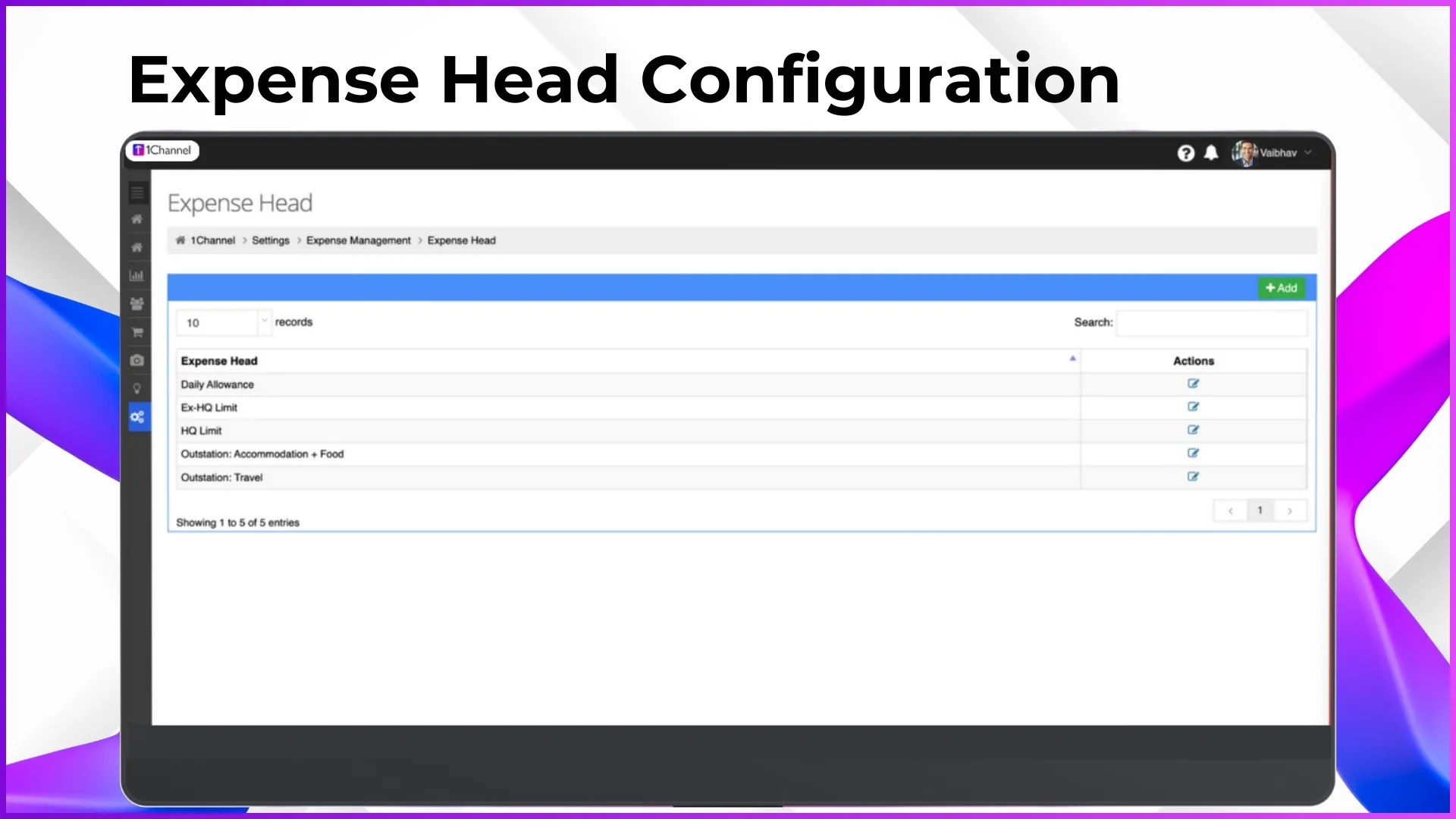
- Expense heads: Define categories such as fuel, toll, meals, accommodation, internet/data, parking, client entertainment, or any custom category relevant to the business.
- Claim policies: Set per-category daily limits, monthly caps, mandatory attachment rules, and role-based restrictions. A pharmaceutical company might allow accommodation claims for reps covering East Malaysia but disable them for Klang Valley-based reps.
- Approval workflows: Configure single-level or multi-level approvals. Define which roles approve at each level and set escalation rules for claims that remain unactioned beyond a specified timeframe.
- Backdating restrictions: Control how far back a rep can submit a claim. Setting a 15-day window prevents month-old claims from appearing in the current cycle.
- Export formats: Configure claim data exports that align with the organisation's accounting software or payroll system requirements.
All configurations are managed through the cloud portal, meaning policy changes take effect immediately across all users without requiring app updates or device-level changes.
What Changes for Each Role
For field sales representatives
Expense logging becomes a 30-second task done immediately after each expense rather than a weekend chore. The app shows remaining daily limits before submission, so reps know exactly what is claimable. Reimbursement timelines become predictable because claims are processed in structured cycles rather than ad hoc batches. No more chasing managers on WhatsApp for approval updates, the app shows real-time claim status.
For sales managers
Approval becomes a review-and-confirm action rather than a detective exercise. Each claim arrives with context: the rep's attendance status, field activity for the day, GPS-tagged location, and attached receipts. Managers can approve legitimate claims in bulk and flag exceptions individually. Monthly expense reports by team are available on-demand rather than compiled manually at quarter-end.
For finance and HR teams
The end-of-month scramble disappears. Claims arrive pre-validated, categorised, and approved. Export-ready reports align with payroll cycles. Audit trails satisfy both internal compliance requirements and external review standards. The time previously spent on expense processing can be redirected to financial analysis and planning.
A Practical Scenario: FMCG Field Team in Selangor
Consider an FMCG company with 25 field sales reps covering hypermarkets, mini-markets, and traditional trade outlets across Selangor. Before implementing automated expense workflows:
- Reps submitted claims via email with Excel attachments every two weeks
- The regional manager spent 4 to 5 hours per cycle reviewing and approving claims
- Finance rejected approximately 15% of claims for missing receipts or policy violations
- Average reimbursement time was 18 working days from submission to bank transfer
- Three reps had stopped claiming small expenses (parking, data top-ups) because the process was not worth the effort
After implementing a cloud-based expense workflow within their SFA platform:
- Reps log expenses daily from the app in under a minute per entry
- Policy validation catches limit breaches at submission, reducing finance rejections to under 3%
- The manager reviews and approves claims in 20 minutes per cycle using the batch approval feature
- Reimbursement time dropped to 5 working days
- All expenses are now captured, giving management accurate field operations cost data for the first time
The operational cost of running the field team did not change significantly. What changed was the organisation's ability to see, control, and optimise those costs.
Frequently Asked Questions
Can expense categories be customised for different industries?
Yes. The admin portal allows creation of any number of expense heads tailored to the business. A pharmaceutical company might have categories for clinic visit parking and sample transport, while a consumer electronics company might configure categories for demo unit shipping and product training venue hire. Categories can be added, modified, or deactivated at any time from the cloud portal.
What happens if a manager does not approve a claim within the expected timeframe?
Escalation rules can be configured so that unapproved claims are automatically routed to a backup approver or a higher-level manager after a defined number of days. This prevents the common bottleneck of claims sitting in one person's inbox during holidays or busy periods.
Can reps submit claims for dates they were on leave?
The system cross-references claim dates with the leave management module. If a rep submits an expense for a date marked as leave, the claim is flagged for review. Managers can approve or reject based on context. For example, a pre-approved travel expense incurred the day before a leave period began.
How does this work for reps who operate in areas with poor connectivity?
The mobile app supports offline expense entry. Reps can log expenses, attach receipt photos, and save entries locally. When connectivity is restored, entries sync automatically and enter the approval workflow. This is particularly relevant for reps covering rural areas in Sabah, Sarawak, or northern Peninsular Malaysia.
Is the expense data accessible for annual audits?
All claim data, including submission timestamps, approval actions, attached documents, GPS locations, and policy validation results, is stored in the cloud platform and exportable in structured formats. The audit trail provides the level of documentation that both internal compliance teams and external auditors require.
Final Suggestions
If your organisation is evaluating expense management as part of a broader field sales automation initiative, consider these points:
- Start with clear expense policies. Automation enforces rules, but those rules need to be defined first. Document your per-category limits, approval hierarchies, and exception handling procedures before configuring the system.
- Configure expense heads to match your chart of accounts. When expense categories in the SFA system align with your accounting categories, the export-to-payroll process becomes seamless.
- Enable GPS tagging from day one. The contextual value of GPS-tagged expense claims compounds over time. After a few months, you will have location-correlated cost data that supports route optimisation decisions.
- Communicate the benefits to reps, not just managers. Field teams adopt expense automation faster when they understand the personal benefit: faster reimbursements, fewer rejections, and no more receipt hoarding.
- Review expense analytics quarterly. The data generated by automated expense workflows reveals patterns, high-cost routes, seasonal spending trends, category-level overruns, that inform budgeting and operational decisions.
Expense claim management is not a glamorous part of field sales operations. But when it works well, it removes a persistent source of friction between reps, managers, and finance. When it works poorly, it erodes trust, wastes time, and obscures the true cost of field operations. For Malaysian businesses scaling their field teams across diverse geographies, getting this workflow right is not optional. It is foundational. Get in touch to explore how 1Channel's cloud-based SFA platform can automate expense management for your field sales team.