Every invoice a 1Channel DMS account generates pulls from one configurable field list: company details, tax registration, bank information, line items, and a signature block.
Each one is a toggle, not a fixed layout baked into the template.
This post walks through what that field list actually controls, and shows two differently configured invoices side by side.
It also flags where a business typically gets its printed invoice wrong.
It matters wherever a single distributor bills retailers, wholesalers and pharmacies from the same system: FMCG, pharma and healthcare, building materials, and cosmetics and personal care.
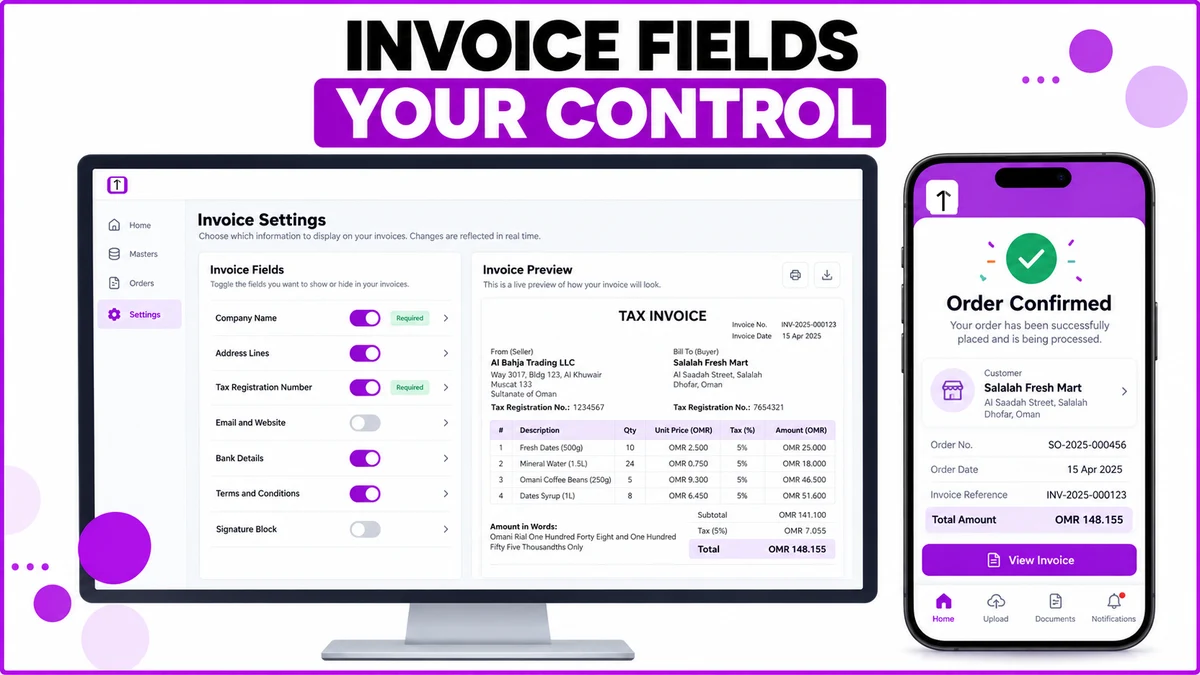
What Prints on a Tax Invoice, Field by Field
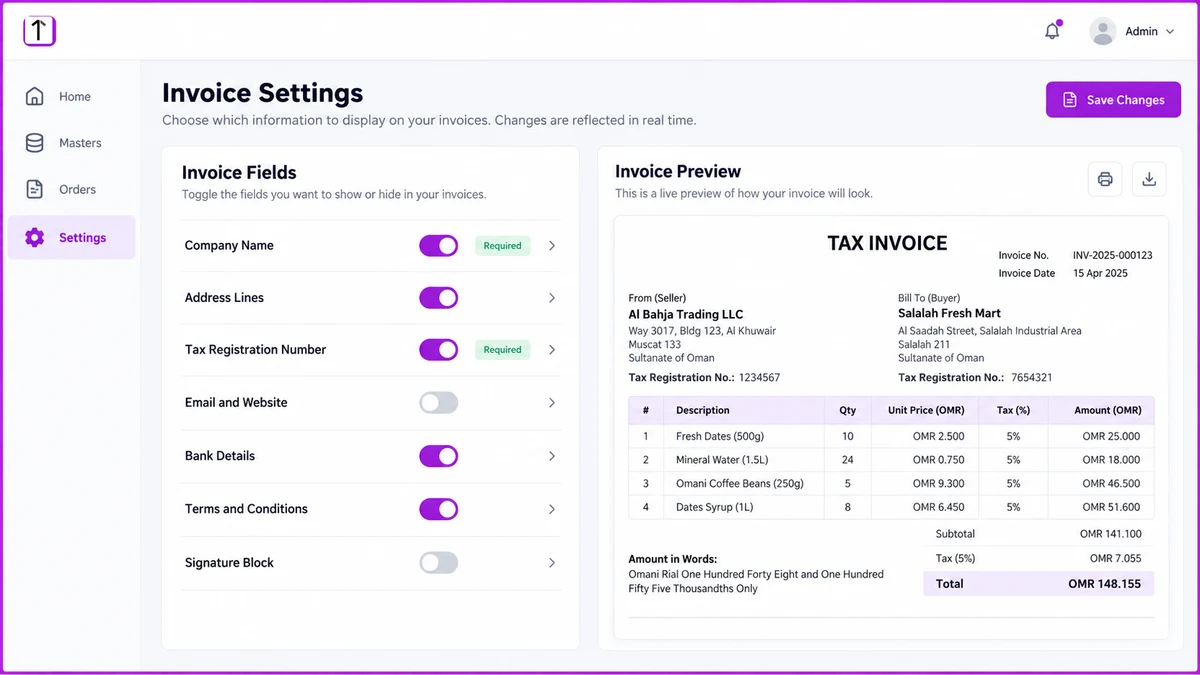
The Invoice Settings screen controls exactly what a generated invoice shows, with a live preview that updates as each toggle changes.
| Invoice field | What the toggle controls | Why it needs a decision |
|---|---|---|
| Company and tax details | Company name, address lines, tax registration number | Required on a valid Oman VAT invoice |
| Bank details | Account name and transfer details for settling by bank | Only relevant when the buyer pays later by transfer |
| Terms and signature | Payment terms, custom notes, signature block | Sets credit terms and dispute-handling expectations |
| Line-item table | SKU, quantity, rate, tax percentage, line total, amount in words | The section a buyer actually checks against the delivery |
Two Invoices, Configured Differently
A cash sale to a baqala needs the company details and the line-item table.
Bank details add nothing when the outlet pays on delivery, so that section stays off.
Example: a baqala orders mineral water and dates for OMR 18.500. The printed invoice shows the SKU lines, the tax amount, and the total, nothing more.
A 30-day credit invoice to a distributor works differently.
Bank details, payment terms, and the signature block all need to be on, since the buyer settles later by transfer.
Example: Al Bahja Trading LLC places a monthly order worth OMR 148.155 on 30-day terms with Salalah Fresh Mart.
The same template now also prints the transfer details and the agreed terms, so the settlement instructions travel with the document.
Getting the Field List Right Before the Rules Tighten
Oman's Tax Authority is phasing in mandatory e-invoicing under the Fawtara program, starting with large VAT-registered businesses in 2026 and reaching every VAT-registered business by 2027.
A complete, structured invoice already carries a tax registration number, a line-item tax breakdown, and seller and buyer details.
That field list is a shorter distance from Fawtara's requirements than one assembled ad hoc in a spreadsheet.
The same configuration carries through to the mobile app.
A distributor can open an order there and see the same invoice reference and total that printed on the desktop copy.
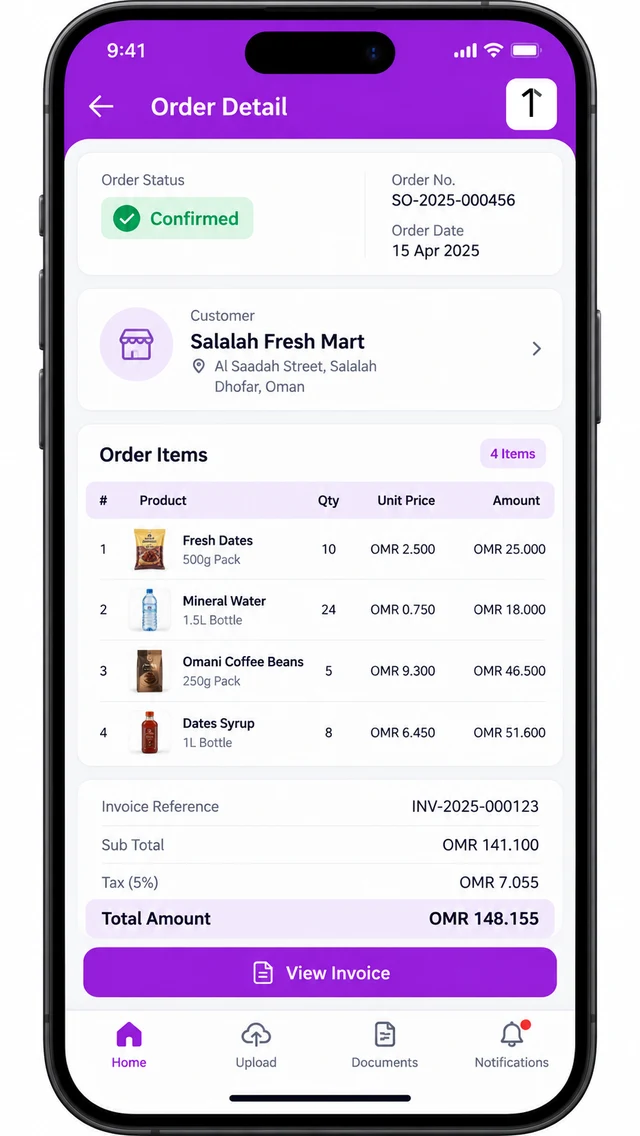
How 1Channel Builds Every Invoice Field-Correct From the Order
1Channel generates the tax invoice directly from the confirmed order, using whichever fields that company has switched on.
The line items, tax registration number, and totals never need retyping.
Its distributor order management tools carry the same OMR figures and VAT treatment from order capture through to the printed invoice.
There is no separate billing step to reconcile.
Generate a Correct Tax Invoice From Every Confirmed Order
See how order capture, credit gating, and VAT invoicing work as one configured flow for Oman distributors.
Explore Distributor Order Management →Common Mistakes to Avoid
Most invoice-field problems trace back to one configuration copied everywhere, instead of a deliberate choice per account type.
- Leaving bank details on every invoice. A cash sale at the counter doesn't need transfer instructions printed on it.
- Printing tax registration numbers inconsistently. The same field configuration should apply across every branch and template, not vary by who set it up.
- Treating "Amount in Words" as optional. Some buyers reject an invoice that leaves it off, especially on larger wholesale orders.
- Reusing one configuration for both retail and wholesale accounts. A baqala invoice and a 30-day credit invoice need different fields switched on.
- Waiting for Fawtara's later phases before checking today's field list. A complete, structured invoice now is a shorter distance to mandatory e-invoicing than one fixed later under a deadline.
Note: Software screens may vary based on your business structure and configured workflows.