Most stock errors at a building materials distributor start at the receiving bay, on the day one order arrives in two parts.
With Vision 2030 projects keeping Saudi Arabia's building materials depots busy, a load booked in but never fully unloaded quietly inflates what reps think they can sell.
This post follows one Riyadh order through two trucks and two goods receipt notes (GRNs).
It shows how a short pallet and a damaged line are recorded, and what the stock looks like afterwards.
The same receiving discipline matters to Building Materials & Hardware, Consumer Durables, Automotive and FMCG distributors, wherever inbound loads are heavy, mixed and counted by hand.

Why Riyadh Loads Arrive in Parts
Since January 2023, trucks entering Riyadh have needed an online entry appointment, booked for a set time, under Transport General Authority rules.
A trailer that misses its window waits for the next one.
For a mixed building materials order, that can mean the supplier sends what is ready and the rest follows on a second vehicle.
Each truck then reaches the bay with its own delivery note, at a different time, sometimes to a different shift.
The Problem With Booking Stock From the Delivery Note
A delivery note records what left the supplier's warehouse. It says nothing about what survived the trip, or what actually came off the truck.
When receiving staff key stock in from the paperwork, a missing pallet becomes sellable stock.
The field team then books orders against bags that are not in the building.
The gap surfaces weeks later in a stock count, when nobody remembers which truck it was and the claim against the supplier is hard to prove.
One Order, Two Trucks, Two GRNs
Najd Building Materials Trading in Riyadh places a primary order with its supplier.
The order covers 600 bags of 20 kg tile adhesive, 400 boxes of 60x60 floor tiles and 200 lengths of 110 mm PVC pipe.
The supplier dispatches the adhesive and tiles on the first delivery note. The pipes follow on a second note, on a trailer booked into a later window.
Until each GRN is completed, the dispatched goods show as in-transit stock, meaning dispatched but not yet received, rather than sellable stock.
Truck One: A Pallet Short
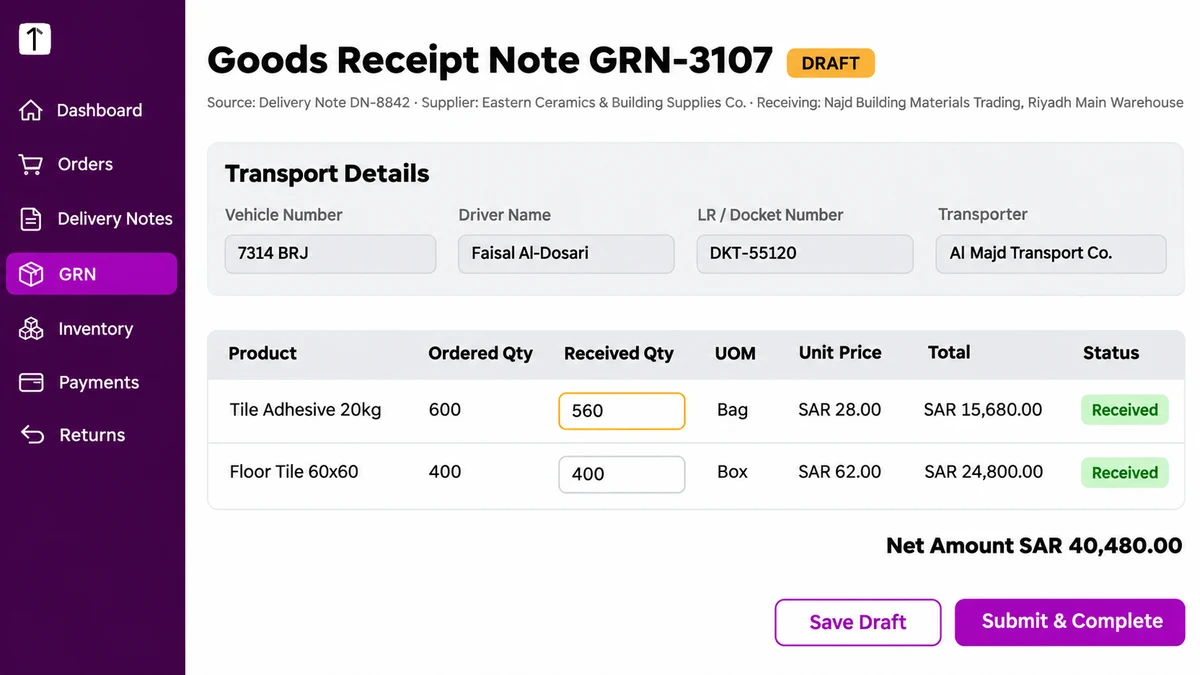
The receiving clerk raises a GRN against the first delivery note and records the transport details: vehicle number, driver name, docket number and transporter.
While the truck is unloaded, the GRN stays a draft, so stock is not yet updated.
The count finds 560 bags of adhesive, not 600, and all 400 boxes of tiles.
| GRN Line | Ordered Qty | Received Qty | Unit Price | Difference |
|---|---|---|---|---|
| Tile Adhesive 20 kg (Bag) | 600 | 560 | SAR 28.00 | 40 short (SAR 1,120) |
| Floor Tile 60x60 (Box) | 400 | 400 | SAR 62.00 | None |
Submit & Complete shows a summary of warehouse, items, quantity and value before it confirms. Only then does inventory rise, by 560 bags and 400 boxes.
The supplier is notified of the 40-bag shortfall, and the gap is settled through a credit note rather than a physical return.
Truck Two: The Pipes and a Cracked Bundle
The pipe trailer arrives in the next window. A second GRN is raised against the second delivery note, with its own vehicle, driver and docket details.
All 200 lengths are on board, so the GRN is completed at 200. During put-away, 12 lengths turn out to be cracked.
The distributor raises a primary return against that GRN from the Returns screen, selecting the 12 lengths with a Damaged reason and their condition.
Both GRNs now carry a Completed status, and nothing from this order is left sitting in transit.
What the Stock Shows Afterwards
| SKU | Booked From Delivery Notes | Booked From GRNs and Returns |
|---|---|---|
| Tile Adhesive 20 kg | 600 bags | 560 bags |
| Floor Tile 60x60 | 400 boxes | 400 boxes |
| PVC Pipe 110 mm | 200 lengths | 188 lengths |
The third column is what the depot actually holds. The stock movements ledger shows each change with its type, warehouse and quantity.
Reps see the same figures. The field app's order catalogue shows the distributor's available stock per SKU in pieces, so a rep sells against 560 bags, not 600.
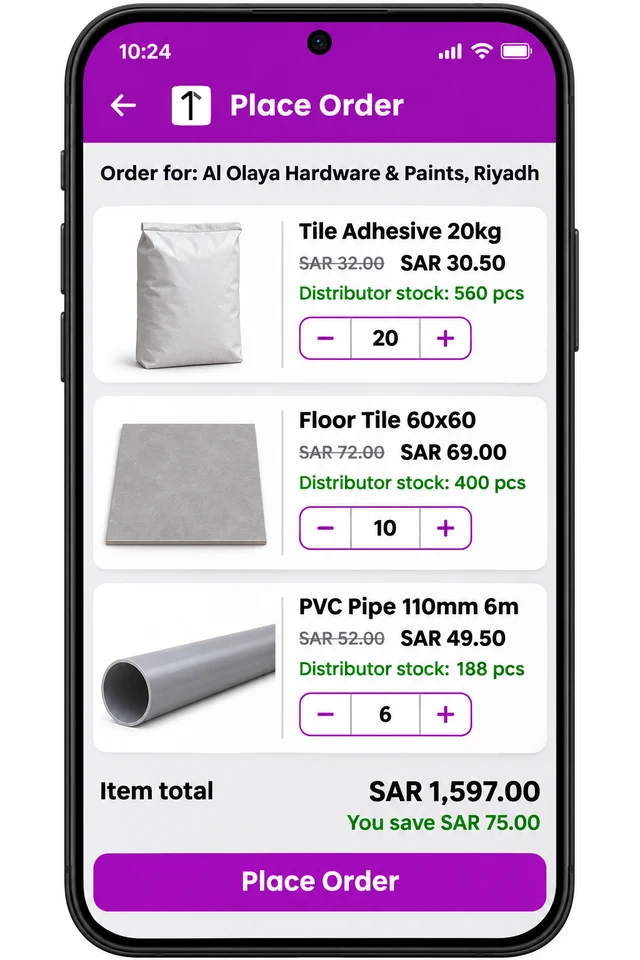
The Stock Inward (GRN) report lists every receipt by warehouse, brand and status, and the stock traceability report traces batches back to their source GRN.
How 1Channel Records Every Inbound Load
1Channel ties each receipt to the delivery note it came against. Stock rises by what was counted at the bay, not by what the paperwork says.
Shortfalls are notified to the supplier from the GRN itself, and damaged goods go back through a primary return linked to the same receipt.
Book Stock on What Reached the Bay
See how 1Channel handles goods receipt, in-transit stock and supplier shortfalls for distributors across the Kingdom.
Explore GRN Management Software →Decision Checklist
- Is every inbound truck received on its own GRN, against its own delivery note?
- Are vehicle, driver, docket and transporter recorded for each load?
- Does stock stay unchanged until the count is finished and the GRN is completed?
- Is the supplier told about a shortfall on the day it is found?
- Do damaged lines go back as a return linked to the original GRN?
- Do reps take orders against the received figure, not the dispatched one?
Note: Software screens may vary based on your business structure and configured workflows.