Every November order a rep writes at a spaza shop is a small forecast. It decides what the owner can sell once December demand arrives.
Across South Africa, that pressure peaks over the festive season for FMCG, cosmetics and personal care, consumer durables and agriculture brands selling through general trade.
This post follows one spaza order from the outlet card to the distributor's queue, covering stock, suggestions and credit checks before Submit.
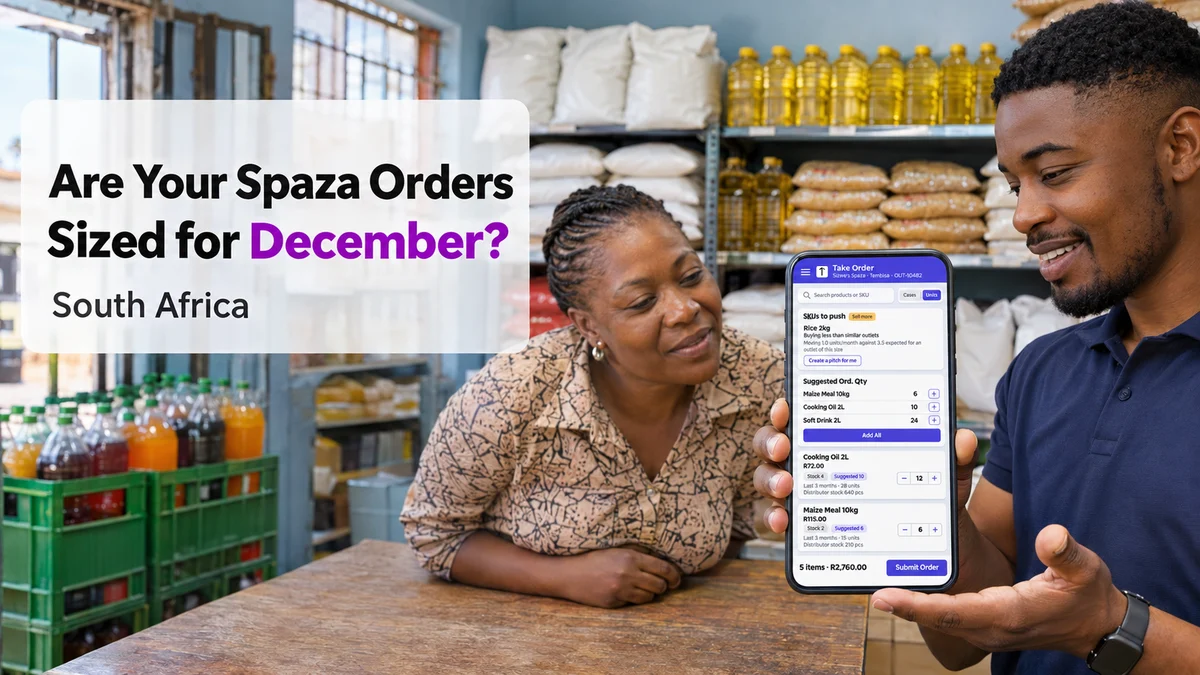
Why Festive Spaza Orders Go Wrong
The festive season is the year's biggest retail stretch, and Black Friday now opens it. Spaza owners stock up in the weeks before December arrives.
Most under-ordering starts with a habit. The rep repeats last month's order, the owner agrees, and nobody checks how fast each line actually moved.
The shop then runs out of its fastest lines in mid-December, just when it needs them most.
Over-ordering fails differently. A large order of slow lines ties up cash the owner needs for fast ones, and can push the account past its credit limit.
At the counter, the rep usually lacks four facts:
- How many units of each line the shop sold over the last few months
- Which lines similar outlets buy more of than this shop does
- How much stock the distributor actually holds
- How much credit the account has left
One Spaza Order, From Visit to Submit
Take a spaza shop in Tembisa, in Ekurhuleni, served by a local distributor. The rep visits on a Thursday in late November.
Before the Visit: The Outlet Card
The beat list shows each outlet's mapped distributor, distance, Outstanding balance, Credit % used and last visit.
Here, the card shows R4,200 outstanding against a R6,000 limit, so 70% is used. The rep knows a big order will need a conversation.
At the Counter: Count, Then Order
The rep updates retailer stock first, entering a count in pieces for each SKU beside its previous value. The shelf holds 4 bottles of 2L cooking oil.
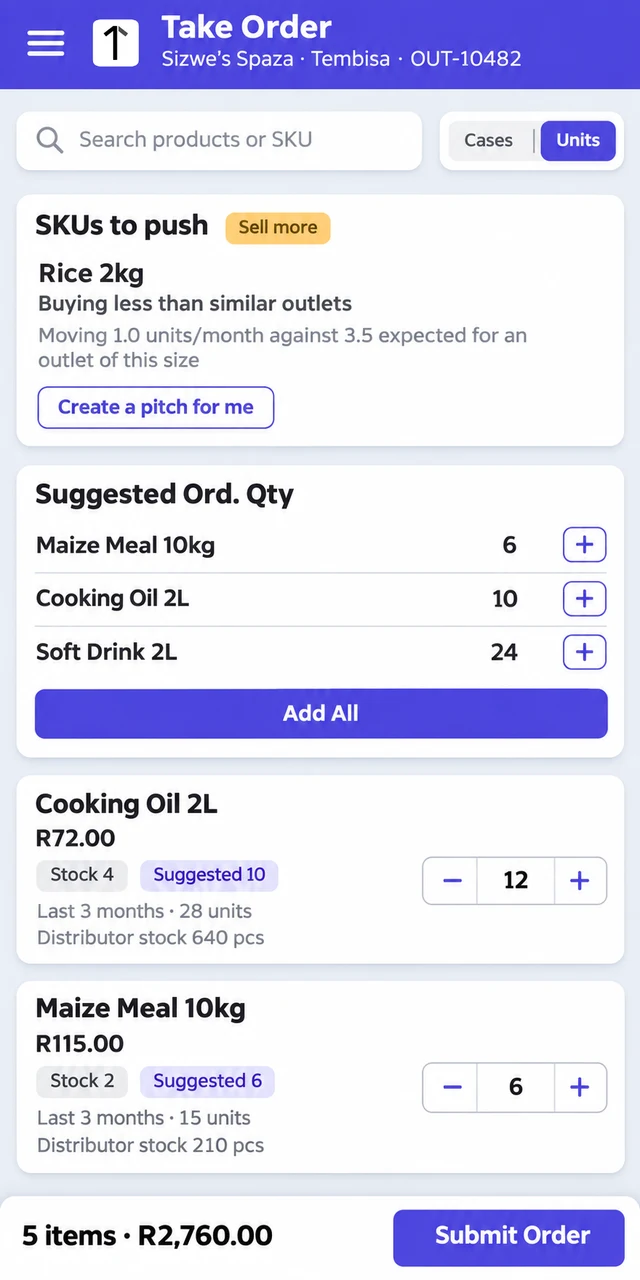
On Take Order, each product card shows the price, stock, a suggested order quantity and recent movement over the last three months.
Quantities go in as cases or single units, and each SKU shows how many pieces the mapped distributor has in stock.
The Push Card Explains Its Suggestions
An AI-backed SKUs to push card flags lines with a Sell more label and a plain reason, such as buying less than similar outlets.
For this shop, it notes that 2kg rice moves about 1 unit a month against roughly 3.5 expected for an outlet of its size.
The Suggested Ord. Qty list adds every suggestion to the cart with Add All, and the rep then adjusts each line with the owner.
The screen does not set the festive lift for them. It gives a starting point, and the two agree the December increase together.
| Line | Suggested | Ordered | Value |
|---|---|---|---|
| Maize meal 10kg at R115 | 6 | 6 | R690 |
| Cooking oil 2L at R72 | 10 | 12 | R864 |
| Soft drink 2L at R26 | 24 | 24 | R624 |
| Sugar 2.5kg at R55 | 4 | 6 | R330 |
| Rice 2kg at R42 | 4 | 6 | R252 |
| Total | R2,760 |
When the Order Passes the Credit Limit
The order comes to R2,760, but the account has only R1,800 of headroom left.
The rep is flagged, so an area manager reviews the account instead of the rep cutting lines at the counter.
The account pays on time, so the manager raises the limit to R8,000 on the spot. The order is then submitted for the distributor's approval.
It reaches the distributor's Order Management tagged as placed via the SFA mobile app, with no paper order to retype.
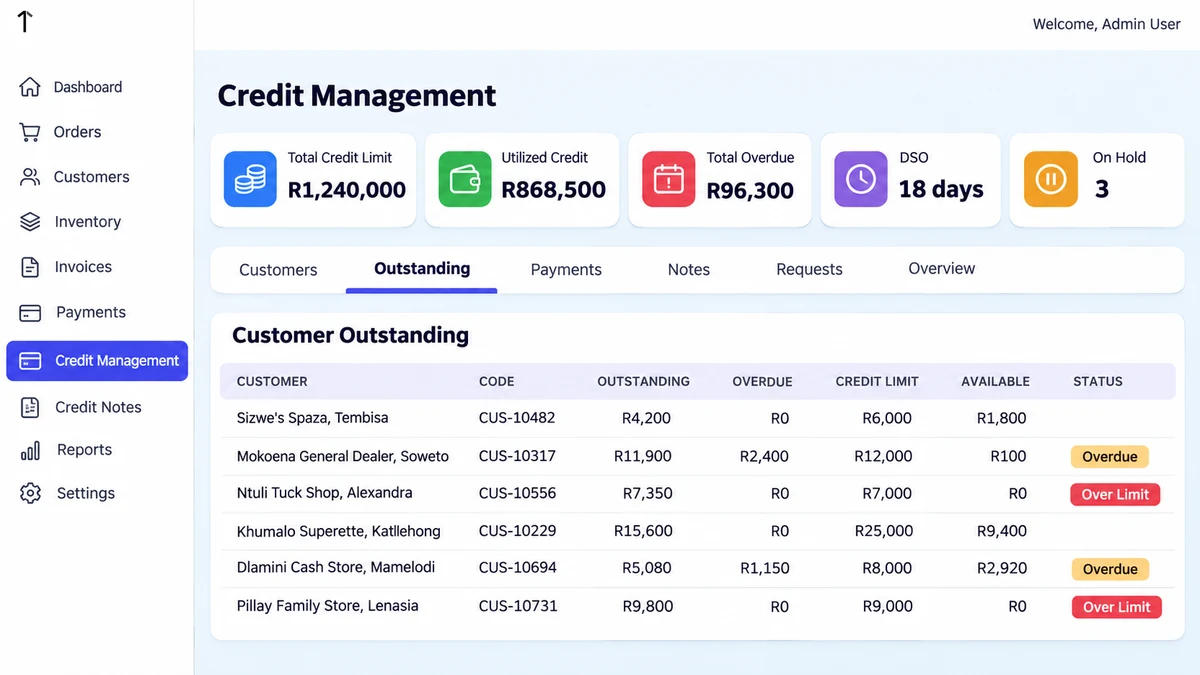
On the web portal, the Outstanding tab lists each customer's outstanding and overdue amounts, credit limit and available headroom, with Over Limit and Overdue badges.
Reviewed early in November, it shows which spaza accounts need a limit decision before the December ordering cycle starts.
What Sales Managers Can Set Before December
A few habits keep festive spaza orders grounded in data:
- Count before ordering. Reps update retailer stock at every festive visit, so orders start from the real shelf.
- Share the push reasons. An owner accepts a stated reason more easily than a rep's opinion.
- Clear credit early. Work through Over Limit and Overdue accounts before the larger orders arrive.
- Record every No Order. The rep picks a reason, so missed orders show up in reporting.
How 1Channel Puts Order Data in the Rep's Hand
1Channel's field app keeps outlet credit, retailer stock, recent movement and AI push suggestions inside the Take Order flow.
Orders reach the distributor for approval without retyping. The cloud app runs in multiple languages, configured to each client's requirement.
Size Every Festive Order From Real Movement
See how 1Channel shows reps stock, suggested quantities and credit headroom before a spaza order is submitted.
Explore Sales Force Automation →Conclusion
December rewards spaza owners who have the right lines on the shelf, and it punishes guesswork on both sides of the counter.
Counting stock, reading movement and push reasons, and settling credit before Submit turns a repeated order into a sized one.
The rep and owner still decide together, but now with the numbers in front of them.
Note: Software screens may vary based on your business structure and configured workflows.