FMCG brands in India run trade schemes all year: volume slabs, value discounts, free goods and month-long targets for distributors and retailers. Pharma and consumer durables brands run them much the same way.
The schemes themselves are rarely the problem. The setup behind them usually is. Here are eight setup mistakes, and the setting in a DMS that fixes each one.

1. Letting Overlapping Schemes Clash
When two schemes cover the same SKU, something has to decide which one wins. Left to the rep or the distributor, the answer changes from order to order.
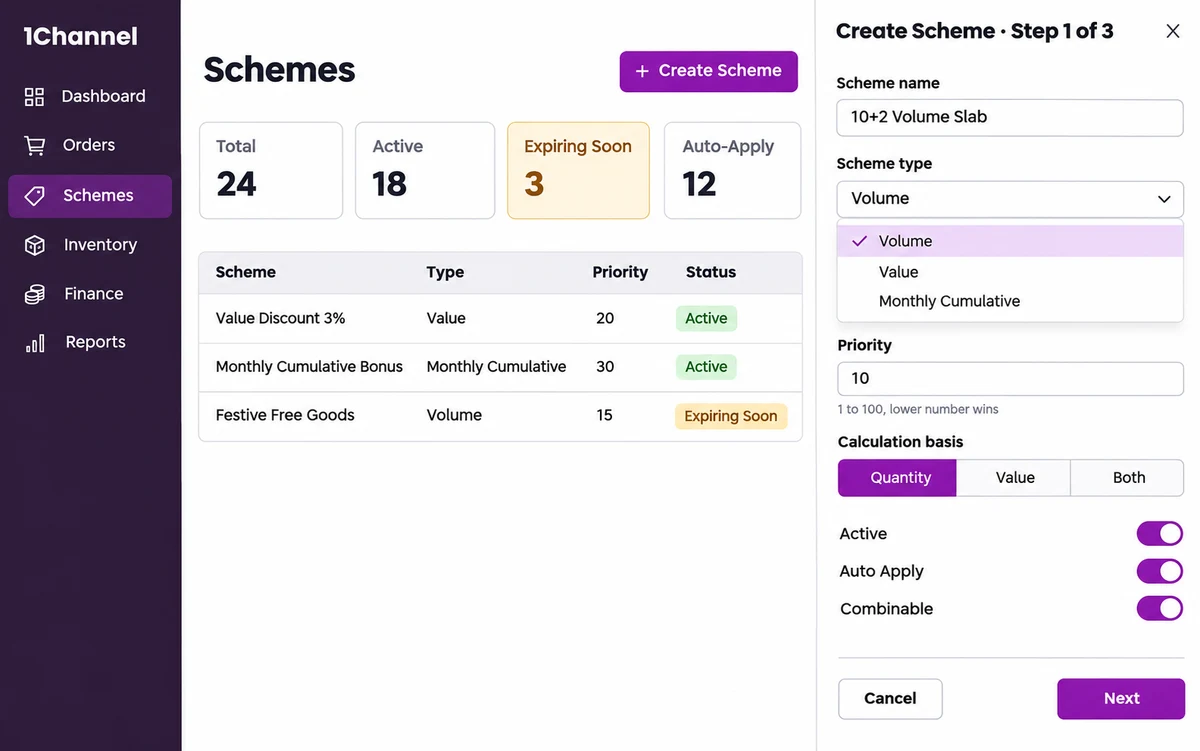
Give every scheme a priority from 1 to 100. The lower number wins, so the outcome is the same on every order.
2. Using One Calculation for Every Scheme
Some schemes reward the number of cases bought. Others reward order value. Forcing both into one rule makes one of them wrong.
Set the calculation basis for each scheme: quantity, value or both.
3. Stacking Schemes With No Rule
Two discounts on one order can be a planned offer or an expensive accident.
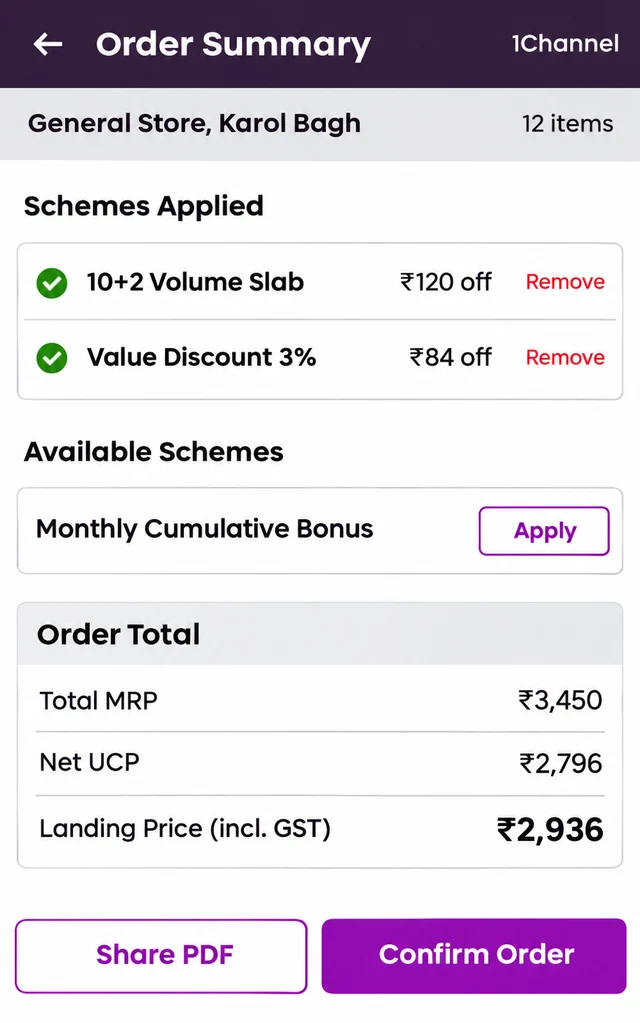
Mark each scheme as combinable or not. Where stacking is allowed, the order lists every applied scheme with its own discount, and any of them can be removed.
4. Leaving Discounts to the Rep's Arithmetic
A buy-three-get-one worked out by hand at the counter is where errors start.
Switch on Auto Apply, and eligible schemes are applied when the order is entered. Schemes set up once apply the same way in the field app and in the distributor's own order cart. Each order is also checked against stock, pricing and credit limit before it's accepted.
5. Hiding Eligible Schemes From the Retailer
A scheme the retailer never hears about doesn't move stock.
At order confirmation, schemes not yet applied appear under Available Schemes, each with an Apply button. The total shows MRP, net unit cost price and landing price including GST, so the retailer sees what the order really costs.
Every Scheme Applied the Way You Set It
1Channel lets you set priority, calculation basis, stacking and auto-apply for every scheme, so field and distributor orders apply them the same way.
Explore 1Channel's Distributor Order Management Software →6. Rewarding Single Orders Only
Many retailers buy small and often. A scheme that looks at one order at a time never rewards them.
Alongside volume and value schemes, use a Monthly Cumulative scheme, so purchases across the month count together.
7. Letting Schemes Expire Unnoticed
A scheme that ends quietly leaves reps promising a discount that no longer applies.
The schemes screen shows an Expiring Soon count next to the total, active and auto-apply counts, so schemes near their end date are visible before they lapse.
After a scheme ends, analytics still rank it by sales contribution, with items given free, order count and an Expired or Active flag.
8. Editing Live Schemes Mid-Month
Changing a running scheme can disturb orders already in progress.
Draft the new scheme configuration first and publish it when it's ready, without disrupting the scheme that's live.
Final Suggestions
- Set priority and calculation basis when a scheme is created, not after the first dispute.
- Decide which schemes may stack before launch, not at the counter.
- Turn on Auto Apply wherever the rule is clear.
- Check the Expiring Soon count every week.
Frequently Asked Questions
1. Can more than one scheme apply to the same order?
Yes, if the schemes are marked combinable. Each applied scheme is listed on the order with its own discount.
2. Which scheme wins when two schemes overlap?
The one with the higher priority, which is the lower number on a scale of 1 to 100.
3. Can a distributor choose whether to apply a scheme?
Yes. A scheme can be set to apply automatically, or set up so the distributor applies it on an order.
Note: Software screens may vary based on your business structure and configured workflows.