For FMCG sales teams, outlet coverage is directly linked to visibility, order frequency, and market share. When field teams rely on manual planning, outlet visits can become inconsistent, routes may overlap, and some stores may be missed entirely.
Sales Force Automation (SFA) helps solve this by bringing outlet mapping, beat planning, geo-tagging, and visit tracking into one structured workflow.
In FMCG sales, every retail outlet matters.
From kirana stores and provision shops to modern trade chains, sales teams need to ensure that outlets are visited on time, orders are captured consistently, and field reps follow the planned beat routes.
This is where SFA helps improve outlet coverage.
Instead of depending on spreadsheets, manual route sheets, or verbal planning, SFA gives sales teams a centralized system to manage outlet master data, assign beats, track visits, validate store locations, and monitor coverage performance across territories.
Why Outlet Coverage Is Critical for FMCG Teams
FMCG businesses operate in a high-frequency retail environment where:
- stores require regular replenishment
- stock-outs directly impact sales
- beat visits need daily discipline
- sales reps cover multiple outlets in a territory
- outlet universe keeps expanding
Poor coverage often leads to:
- missed stores
- delayed order capture
- lower visibility in the market
- poor secondary sales performance
- inefficient route planning
The provided software screens clearly show how outlet coverage is monitored at both rep and territory levels.
For example:
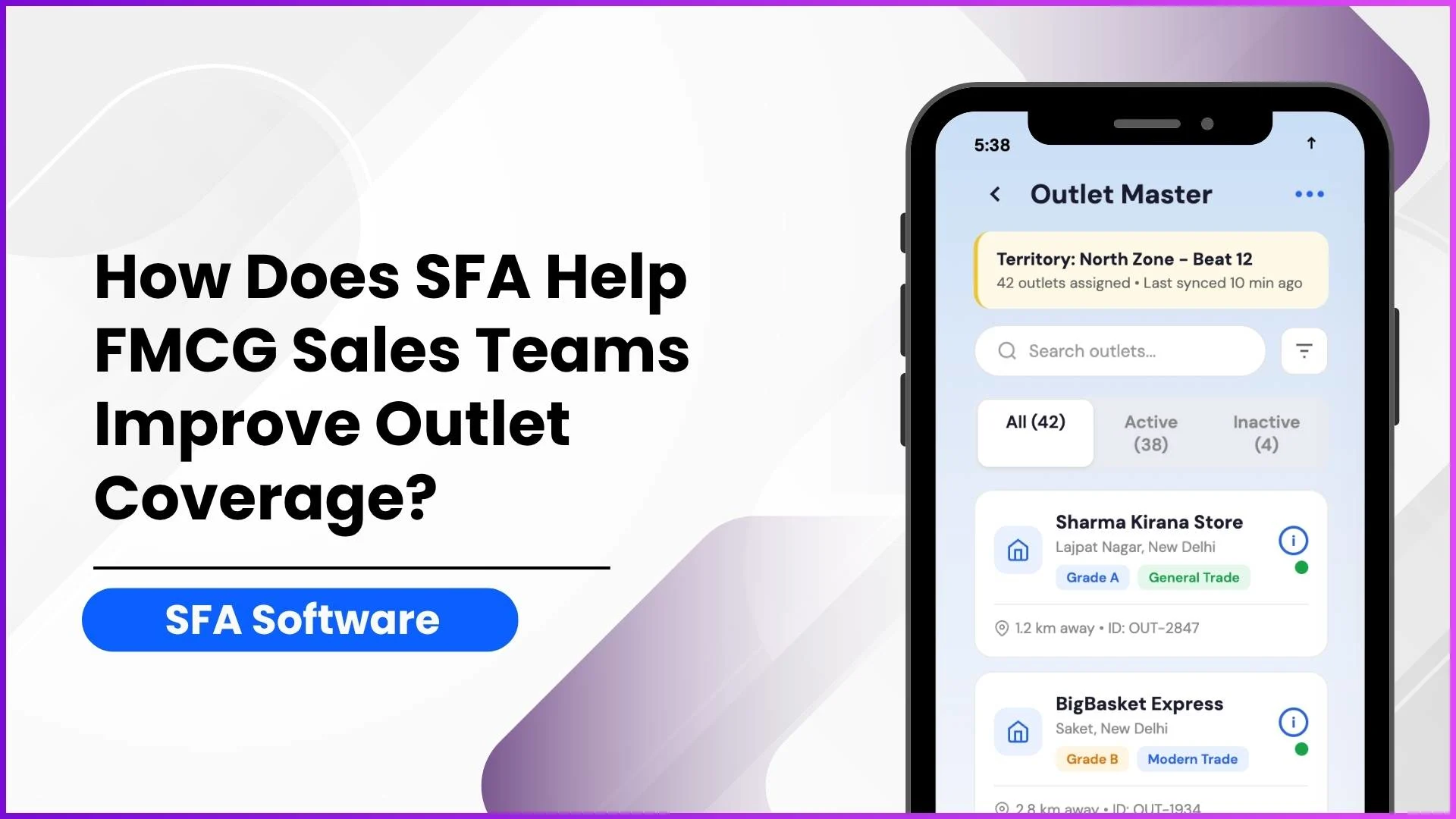
- 42 outlets assigned
- 38 active outlets
- 91% coverage rate
- beat-wise coverage percentages like 87%, 95%, and 72%
This makes coverage measurable instead of assumed.
Manage Outlets and Store Visits Efficiently
1Channel's Store Management Software helps FMCG teams organize outlet master data, assign beats, track store visits, validate locations with geo-tagging, and monitor coverage performance across territories in real time.
Explore Store Management Software →1) Centralized Outlet Master for Better Store Visibility
The first step in improving coverage is having a clean and structured outlet database.
The Outlet Master screen organizes every store with details such as:
- outlet name
- location
- outlet ID
- channel type
- grade
- sub-channel
- territory
- assigned DSR
- distance from current location
Example from the screen data:
- Sharma Kirana Store
- BigBasket Express
- Gupta Provision Store
This helps sales reps quickly identify which outlets belong to their beat and which stores need to be visited.
The admin view further strengthens this with:
- total outlets
- active outlets
- grade-wise classification
- channel mapping
- beat assignment
This reduces outlet duplication and ensures complete store universe visibility.
2) Beat Planning Ensures Every Outlet Gets Covered
One of the strongest ways SFA improves outlet coverage is through territory and beat planning.
The document specifically mentions:
- Beat Plan Approval
- Market Visit Plan
- Weekday Market Visit Plan
This means managers can define:
- which stores should be visited
- on which day
- by which field rep
- within which territory
Example from your screen data:
- Beat 12 – Mon / Wed / Fri – 8 outlets
- Beat 14 – Tue / Thu / Sat – 12 outlets
- Beat 18 – 10 outlets
This structured beat allocation ensures no store is left out and helps distribute workload evenly across reps.
Instead of random visits, teams follow a fixed execution plan.
3) Geo-Tagging Validates Real Outlet Presence
A major challenge in field sales is verifying whether visits actually happened at the intended outlet.
SFA solves this through geo-tagging and geo-fencing.
The provided screens show:
- 38 of 42 outlets geo-tagged
- tagged
- pending
- under review
- re-tag options
The document also mentions GPS upload and geofencing controls.
This means the system can:
- validate exact outlet coordinates
- check whether reps are physically present
- prevent false check-ins
- restrict activity outside store boundaries
This directly improves real outlet coverage quality, not just reported coverage.
4) Distance-Based Outlet Access Improves Routing
The mobile screen displays outlet distance like:
- 1.2 km away
- 2.8 km away
- 4.1 km away
This helps sales reps prioritize nearby outlets within their beat and optimize travel time.
Better route visibility means:
- more outlets visited per day
- less travel wastage
- better productivity
The software also includes reports like:
- Distance between stores
- User Activity Report
- Visit Productivity Report
These help managers identify route inefficiencies and improve beat design.
5) Outlet Categorization Helps Smart Coverage Prioritization
Not all outlets need the same visit frequency.
The outlet categorization screen classifies stores by:
- Grade A
- Grade B
- Grade C
- channel type
- volume tier
- payment type
This helps FMCG teams prioritize high-value outlets.
For example:
- Grade A stores may need frequent visits
- Grade C outlets may follow alternate beat cycles
This ensures high-revenue stores get better sales attention.
6) Real-Time Coverage KPI Tracking
The territory dashboard gives managers clear KPIs such as:
- total outlets
- active beats
- field DSR count
- average coverage %
- visits completed
- orders per week
The document also supports this through:
- Beat Compliance Report
- Visit Productivity Report
- Store Visit Report
This makes it easy to answer:
- Which rep is underperforming?
- Which beat has low coverage?
- Which outlets are repeatedly missed?
This visibility helps improve field execution quickly.
7) Faster New Outlet Addition Expands Coverage
FMCG teams frequently discover new retail outlets in the field.
The Add New Outlet screen helps register new stores instantly with:
- outlet name
- owner name
- mobile number
- address
- grade
- channel
- beat assignment
This ensures new stores enter the sales coverage cycle immediately instead of waiting for backend updates.
This is critical for outlet universe expansion.
Why This Matters for FMCG Growth
Better outlet coverage means:
- more frequent shelf visibility
- higher order frequency
- faster stock replenishment
- stronger market penetration
- improved secondary sales
For FMCG brands, this directly supports revenue growth.
How 1Channel SFA Helps Improve Outlet Coverage
1Channel SFA helps FMCG sales teams improve outlet coverage through structured beat planning, outlet master management, geo-tagging, territory assignment, and real-time coverage analytics.
From adding new outlets to validating field visits and monitoring beat compliance, the platform helps teams ensure every assigned store is covered systematically.
This improves field productivity, reduces missed visits, and strengthens retail execution across territories.
Improve FMCG Outlet Coverage with SFA
1Channel Sales Force Automation provides comprehensive outlet management, beat planning, geo-tracking, visit validation, and coverage analytics to help FMCG teams ensure every store is visited consistently and efficiently.
Explore Sales Force Automation →FAQs
How does SFA improve outlet coverage in FMCG?
SFA improves outlet coverage through beat planning, geo-tagging, route assignment, outlet categorization, and real-time visit tracking.
What is beat planning in SFA?
Beat planning is the process of assigning stores to sales reps based on territory, day, and route schedules to ensure consistent coverage.
How does geo-tagging help sales teams?
Geo-tagging validates outlet location and confirms whether visits happened at the correct store location.
Can SFA help add new outlets in the field?
Yes, the provided screen data shows instant outlet registration with store details, grading, and beat assignment.
How is outlet coverage measured?
Coverage is tracked using KPIs such as:
- number of outlets assigned
- stores visited
- beat compliance %
- average territory coverage