The second purchase request for demo units usually arrives before the first batch has been accounted for. Nobody can say the units are gone. Nobody can say where they are either.
For Indian brands in mobile phones, consumer electronics and appliances, a demo unit is a working product, often worth more than a month of a promoter's pay. Display stands and signage follow the same path at lower value.
The units leave the warehouse with a dispatch note and then pass through three or four handovers that nobody records. The brand ends up buying again what it already owns.

Four Handovers Where Custody Breaks
Each handover moves a unit from one person to another. Each one loses a little of the record.
| Handover | What gets recorded today | What is lost |
|---|---|---|
| Warehouse to area manager | A dispatch note with a quantity | Which units, by serial number |
| Area manager to promoter | A WhatsApp photo, sometimes | Who holds each unit from this day |
| Promoter to store counter | Nothing | Whether the unit was deployed or kept in a bag |
| Store back to warehouse | A count on arrival | What should have come back, and from whom |
By the fourth handover, the brand knows what it shipped and what returned. It cannot name the person responsible for the difference.
How 1View Tracks Every Unit by Person
1View, 1Channel's field-force app, treats demo units and display material as assets with custody. Every movement is logged against a person, not a region.
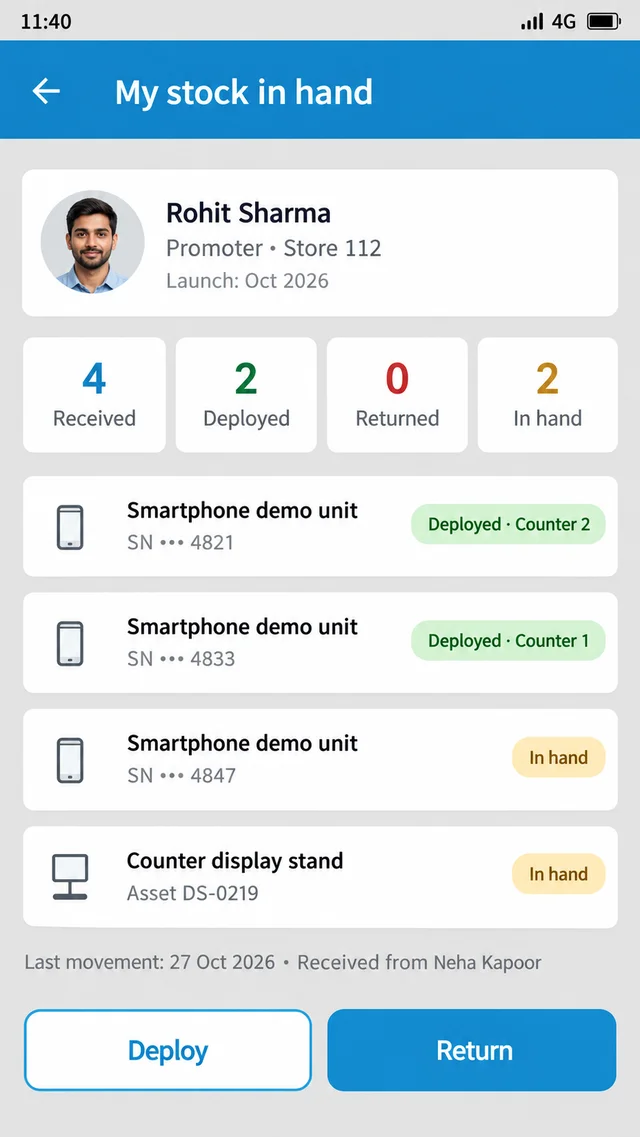
- Receive, allocate, deploy, return: each stage is recorded as the unit changes hands, from warehouse to manager to promoter to store and back.
- Stock in hand per person: every promoter and manager has a live count of what they hold, visible to them and to their reporting line.
- Asset master and rate cards: each asset type is set up once with its value, so an unreturned unit has a cost attached.
- Execution photos per outlet: deployment is backed by a photo from the store, so "deployed" means on the counter, not in a bag.
- Godown stock report: the Assets Available At Godown report shows what is still in the warehouse, against what is out in the field.
Every Demo Unit Has a Name Against It
1View, 1Channel's field-force app, records every demo unit and display asset as it is received, allocated, deployed and returned. Brands see stock in hand per person at any time, so the next purchase request starts from what is already in the field.
Explore 1Channel's Sales Force Automation →What the Second Purchase Order Costs
Take an illustrative brand that issues 120 demo units of a new smartphone to 40 promoters for a launch. Each unit carries a rate-card value of ₹18,000.
| After the launch cycle | With per-person custody | Without it |
|---|---|---|
| Deployed on counters | 70, each against a promoter and store | "Most of them" |
| Returned to warehouse | 15, each matched to the person who returned it | 15, from nobody in particular |
| Still with promoters | 35, each with a name against it | Unknown |
| Next purchase request | 5, for new stores only | 40, because 35 are untraceable |
| Spend on units already owned | ₹0 | ₹6,30,000 |
The 35 units exist in both cases. Only one brand can ask for them back.
Closing the Loop at Return Time
The return is the step most brands skip. The launch ends, promoters move to other stores, and the units stay wherever they were last used.
With stock in hand per person, the return is a list, not a search. Each promoter sees what they still hold, and the manager sees who has not returned it.
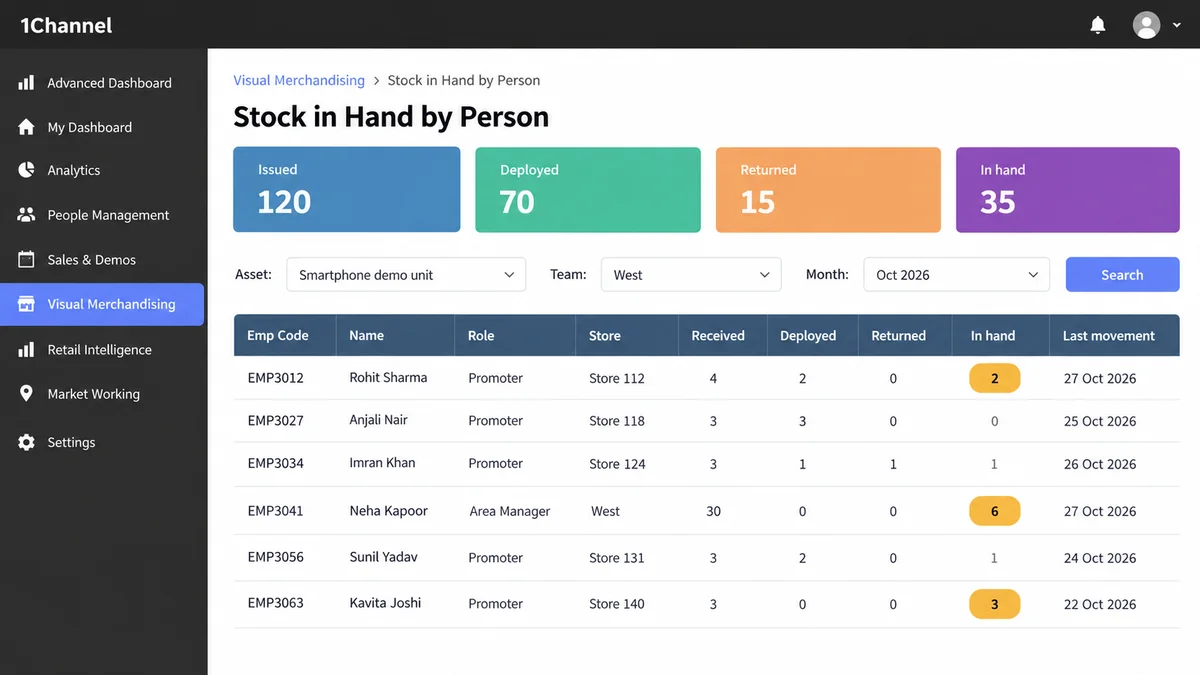
Units that are genuinely lost still happen. The difference is that the brand knows which ones, from whom, and what they were worth, before it approves the next order.
Final Suggestions
- Issue demo units by serial number, never by quantity alone.
- Make the promoter, not the region, the unit of custody.
- Put a rate-card value on every asset type, so a missing unit shows as a cost, not a count.
- Run the return before the next purchase request, not after.
Note: Software screens may vary based on your business structure and configured workflows.