Field sales tools to manage distributed teams, automate workflows, and drive productivity across every channel
Manage field sales teams with mobile attendance, route plans, outlet visits, and real-time reporting
Custom questionnaires, field task tracking, offline data collection, and audit management
Beat plan creation, territory allocation, GPS-validated route compliance, and visit scheduling
40+ pre-built reports, custom report builder, real-time dashboards, and MTD sales tracking
Leave types, role-based policies, automatic credits, carry-forward limits, holiday calendars, and reporting-head approvals
User creation, organisation tree, role-based access, attendance statuses and remarks, and notifications
Claim submission from the app, expense heads, role-based claim policies, and reporting-head approvals
Store creation with GPS coordinates, geofencing, channel and category mapping, and store approval
Create trade schemes, map them to stores and product categories, and show offers to field promoters
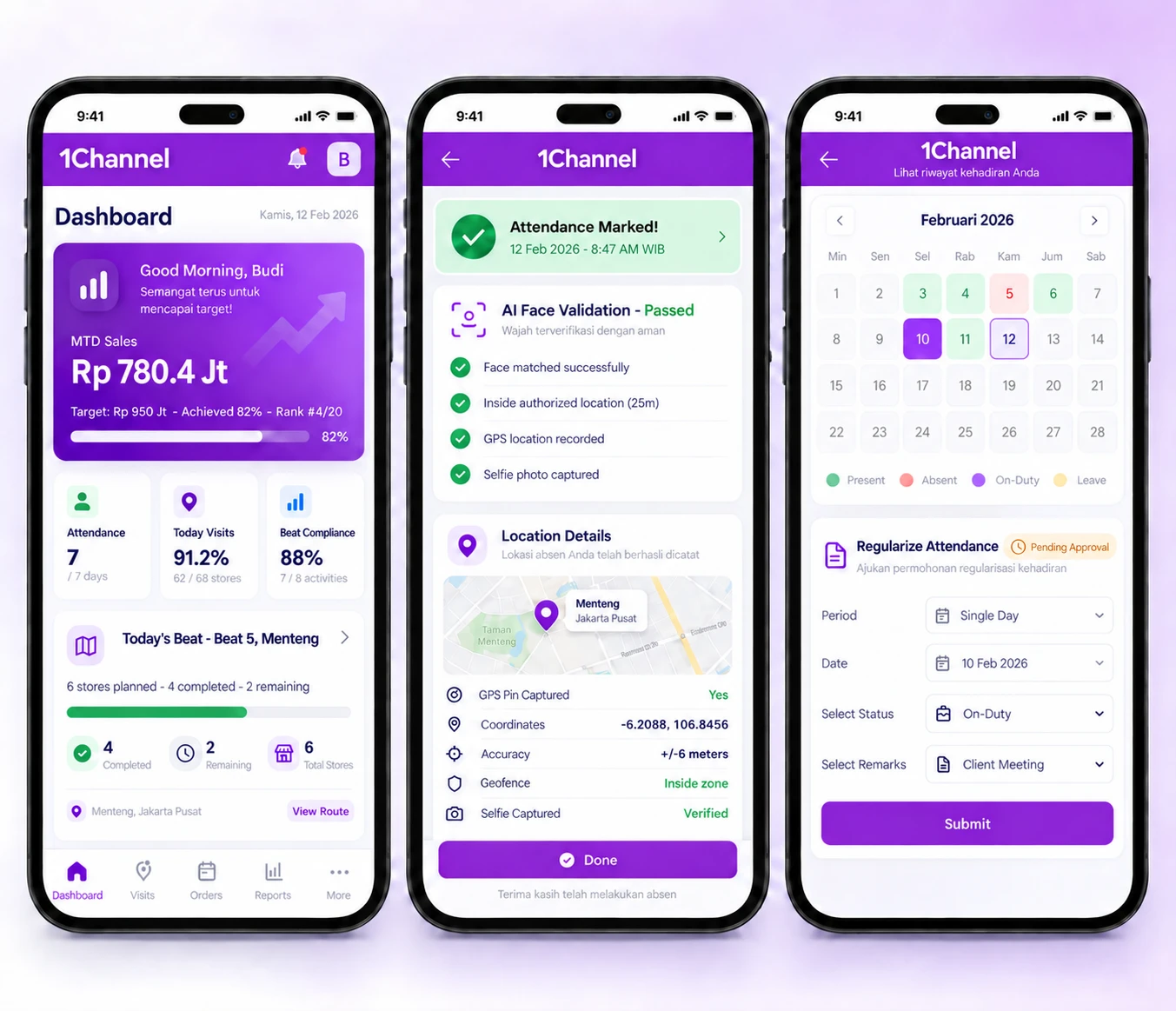
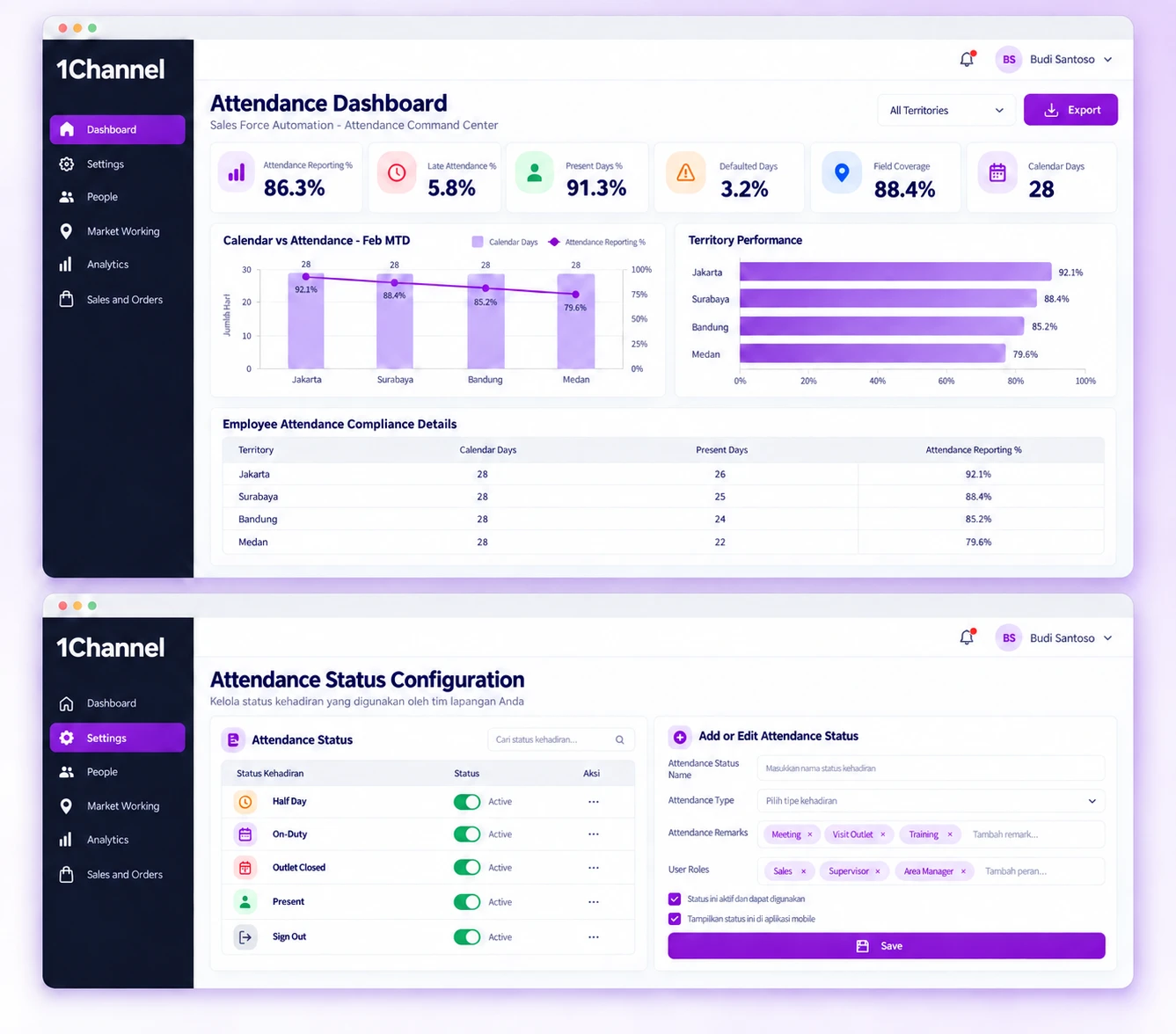
Set-up starts in the cloud portal: an admin builds the status list, decides which roles may use each status, and sets a geofencing radius for the roles that need one. Every new user takes a reference selfie at first login, which the admin approves. After that, a check-in means opening the app, taking a live selfie for the AI match and choosing a status, and the app saves the time and location with it. Managers then follow reporting, late attendance and missed days on the Attendance Dashboard, or download the attendance reports.
Our recognitions constantly motivate us to push the envelope of excellence and empower our customers with winning ideas each day.
Each check-in is accepted only when the live selfie matches the employee's approved reference photo.
How It Works:
Why It Matters:
Attendance is tied to the face on file, which makes it much harder for a colleague to check in for someone else.
Every check-in carries the location it was made from, and a geofence can cap how far from the assigned store it may be.
Features:
Why It Matters:
Where a geofence is set, attendance can only be marked from within that distance of the store.
Define the status list once, then decide which roles can pick each status.
Features:
Why It Matters:
Everyone records attendance in the same vocabulary, so reports compare like with like.
The app can ask for another attendance capture during the shift to confirm the employee is still where they checked in.
Features:
Why It Matters:
A single check-in says little about the rest of the shift, and the random capture tests whether the employee stayed put.
Employees can raise a request to correct a missed day, and admins choose which statuses need an approver's decision.
Features:
Why It Matters:
Missed days are fixed through a defined request rather than ad hoc messages, with approval wherever you require it.
See how well each team is reporting attendance on a dashboard, then pull the detail into reports when needed.
Available Data:
Why It Matters:
Managers can see who is reporting, who is late and who is missing days without collating registers by hand.
Teams that work away from head office need attendance records that say more than a timestamp. The platform checks the face, records the location, and can restrict check-in to a set distance from the assigned store.
Benefits:
At 1Channel, we celebrate every step of our new customers journey, market of geography, or higher customer satisfaction score to become the preferred Field Sales CRM leader.