Field sales tools to manage distributed teams, automate workflows, and drive productivity across every channel
Manage field sales teams with mobile attendance, route plans, outlet visits, and real-time reporting
Custom questionnaires, field task tracking, offline data collection, and audit management
Beat plan creation, territory allocation, GPS-validated route compliance, and visit scheduling
40+ pre-built reports, custom report builder, real-time dashboards, and MTD sales tracking
GPS attendance marking with AI face validation, geofencing, configurable statuses, and regularisation requests
User creation, organisation tree, role-based access, attendance statuses and remarks, and notifications
Claim submission from the app, expense heads, role-based claim policies, and reporting-head approvals
Store creation with GPS coordinates, geofencing, channel and category mapping, and store approval
Create trade schemes, map them to stores and product categories, and show offers to field promoters
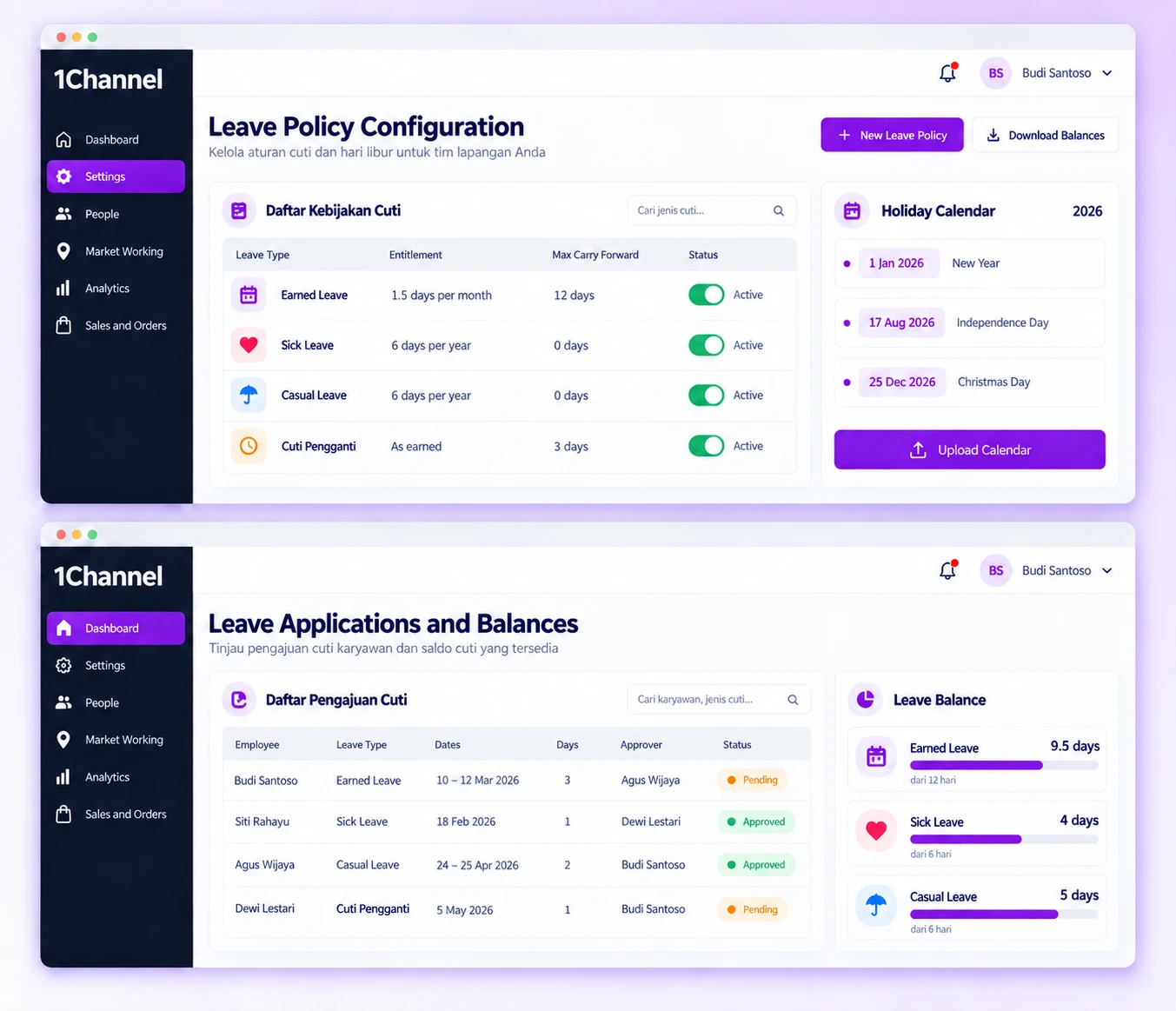
Configuration starts in the portal. An admin defines the leave types, builds a policy for the relevant user roles, uploads opening balances and adds the company's holidays. From then on the policy credits days on its schedule. Employees open Leave Management in the mobile app to check what is left and to apply. The application goes to their reporting head, who approves it from the portal, and the result appears back in the employee's app.
Our recognitions constantly motivate us to push the envelope of excellence and empower our customers with winning ideas each day.
Create the leave types your HR policy uses, then attach each one to a policy for chosen user roles.
Features:
Why It Matters:
Roles that follow different leave rules can each be given a policy of their own.
After opening balances are loaded once, each policy credits leave on its own schedule.
Features:
Why It Matters:
HR does not have to re-enter everyone's balance each month.
State how many unused days each leave type may move into the next cycle.
Features:
Why It Matters:
Unused days follow a rule your company sets rather than piling up unchecked.
Each leave type has a defined approval route, and requests wait in the reporting head's queue in the portal.
Features:
Why It Matters:
Requests follow a fixed route, and employees see the result without having to ask around.
Keep company holidays in the portal, where they are also shown to employees in their app.
Features:
Why It Matters:
Employees can look up holiday dates themselves, and each policy states how those days are treated.
Load starting balances once, then download the current position whenever HR wants to check it.
Features:
Why It Matters:
HR can check balances on demand instead of asking each team for figures.
Once the policy is set, leave balances stop depending on someone remembering to update a sheet. Credits follow the schedule you chose, applications reach the right approver, and HR can download the current position at any time.
Benefits:
At 1Channel, we celebrate every step of our new customers journey, market of geography, or higher customer satisfaction score to become the preferred Field Sales CRM leader.