Field sales tools to manage distributed teams, automate workflows, and drive productivity across every channel
Manage field sales teams with mobile attendance, route plans, outlet visits, and real-time reporting
Custom questionnaires, field task tracking, offline data collection, and audit management
Beat plan creation, territory allocation, GPS-validated route compliance, and visit scheduling
40+ pre-built reports, custom report builder, real-time dashboards, and MTD sales tracking
GPS attendance marking with AI face validation, geofencing, configurable statuses, and regularisation requests
Leave types, role-based policies, automatic credits, carry-forward limits, holiday calendars, and reporting-head approvals
User creation, organisation tree, role-based access, attendance statuses and remarks, and notifications
Claim submission from the app, expense heads, role-based claim policies, and reporting-head approvals
Create trade schemes, map them to stores and product categories, and show offers to field promoters
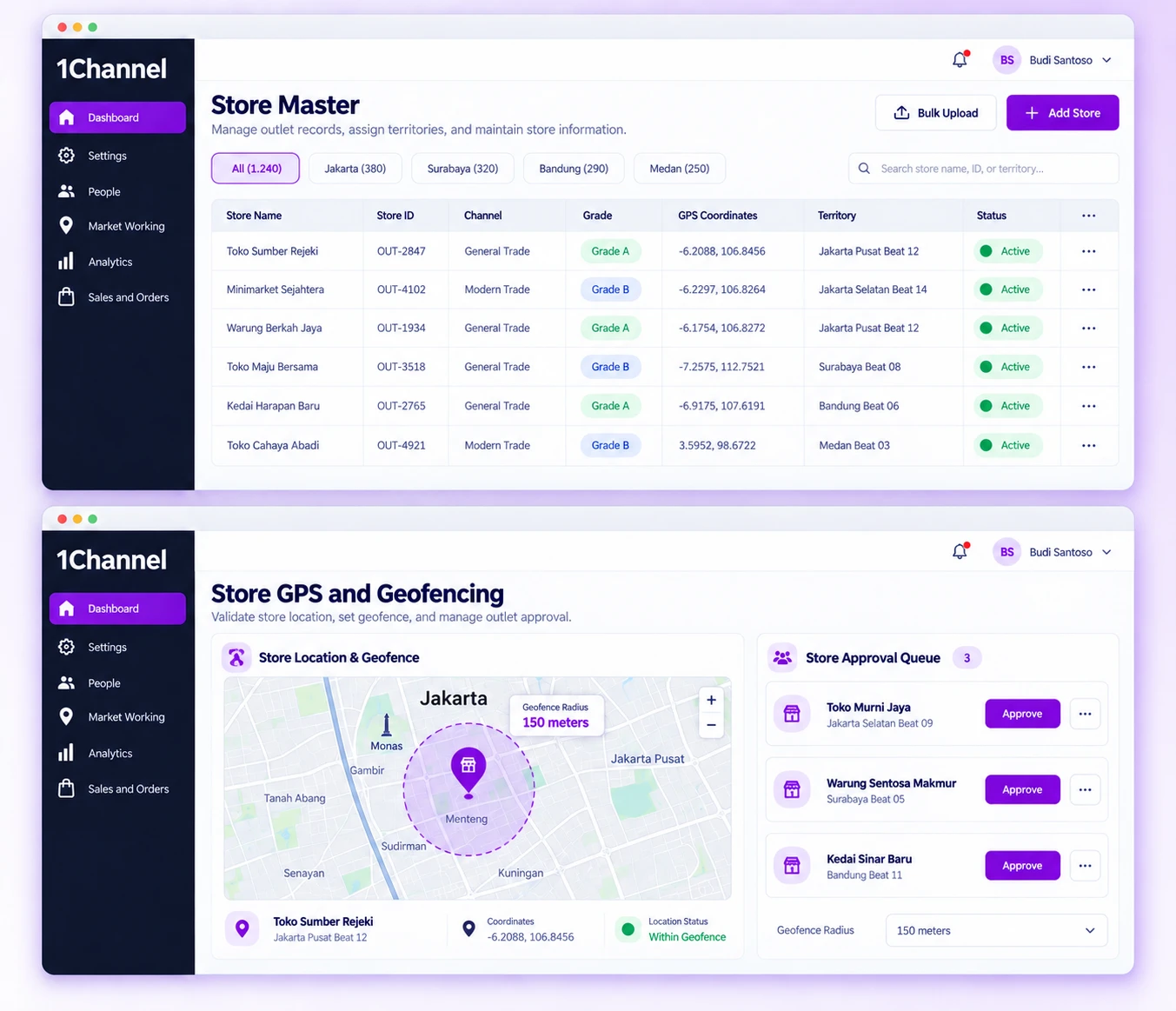
Channels, categories, sub-regions and territory levels are defined once in the portal settings, then used to tag every store. An admin creates each store in the Store Master, or uploads a batch, adds its GPS location and assigns it to the field user who will service it. New or modified stores wait for approval before they go live, and geofence rules, set by role, activity and radius, restrict where that user can perform the activity.
Our recognitions constantly motivate us to push the envelope of excellence and empower our customers with winning ideas each day.
Organise stores by channel, category, and classification so the retail network structure matches how the business actually operates.
Features:
Why It Matters:
Stores can be filtered, reported on and assigned along the same channel, category and territory lines the business already works by.
Geofence rules limit where a field user can perform an activity, measured as a set distance from the user's assigned store.
Features:
Why It Matters:
An activity is tied to a physical location, so it can only be carried out within the configured distance of the store.
Stores can be added one at a time or in bulk, with attributes configured to match each outlet's setup.
Features:
Why It Matters:
Store data can be captured at whatever pace and detail level the rollout requires, from a handful of outlets to a full network.
Each store is mapped to a single field user at a time, while one user can be responsible for several stores.
Features:
Why It Matters:
With a single owner per store, it is always clear which field user is accountable for a given outlet.
New and modified stores go through an approval step before they go live, and store GPS locations are maintained in the same portal.
Features:
Why It Matters:
New and edited outlet records are checked before they go live, which keeps unreviewed stores out of field operations.
A centralised store master keeps classification and exception data consistent across the retail network.
Features:
Why It Matters:
Visit exceptions arrive as structured options rather than free text, so they can be reported on consistently across every outlet.
Companies running large or fast-growing retail networks across Indonesia need a store list they can rely on: complete records, one clear owner per outlet and firm rules on where field work is done. The platform gives store creation, assignment and approval a fixed structure, so the field team and the data behind it match the network on the ground.
Benefits:
At 1Channel, we celebrate every step of our new customers journey, market of geography, or higher customer satisfaction score to become the preferred Field Sales CRM leader.