On a Thursday morning, two field sales reps in Penang send WhatsApp messages to their team leader requesting leave for the following Monday and Tuesday. The team leader forwards the messages to the area manager, who approves verbally over a phone call. Nobody informs the operations team. On Monday, the beat plan still shows 8 reps assigned to Penang, but only 6 are actually in the field. Two territories go unvisited. The attendance dashboard shows two defaulters. The payroll team at month-end has no formal leave record for those two days.
This scenario plays out in organisations where leave management is handled through informal channels while attendance, beat planning, and payroll run on structured systems. The disconnect creates gaps that are small individually but compound into significant operational problems over time: inaccurate attendance records, overstated coverage numbers, payroll disputes, and coverage shortfalls that nobody planned for.
A cloud-based leave management module inside the SFA platform solves this by making leave applications, approvals, balance tracking, and downstream integrations part of the same system that manages attendance, visits, and field activities. When a rep applies for leave through the app, the system automatically adjusts attendance records, visibility dashboards, and payroll data without any manual intervention.
Table of Contents
Why Leave Management Is Different for Field Sales Teams
Office-based employees can request leave through an HR portal, and the impact is limited to their desk being empty. For field sales teams, an unplanned absence has cascading effects that touch multiple operational systems.
- Beat plan disruption. Each field rep has a daily beat plan with assigned outlets. When a rep takes leave, those outlets receive no visit unless the plan is adjusted. If the leave was requested informally and not reflected in the system, the beat plan continues to show a full schedule while the territory goes uncovered.
- Attendance data mismatch. Without a formal leave record, the attendance dashboard shows the rep as a defaulter on the leave day. This inflates the not-marked defaulter count and deflates the present attendance percentage, distorting both metrics.
- Payroll inaccuracy. When leave is approved verbally but not recorded in the system, the attendance closure module has no leave entry for those days. HR must manually reconcile the gap during payroll processing, which creates delays and disputes.
- Coverage planning blindness. Managers planning weekly or monthly coverage cannot account for leave days they do not know about. If two reps in a territory are on leave on the same day, the manager needs advance visibility to arrange coverage. Informal leave requests provide no such visibility.
These problems are not caused by a lack of leave policies. They are caused by leave processes that operate outside the system that manages everything else.
How Leave Management Works Inside the SFA Platform
The leave management module is part of the HR Management section within the SFA admin portal. It connects the employee's mobile app, the manager's approval workflow, and the HR team's policy configuration into a single automated process.
Step 1: Employee applies for leave from the mobile app
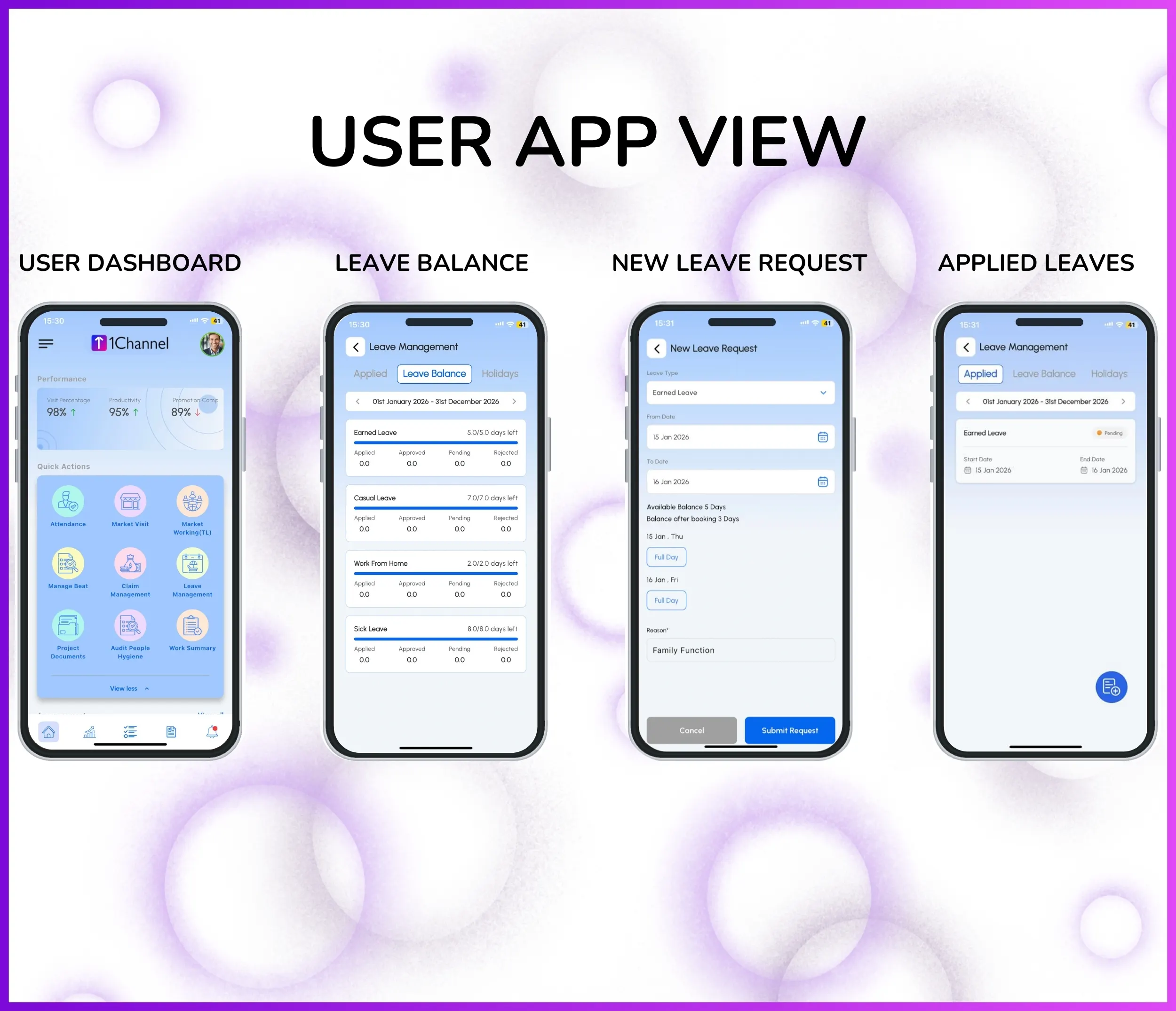
The field rep opens the leave management section inside the SFA mobile app. The app displays their current leave balance by type, showing how many days of annual leave, sick leave, casual leave, or any other configured type are available. The rep selects the leave type, enters the start and end dates, and submits the request.
The submission takes less than a minute. The rep can see the status of their request in the app immediately after submission, showing it as "Pending Approval."
Step 2: Manager reviews and approves from the portal
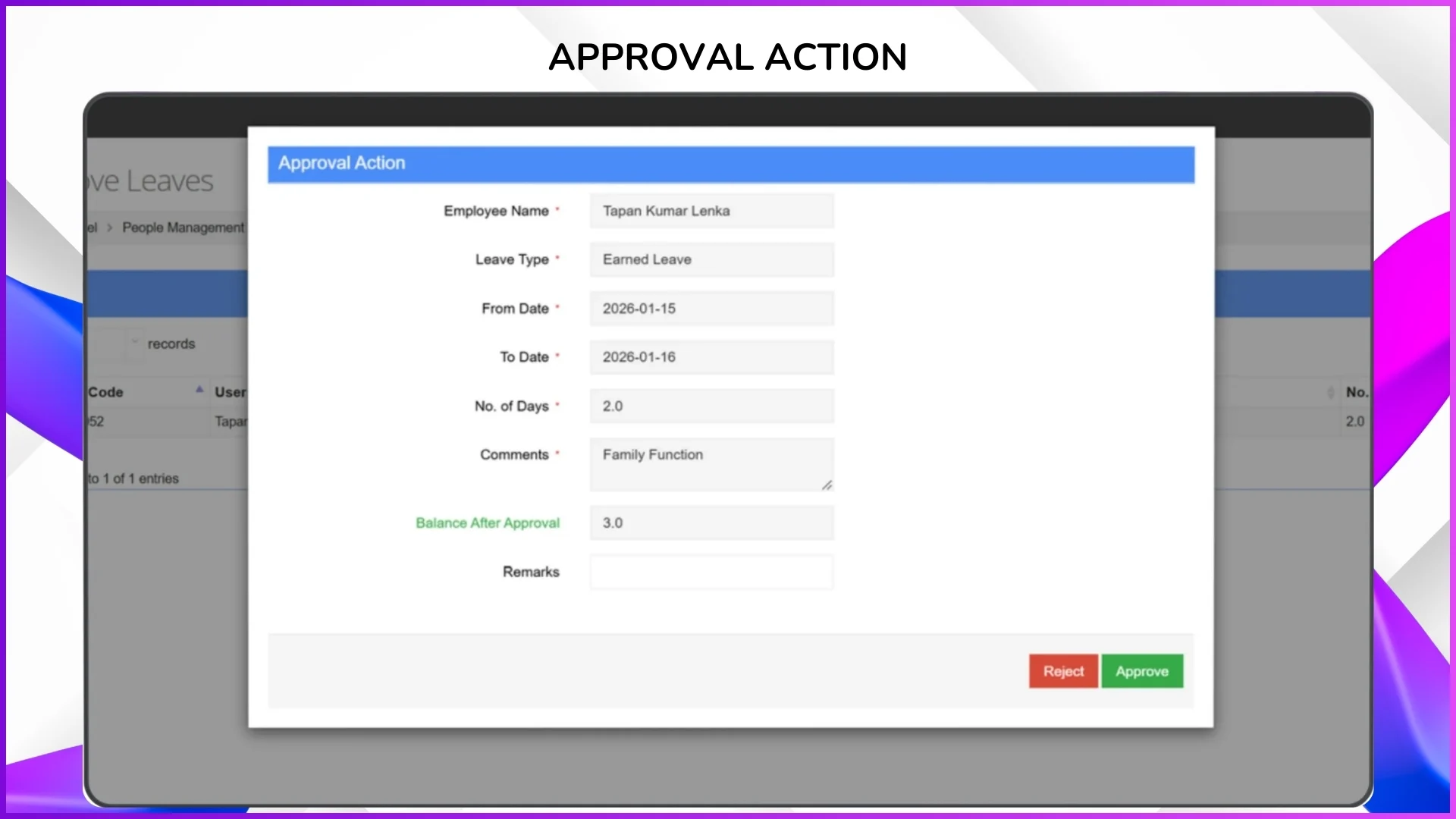
The leave request automatically routes to the rep's reporting manager based on the organisational hierarchy configured in the user management settings. The manager sees the request in the "Approve Leaves" section of the portal with details including the employee's name, code, leave type, dates, number of days, and available balance.
The manager can approve or reject the request with a single action. If rejected, the rep receives a notification on their app. If approved, the leave is recorded in the system and all downstream data adjusts automatically.
Step 3: System updates attendance, dashboards, and payroll data
Once approved, the leave is reflected across the platform:
- The attendance dashboard shows the rep's status as "Leave" on the approved dates, not as a defaulter
- The present attendance percentage calculation excludes the rep from the denominator on leave days
- The attendance closure module includes the leave days with the correct status for payroll processing
- The leave balance is automatically deducted by the number of approved days
This automation eliminates the manual reconciliation work that HR teams otherwise perform at the end of every month.
What HR Teams Can Configure
The leave management module is fully configurable from the admin portal under HR Management settings. Organisations can set up their leave policies to match internal rules and local employment regulations without any custom development.
Leave type definitions
Create any number of leave types based on the organisation's policy. Common types include annual leave, sick leave (with or without medical certificate requirements), emergency leave, compassionate leave, maternity leave, paternity leave, and unpaid leave. Each type can have its own accrual rules and balance limits.
Leave balance upload and auto-allocation
Admins can upload leave balances in bulk at the start of a cycle using an Excel template. For recurring allocations, the system can be configured to credit a fixed number of leave days per month automatically. For example, if the policy grants 1.5 days of earned leave per month, the system adds 1.5 days to each employee's balance on the first of every month without manual intervention.
Carry-forward rules
Configure how many unused leave days carry forward to the next cycle. Some organisations allow full carry-forward of earned leave up to a cap, while others expire unused casual leave at the end of each calendar year. The system enforces these rules automatically during the cycle transition.
Approval policy definitions
Define who approves leave requests for each role. Approval can follow the standard reporting hierarchy, or specific approval chains can be configured for different leave types. For example, sick leave of 1 to 2 days might require only team leader approval, while annual leave of more than 5 consecutive days might require area manager approval.
Holiday calendar
Upload the organisation's holiday calendar including national public holidays, state-specific holidays, and company-declared holidays. The system uses this calendar to calculate working days accurately. When a rep applies for leave from Friday to Monday in a week where Monday is a public holiday, the system counts only Friday as a leave day rather than two days.
Leave Management in the Malaysian Employment Context
Malaysia's Employment Act 1955 and subsequent amendments establish minimum leave entitlements that vary based on tenure. While the SFA platform does not enforce legal compliance directly, its configurable leave types and balance settings allow organisations to align with these requirements.
Annual leave entitlements by tenure
Under Malaysian employment law, the minimum annual leave entitlement is 8 days for employees with less than 2 years of service, 12 days for employees with 2 to 5 years of service, and 16 days for employees with more than 5 years of service. Organisations can configure these tiers as separate policies or as a single leave type with balance adjustments based on employee tenure data in the system.
Sick leave provisions
The statutory minimum sick leave ranges from 14 to 22 days per year depending on length of service, with an additional 60 days if hospitalisation is required. Configuring separate "Sick Leave" and "Hospitalisation Leave" types in the system allows accurate tracking against these statutory entitlements.
State-level public holidays
Malaysia has a mix of national and state-specific public holidays. Thaipusam is a national holiday, but certain states observe additional holidays like Nuzul Al-Quran on different dates, or state-specific holidays such as the Sultan's birthday. Uploading a state-aware holiday calendar ensures that leave day calculations are accurate for reps operating in different states.
Festive season planning
Hari Raya Aidilfitri, Chinese New Year, Deepavali, and Christmas are periods when leave requests spike significantly. With leave balances and approval workflows managed in the system, managers have advance visibility into how many reps in each territory are requesting time off during these periods. This allows proactive coverage planning rather than reactive scrambling when multiple reps are absent simultaneously.
How Leave Data Flows into Other Modules
The value of managing leave inside the SFA platform, rather than in a separate HR system, is that leave data automatically connects to every module that depends on workforce availability.
- Attendance dashboard. Approved leave days appear as "Leave" status on the attendance dashboard. The rep is excluded from the defaulter count and the present percentage calculation adjusts accordingly. Managers see accurate field strength numbers without needing to cross-reference a separate leave tracker.
- Beat plan compliance. When a rep is on approved leave, their planned outlet visits for those days can be identified and reassigned to other reps or flagged as intentionally unvisited. Without leave integration, those outlets appear as missed visits in the compliance report, distorting the rep's performance metrics.
- Expense validation. The expense approval workflow can cross-reference leave dates. If a rep submits a fuel or travel claim for a day they were on approved leave, the system flags it automatically. This prevents erroneous claims without requiring manual date-by-date verification.
- Attendance closure and payroll. The attendance closure module consolidates working days, leave days, half-days, and absences into a payroll-ready format. Because leave approvals update the attendance record automatically, HR teams do not need to manually adjust attendance data before running payroll. The leave type classification (paid, unpaid, sick) is preserved in the export, so payroll calculations can differentiate between paid and unpaid leave days.
- Analytics and reporting. Leave patterns appear in the analytics module. Managers can track leave frequency by team, by territory, and by time period. If a particular territory consistently has lower field strength due to concentrated leave patterns, the data supports staffing or scheduling decisions.
Explore Sales Force Automation
1Channel's cloud-based SFA platform includes integrated leave management with automated approvals, balance tracking, holiday calendars, and payroll-ready attendance closure.
Explore SFA Solutions →What Field Reps See on Their App
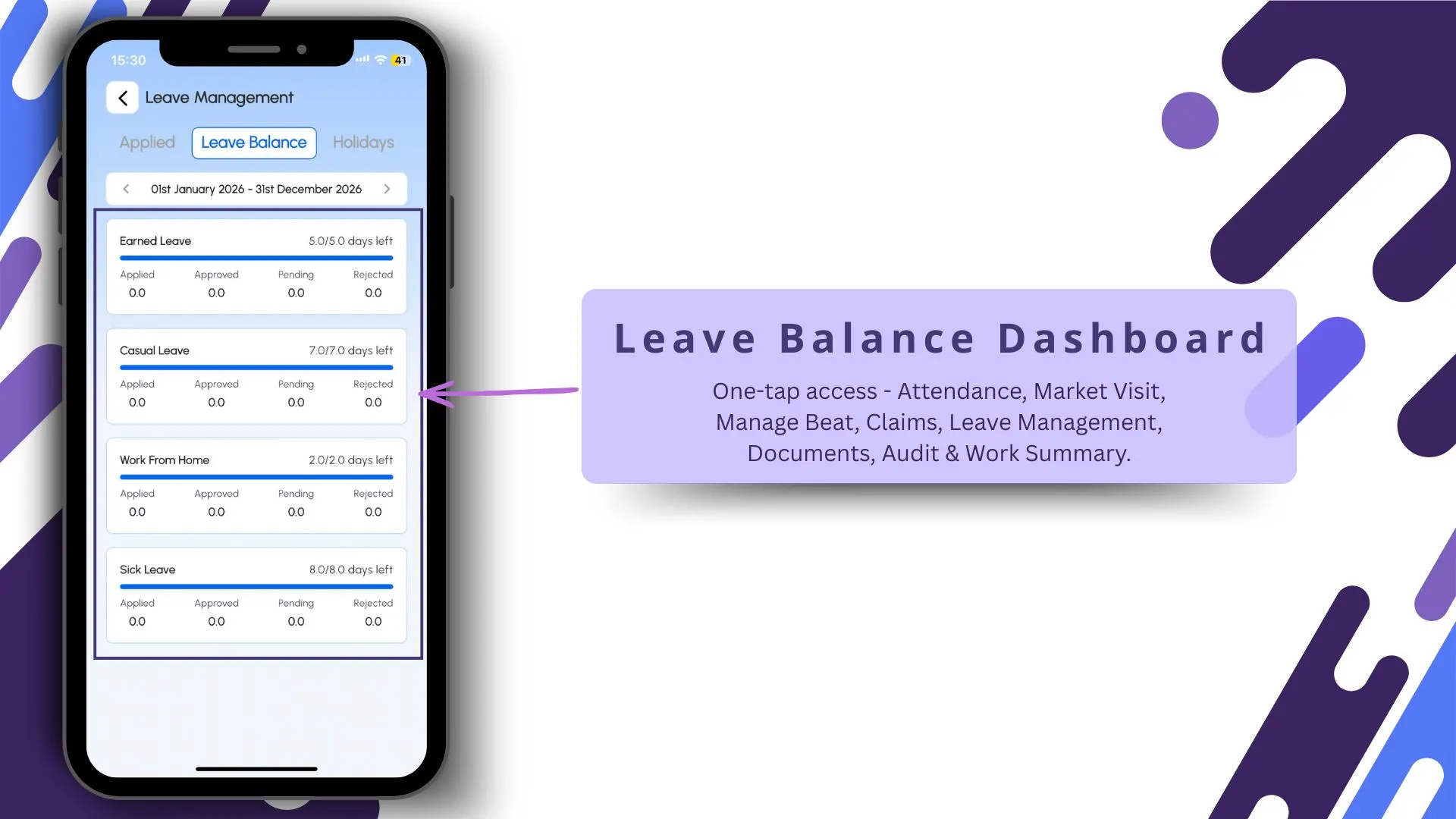
The mobile app provides field employees with complete visibility into their leave status without needing to contact HR or their manager. The leave module in the app includes:
- Leave balance by type. The rep can see their remaining balance for each leave type at any time. If they have 6 days of annual leave and 3 days of sick leave remaining, both numbers are visible on a single screen.
- Leave application form. A simple form where the rep selects the leave type, enters start and end dates, and submits. The system automatically calculates the number of leave days based on the holiday calendar, excluding weekends and public holidays.
- Application status tracking. Each submitted request shows its current status: pending, approved, or rejected. The rep does not need to follow up with their manager to check whether the leave was approved.
- Attendance calendar. A colour-coded monthly calendar view shows present days, leave days, half-days, absences, and late entries. The rep can see their complete attendance and leave history at a glance.
This self-service approach reduces the dependency on managers and HR for basic leave information and encourages reps to use the formal system rather than informal channels.
Attendance Regularisation and Leave Interactions
Not all leave situations fit the standard application-then-approval workflow. The SFA platform handles exceptions through the attendance regularisation process.
If a rep was absent on a day without prior leave application, perhaps due to a sudden illness or a family emergency, they can submit an attendance regularisation request from the app. The request includes the reason and the attendance status they are requesting, such as "Sick Leave" or "Emergency Leave." This request routes to the manager for approval, and once approved, the attendance record for that day is updated from "Absent/Defaulter" to the approved leave status.
Similarly, if a rep marked "Present" on a day they actually took a half-day, the regularisation workflow allows the correction. The manager approves the change, and the attendance record is updated without affecting the original audit trail.
This flexibility ensures that the system accommodates real-world exceptions while maintaining a complete record of every change and approval.
Frequently Asked Questions
Can leave types be customised for different organisations?
Yes. The admin portal allows creation of any number of leave types with custom names, accrual rules, and balance limits. Common types include annual leave, sick leave, emergency leave, compassionate leave, maternity leave, and unpaid leave. Organisations can add or modify leave types at any time.
How does the system handle leave during public holidays?
The holiday calendar uploaded by the admin defines which dates are public holidays. When a rep applies for leave that spans a public holiday, the system automatically excludes the holiday from the leave day count. If the organisation observes state-specific holidays, the calendar can be configured to reflect those.
Can leave balances be allocated automatically each month?
Yes. The system supports automatic leave allocation based on configured policies. For example, if the policy grants 1.5 days of earned leave per month, the system credits this balance to each employee automatically on the first of every month. Initial balances can be uploaded in bulk via Excel template at the start of the cycle.
What happens if a rep applies for leave but has insufficient balance?
The system displays the available balance before submission. If the rep attempts to apply for more days than their balance allows, the request is either blocked or flagged depending on the organisation's configuration. Some organisations allow negative balance applications that require additional approval levels.
Can leave data be exported for external payroll systems?
Yes. The attendance closure module consolidates leave data along with attendance records into exportable formats. The export includes leave type, dates, approval status, and balance deductions, structured for import into the organisation's payroll processing software.
Does the system support half-day leave?
Yes. Half-day leave is a configurable attendance status. Reps can request half-day leave through the app, and the system deducts 0.5 days from the leave balance upon approval. The attendance dashboard reflects the half-day status correctly for both compliance reporting and payroll purposes.
Final Suggestions
- Make the app the only channel for leave requests. If reps can still request leave through WhatsApp or phone calls, the system will always have gaps. Establish a clear policy that all leave requests must go through the SFA app to ensure complete records.
- Upload the holiday calendar before the year starts. State-specific holidays in Malaysia mean that reps in different states have different non-working days. Upload the complete calendar early so that leave day calculations are accurate from January onward.
- Set up auto-allocation rather than manual uploads. For recurring leave credits like monthly earned leave accrual, configure automatic allocation. This eliminates the administrative task of uploading balances every month and ensures reps always see their current balance.
- Review leave patterns during peak seasons. Use the analytics module to track leave concentration during Hari Raya, Chinese New Year, and year-end periods. If 40% of a territory's reps request leave during the same week, managers need advance visibility to plan coverage.
- Configure approval chains for extended leave. Short leave of 1 to 2 days can follow the standard reporting hierarchy. Extended leave of more than 5 days should route to a higher approver to ensure that territory coverage planning accounts for the prolonged absence.
Leave management may seem like an HR function, but for field sales teams, it directly affects attendance accuracy, territory coverage, expense validation, and payroll processing. Managing it inside the same platform that handles all other field operations ensures that a rep's leave day is not an invisible gap in the system but a planned, tracked, and accounted-for event. Get in touch to explore how 1Channel's SFA platform integrates leave management with your field operations.