A level ladder gives every promoter a fixed sequence of stages, plus written criteria for moving from one stage to the next.
Promoters in consumer electronics, modern trade retail, home appliances and cosmetics all need one, especially when teams are spread across malls throughout South Africa.
Without it, promotion usually happens at a quarterly review. An area manager picks names, and promoters in other provinces rarely know what they were measured on.
This post explains how a training platform sets up levels and promotion criteria, and how promotion then happens on its own once a promoter meets the bar.
It also covers how level-based quiz assignment keeps product knowledge current between promotions.

Why Gut-Feel Promotions Cost Promoter Teams
A promoter who sells well in a Sandton flagship and one who sells well in a smaller Durban store rarely get compared on the same terms.
Product knowledge is checked once at onboarding and then forgotten. Tenure gets counted loosely, and nobody can show a promoter what is missing.
The result is predictable. Strong promoters leave for a competitor's counter, and weaker ones move up because their manager happened to see them on a good day.
Building the Level Ladder
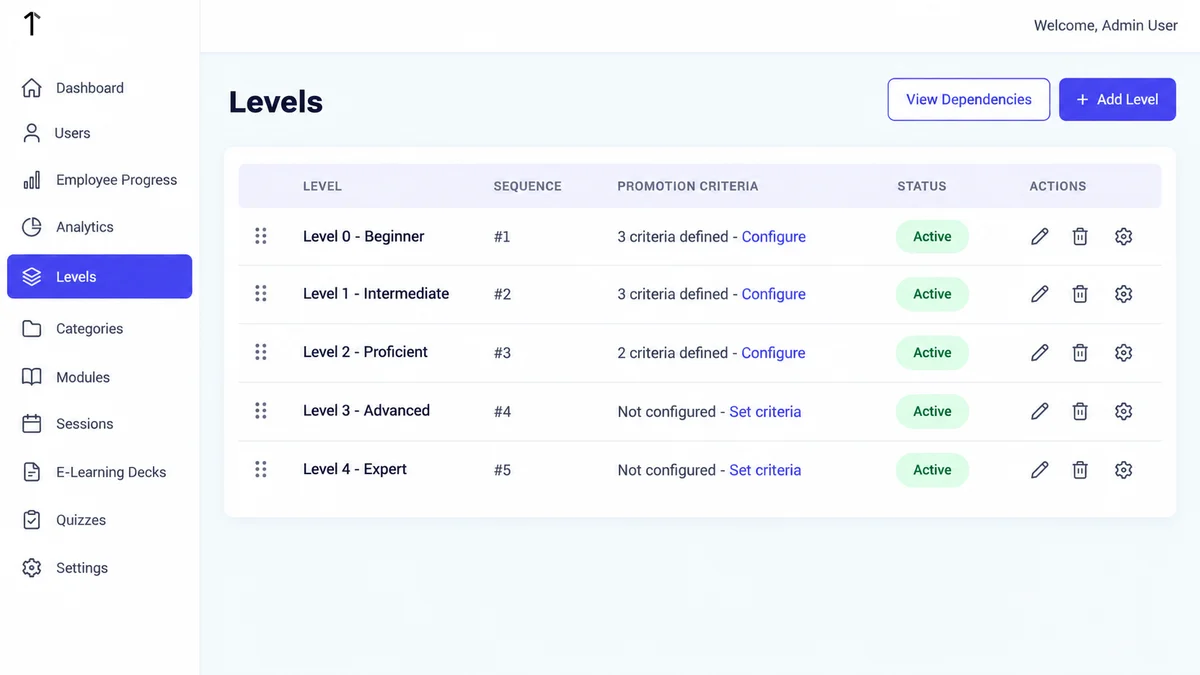
In the admin portal, the Levels screen lists every stage in order, from Level 0 upward. Each level can carry a nickname such as Beginner, Intermediate or Proficient.
Levels are reordered with a drag handle, and every level must exist up front, even though a promoter holds only one level at a time.
A module's level also controls who sees it. Level 1 content stays hidden from a promoter still at Level 0.
Setting Promotion Criteria
Clicking Configure on a level opens its promotion criteria. Admins choose from a fixed set of three criteria types and give each one a target value.
| Criteria type | What it measures | Example target |
|---|---|---|
| Certificate received (%) | Share of required certificates the promoter holds | 100% |
| Avg. Productivity Units | Average productivity units over a chosen period | 30 units, last 3 months |
| Tenure (in days) | Days spent at the current level | 120 days |
Once a promoter's actual figures meet every criterion set for their level, promotion to the next level happens automatically. No review meeting is needed.
A level without criteria shows "Not configured" with a Set criteria link, so gaps in the ladder are easy to spot.
What the Promoter Sees on the Phone
On the mobile app, the home screen shows the promoter's name, unique LMS code and a Current Level card with a trophy icon.
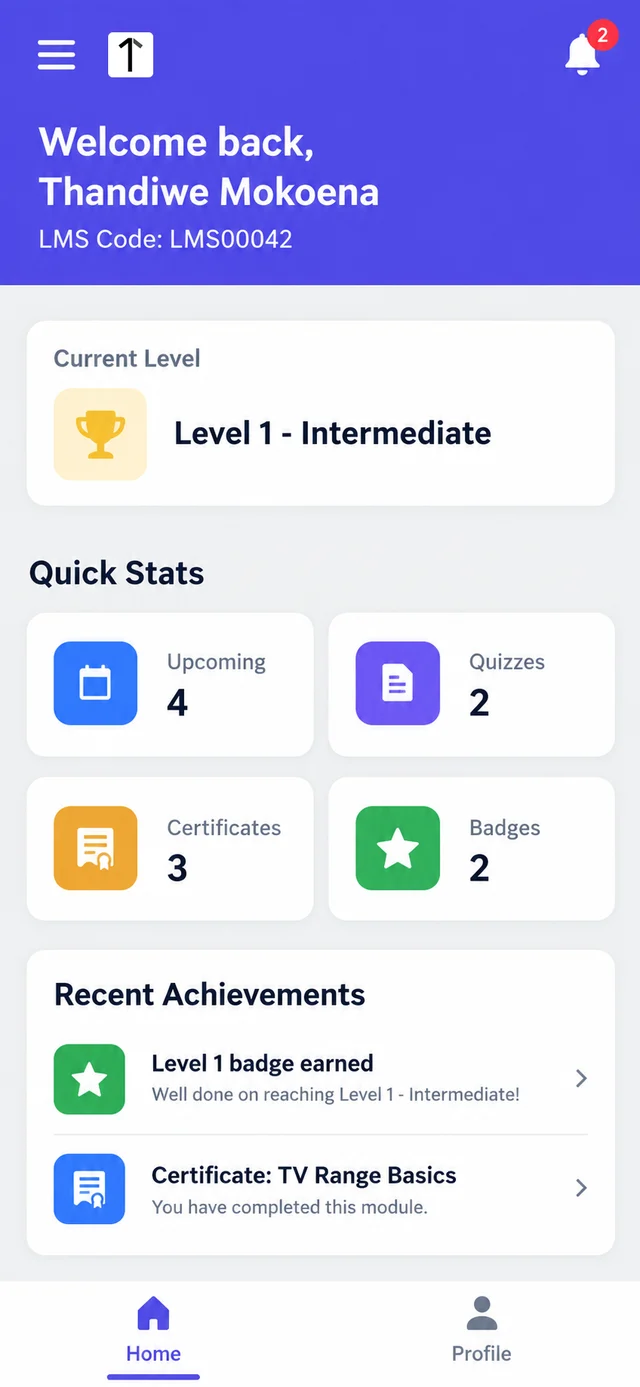
Quick Stats count upcoming trainings, quizzes, certificates and badges. Each level has its own badge, so moving up is visible to the promoter straight away.
Managers follow the same picture in Employee Progress Tracking, which shows each promoter's current level, the next level, module progress and promotion status as a percentage.
Two Promoter Teams, Two Ladders
A television brand in Gauteng. The brand runs 64 promoters across malls in Sandton, Rosebank and Menlyn.
Its Level 0 criteria are 100% certificates, 30 average productivity units over three months and 120 days' tenure.
After the first quarter, Employee Progress shows 11 promoters at 100% promotion status. They move to Level 1 automatically, and Level 1 sales modules appear on their phones.
Another 9 have met the tenure and productivity targets but still lack a certificate. Their managers know exactly what to chase.
An appliance distributor before Black Friday. A Western Cape team assigns a new washing-machine quiz By Level to every Level 1 promoter.
The quiz has a 70% pass mark, three attempts and a seven-day completion timeframe.
Promoters who reach "Max Attempts Reached" cannot retry. For them, the admin schedules an In-Store session.
A trainer visits the store, trains the promoter there and marks attendance with a photo.
For coaching between sessions, Pitch AI scores recorded sales pitches against the brand's own rubric, and AI roleplay lets promoters practise the sale before facing customers.
How 1Channel Keeps Promotions Tied to Evidence
1Channel's sales team LMS holds the level ladder, the criteria, quizzes and attendance in one cloud system, so every promotion has the figures behind it.
Automated promotion removes the quarterly guesswork, while level-gated content means each promoter only sees training that suits their stage.
Let Promoters See the Path to Their Next Level
See how 1Channel sets up level ladders, promotion criteria and level-based quizzes for promoter and field teams.
Explore Sales Team LMS →Final Suggestions
- Define every level before go-live, even the ones few promoters will reach this year.
- Configure criteria for Level 0 first, since that is where most new promoters sit.
- Keep tenure targets realistic for your turnover, or promotions will rarely trigger.
- Tag modules to the right level so promoters are not shown content above their stage.
- Use By Level quiz assignment before peak periods such as Black Friday and the festive season.
- Check Employee Progress monthly for promoters stuck on a single missing criterion.
Note: Software screens may vary based on your business structure and configured workflows.