A partner who earns points every month but never sees how that stacks up against anyone else only has half the picture.
That gap shows up across FMCG retailer programs, building materials and hardware dealer networks, automotive parts counters, and consumer durables and electronics resellers throughout South Africa.
Where a partner ranks against their peers, and how close they sit to the next reward tier, is what keeps a program feeling alive once the novelty of simply earning points wears off.
1Channel's Loyalty platform configures both as a layer on top of the core points engine, run from the Admin Portal and surfaced straight into the partner's own mobile app.
This post covers how the leaderboard and tier structure get configured, what a partner actually sees on their phone, and where an optional contest layer fits on top.
Why a Flat Points Balance Stops Motivating
A points balance on its own only answers one question: how many has this partner earned so far.
It says nothing about whether that number is strong, average, or trailing behind the rest of the province, and it gives no sense of how close a partner sits to unlocking the next tier of benefits.
Both gaps matter more as a program scales past a handful of partners, because a number with no comparison stops feeling like an achievement.
Configuring the Leaderboard
The Leaderboard module sits inside the Gamification settings of the Admin Portal, built on top of whichever point-earning mechanism the program already uses, whether that's an ERP sales feed, a QR code scan, or an approved manual purchase entry.
Setting the Time and Geography Scope
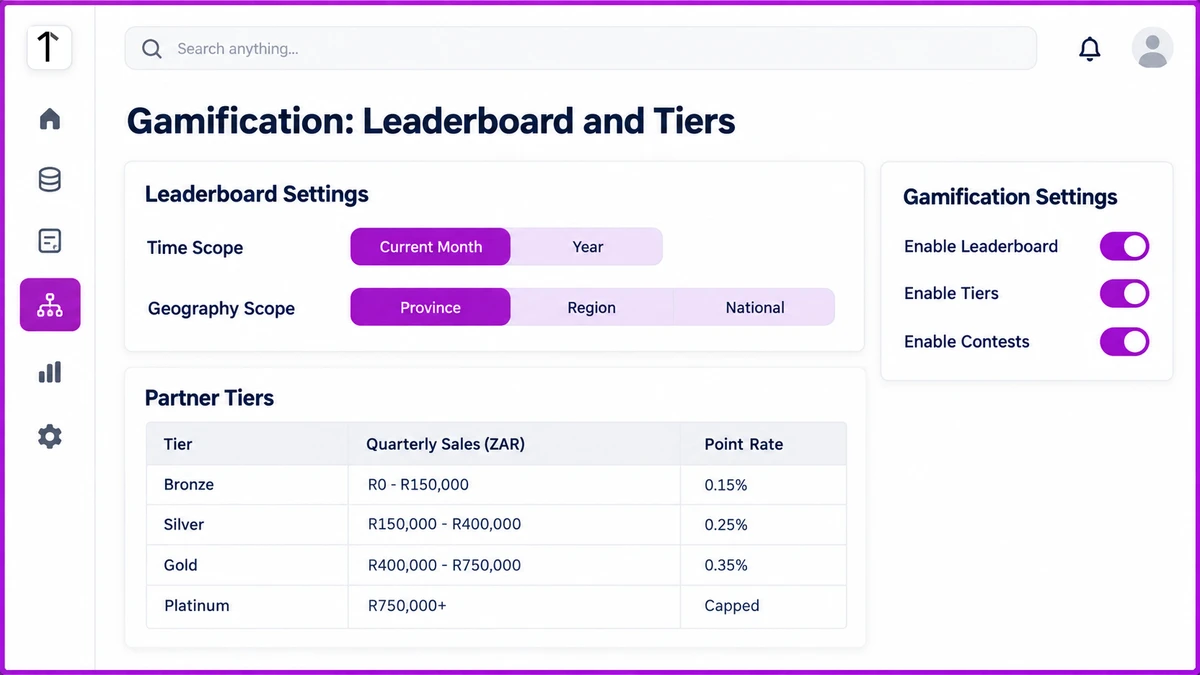
A Time toggle switches the ranking between Current Month and Year, so a partner having a slow month isn't permanently buried under a strong result from three months back.
A second toggle sets the geography scope: Province, Region, or National, matching how the brand's own sales hierarchy is structured rather than forcing every partner into one countrywide list.
A hardware dealer in the Eastern Cape competing against a national list of thousands reads very differently from the same dealer ranked against the dozen other partners in their own province.
Building the Tier Table
Tiers sit on the same configuration screen as the leaderboard, each one defined by a quarterly sales band and a point rate that the program team sets to match its own incentive budget.
| Tier | Quarterly Sales (ZAR) | Point Rate |
|---|---|---|
| Bronze | R0 - R150,000 | 0.15% of sales value → points |
| Silver | R150,000 - R400,000 | 0.25% of sales value → points |
| Gold | R400,000 - R750,000 | 0.35% of sales value → points |
| Platinum | R750,000+ | Highest rate, usually capped (e.g. max 25,000 pts/quarter) |
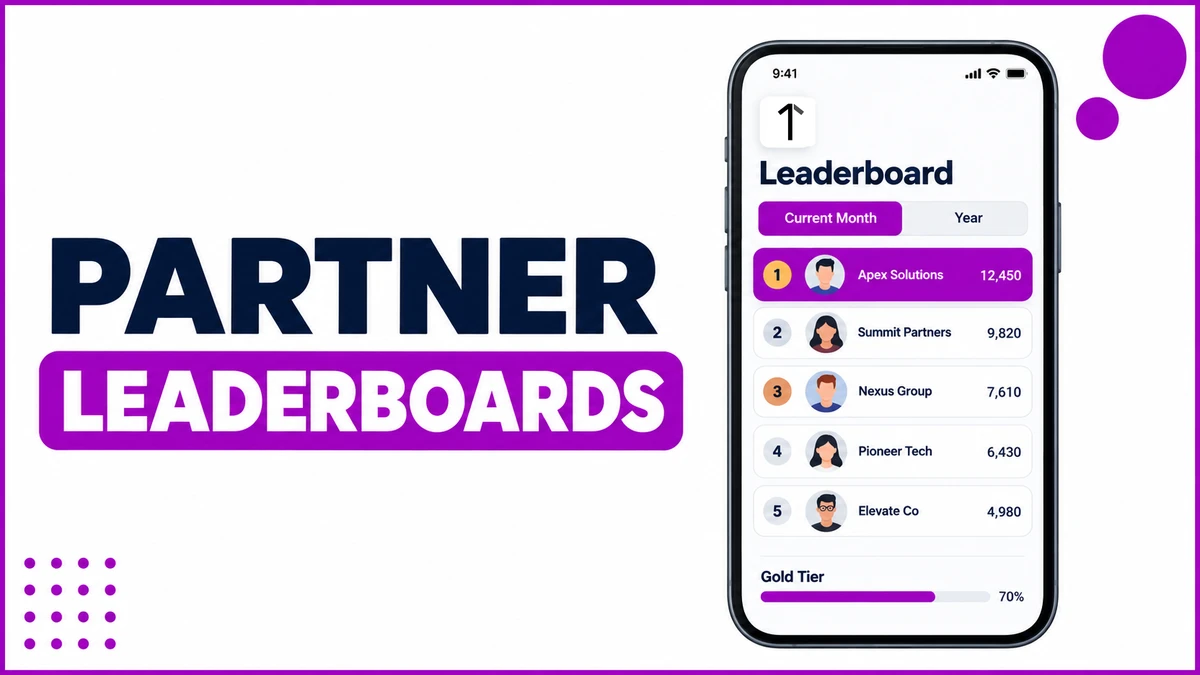
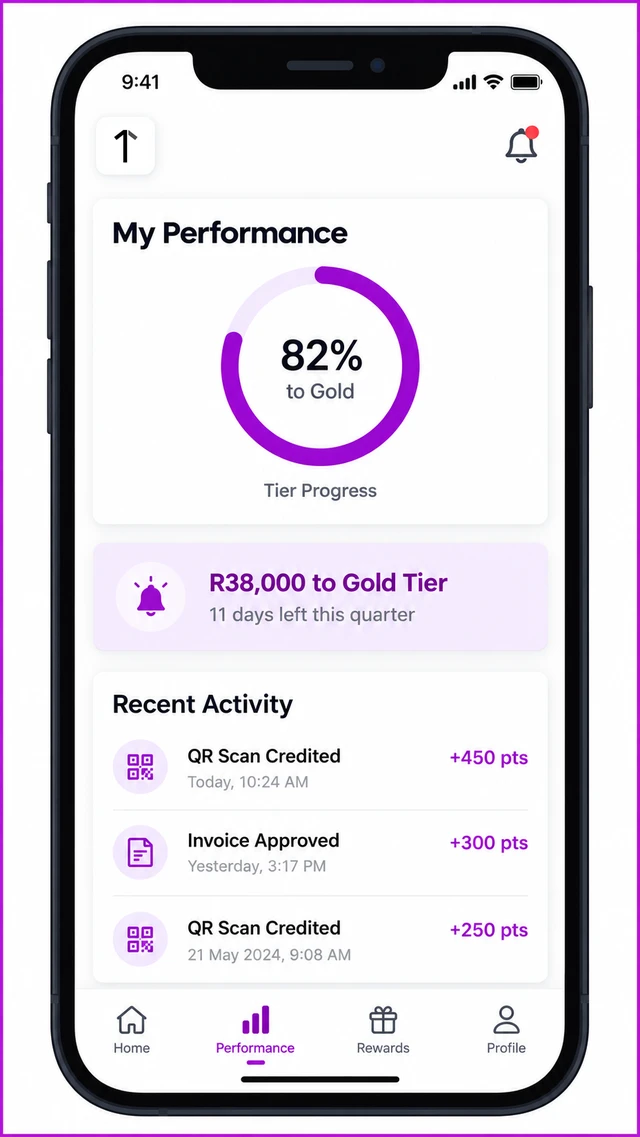
A progress bar on the partner's own dashboard shows exactly how much further their current quarter's sales need to go before the next tier's rate kicks in.
Two Ways Retailers See This in Practice
Monthly rank check. Karoo Building Supplies, a hardware dealer enrolled on a building-materials retailer program, opens the Leaderboard tile each month to see where this quarter's sales rank against other dealers in the Western Cape.
The Current Month toggle shows them sitting fourth out of nineteen province dealers, two places better than the month before, which is the exact comparison a flat points balance could never have shown.
Tier progress nudge. Rosebank Auto Parts sits R38,000 short of the Gold tier threshold with eleven days left in the quarter, and a configured notification flags exactly that gap before the window closes.
Because the nudge names the shortfall and the deadline together, it gives the partner something concrete to act on instead of a generic reminder to keep selling.
Spin-the-Wheel and Contests as an Optional Layer
Beyond the leaderboard and tiers, the platform supports a Spin the Wheel or Scratch Card mechanic for an instant-gratification layer, plus seasonal or quarterly contests built on top of the same points data.
Both are configured per campaign rather than switched on permanently, so a brand can run a short festive-season contest alongside the always-on leaderboard without the two mechanics competing for attention.
How 1Channel Powers Partner Leaderboards
1Channel's Loyalty platform builds the leaderboard, tier table, and contest layer on the same points engine that already tracks every sale, scan, and approved purchase, so none of it runs as a separate system to maintain.
Each toggle, tier band, and nudge template is configured once from the Admin Portal and reflects straight into the partner app the next time someone opens it.
Give Every Partner a Reason to Check Back
See how 1Channel's Loyalty platform configures leaderboards, tier progress, and contest mechanics on top of your existing points engine, with no separate system to run.
Explore Loyalty Program Software →Points to Remember Before Configuring a Leaderboard
- Decide the Time toggle default, Current Month or Year, based on how often the program wants partners checking back.
- Match the Geography scope to the brand's own sales hierarchy, not a flat national list, so smaller dealers see a fair comparison.
- Set tier bands and point rates against the program's real incentive budget before publishing them to partners.
- Keep the Spin the Wheel and contest layer campaign-based rather than always-on, so it stays a novelty.
- Review tier progress nudges each quarter close so the shortfall figure a partner sees is still accurate.
Note: Software screens may vary based on your business structure and configured workflows.