1Channel platform background pattern

Trusted By Leading Organizations

Why Choose Our Workflow Automation Software?

Build no-code workflows with conditions, real-time triggers, multi-level approvals, and automated notifications. Similar to CRM workflow automation, the platform supports Email and WhatsApp triggers, escalation rules, and workflow versioning. By default, there are no approvals until workflows are configured.
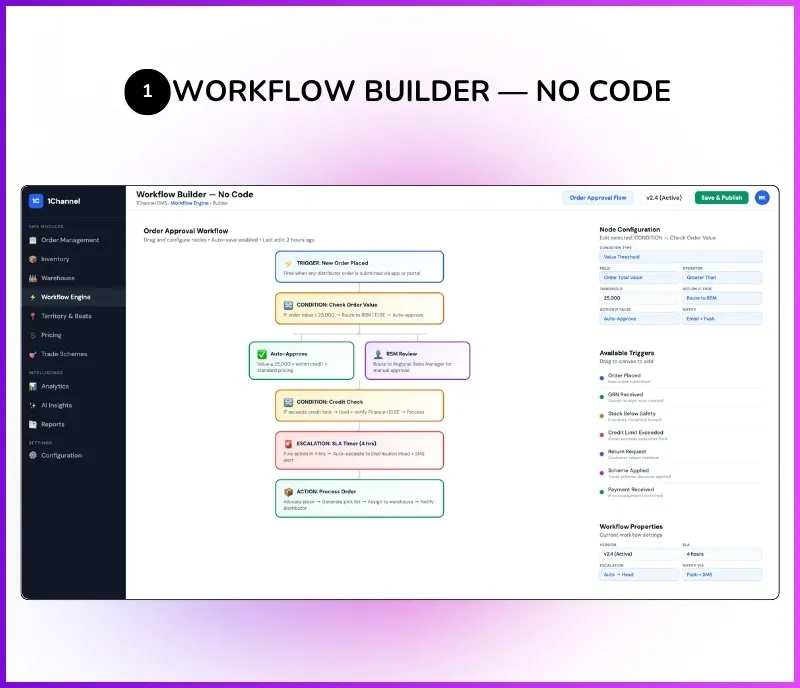
No-Code Workflow Builder – Create workflows with conditions, real-time triggers, loops, and notifications without writing code. Similar to CRM workflows, users can build complex automation rules visually.
Multi-Level Approval System – Configure approval workflows up to 7 levels deep. Approvals can be assigned to specific roles or based on reporting hierarchy, with manager and manager's manager escalation.
Email & WhatsApp Triggers – Send automated notifications via Email and WhatsApp messages when workflows are triggered. For example, when a new customer is created, when data is updated, or when approvals are required.
Role-Based Approval Routing – Assign approvals to specific roles or route them based on organizational hierarchy. Define whether transactions are allowed before approval completion.
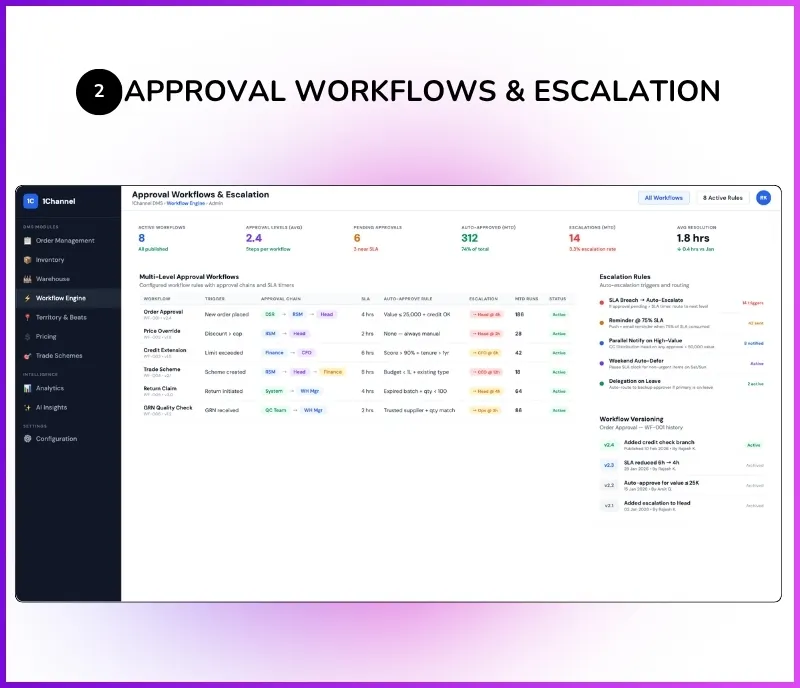
Escalation & Rejection Handling – Configure escalation rules when approvals are pending. Handle rejections with re-submission workflows. Manager approval escalates to manager's manager if not actioned.
Order Approval Workflows – Configure order placement approval before processing. For example, if a retailer's credit limit is ₹1 crore but they place a ₹5 crore order, explicit approval is required.
Workflow Versioning – Modify and publish workflows as new versions without directly impacting live configurations. Draft and publish approach ensures safe changes to production workflows.
Stock Replenishment Approvals – When stock drops below minimum levels, the system can automatically generate a replenishment order. If approval is enabled, it appears under pending approvals until approved.
Credit & Return Approvals – Credit limit exceptions and credit note requests go through configurable approval flows. For example, a ₹50 credit note on a ₹100 return requires higher-level party approval.
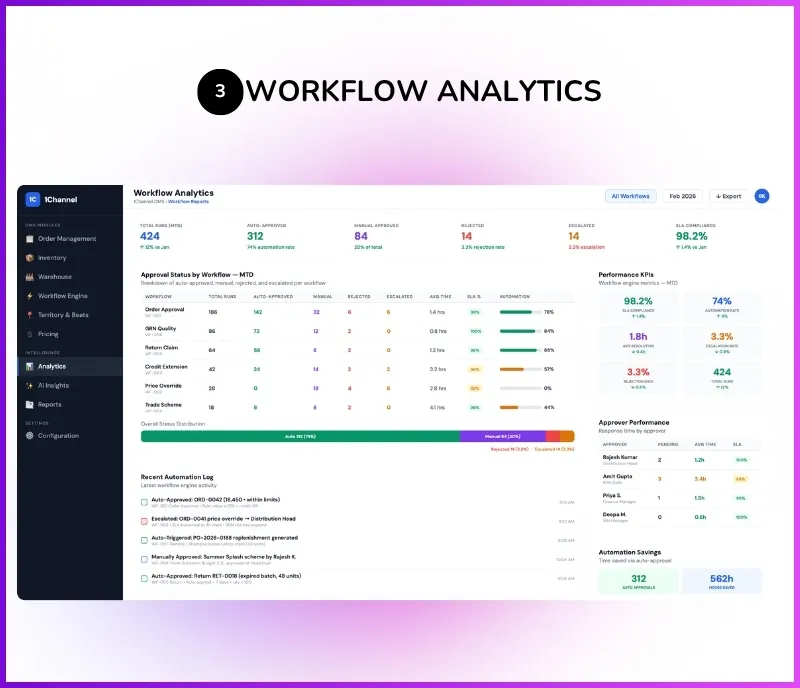
Workflow Analytics – Track approval status, pending workflows, and automation performance through 24+ reports with filters. CSV export with 7-day cached access for team-wide sharing.

Comprehensive Workflow Automation Features

The Admin Portal acts as the centralized control center for building workflows, configuring approval hierarchies, setting up notification triggers, and monitoring automation performance across the distribution and CRM ecosystem. Users can customize dashboard themes, set dark or light mode, and configure the system according to their preferences.

No-Code Workflow Builder

Similar to CRM workflows, users can create workflows with conditions, real-time triggers, loops, notifications, Email triggers, and WhatsApp messages. Workflows can be triggered when a new customer is created, when data is updated, or when approvals are required. By default, there are no approvals in the system until workflows are configured.

Workflow Builder Components

  • Configurable Conditions & Business Rules
  • Real-Time Trigger Configuration
  • Loop-Based Automation Logic
  • Email Notification Triggers
  • WhatsApp Message Automation
  • Customer Creation Trigger (When New Customer is Created)
  • Data Update Trigger (When Data is Updated)
  • Approval Trigger (When Approvals are Required)
  • No-Code Visual Configuration
  • Draft & Publish Workflow Management

Multi-Level Approval Configuration

Approval workflows support multiple approval levels up to 7 levels deep. Approvals can be assigned to specific roles or based on reporting hierarchy. For example, manager approval, then manager's manager approval, with escalation rules and rejection handling. You can also define whether transactions are allowed before approval completion.

  • Up to 7 Levels of Approval Hierarchy
  • Role-Based Approval Assignment
  • Hierarchy-Based Approval Routing (Manager → Manager's Manager)
  • Escalation Rules for Pending Approvals
  • Rejection Handling & Re-Submission Workflows
  • Transaction Control Before Approval Completion
  • Auto Approval for Pre-Defined Conditions
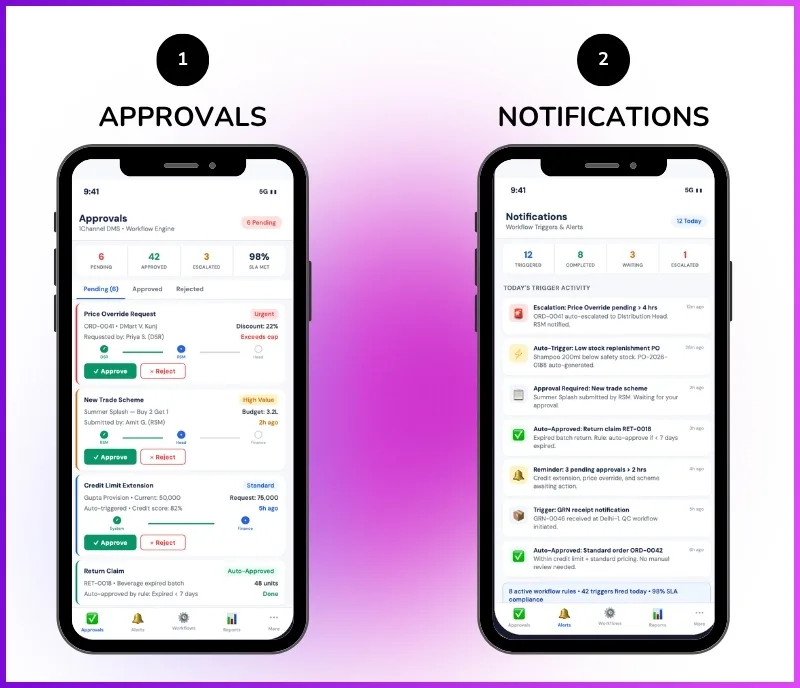
  • Pending Approval Visibility in Dashboard & Mobile App

Workflow Versioning & Publishing

Versioning is available similar to CRM. Workflows can be modified and published as new versions without directly impacting live configurations. This draft and publish approach ensures safe changes to production workflows without disrupting ongoing operations.

  • Draft & Publish Workflow Versioning
  • Modify Workflows Without Impacting Live Configuration
  • Version History & Rollback Support
  • Safe Production Workflow Updates
  • Multiple Active Workflow Versions
  • Workflow Status Management (Active, Draft, Archived)
  • Audit Trail for Workflow Changes
  • CRM-Style Workflow Management

Key Features & Benefits of Workflow Automation

Discover how our approval workflow software helps businesses automate approvals, notifications, and business rules across orders, credit management, stock replenishment, and customer onboarding.

No-Code Workflow Builder

Create workflows with conditions, real-time triggers, loops, and notifications without writing code. Similar to CRM workflows, build complex automation rules visually.

Multi-Level Approvals

Configure approval hierarchies up to 7 levels deep. Assign approvals to specific roles or based on reporting hierarchy with manager and manager's manager escalation.

WhatsApp Automation

Send automated WhatsApp messages when workflows are triggered. Configure notifications for customer creation, data updates, approval requests, and order status changes.

Email Triggers

Automated Email notifications on workflow triggers including approval requests, escalations, credit limit breaches, and replenishment alerts across the distribution network.

Escalation & Rejection

Configure escalation rules when approvals are pending. Handle rejections with re-submission workflows. Manager approval escalates to manager's manager if not actioned.

Workflow Versioning

Modify and publish workflows as new versions without directly impacting live configurations. Draft and publish approach ensures safe production workflow updates.

Order Approval Workflows

Configure order placement approval before processing. For example, if a retailer's credit limit is ₹1 crore but they place a ₹5 crore order, explicit approval is required.

Credit & Return Approvals

Credit limit exceptions and credit note requests go through configurable approval flows. A ₹50 credit note on a ₹100 return requires higher-level party approval.

Replenishment Approvals

When stock drops below minimum levels, the system generates a replenishment order. If approval is enabled, it appears under pending approvals until the next level user approves.

Mobile Approvals

Pending approvals visible in the mobile app. Field teams and managers can approve or reject requests, track approval status, and manage workflows on the go.

24+ Reports & Export

Access approval status reports, workflow analytics, notification logs, and operational dashboards with CSV export and 7-day cached exports for team-wide access.

Fully Configurable

By default, there are no approvals until workflows are configured. Every organization configures approval levels, triggers, notifications, and routing rules according to their business structure.

Who Uses Workflow Automation Software?

Built for businesses needing configurable approval workflows, automated notifications, and business rule automation across distribution, CRM, and field operations in India and globally.

  • FMCG & CPG Companies – Configure multi-level order approvals, credit limit exception workflows, and stock replenishment approvals across India's distribution network. Automate Email and WhatsApp notifications for order status changes
  • Beverage & Alcohol Brands – Set up approval workflows for high-value orders, credit exceptions, and customer onboarding across on-trade and off-trade channels. Workflow versioning for safe configuration updates
  • Consumer Durables – Automate dealer order approvals, credit limit management, and return processing workflows. Configure escalation rules when approvals are pending beyond defined timelines
  • Personal Care & Cosmetics – Build no-code workflows for retailer onboarding, order approvals, and WhatsApp notifications across beauty retail and kirana networks in India
  • Pharmaceuticals – Configure stockist order approval workflows with credit limit validation. Automate GRN discrepancy notifications and return credit note approval flows across pharmacy chains
  • Food & Snacks Brands – Set up automated replenishment approval workflows when stock drops below minimum levels. Configure Email alerts for credit limit breaches (e.g., ₹2,79,765 over limit)
  • Building Materials & Cement – Manage dealer credit exception approvals (e.g., ₹1 crore limit, ₹5 crore order) with multi-level hierarchy-based routing across channel partners in India
  • Electronics & Appliances – Automate distributor order processing workflows with role-based approval routing. Configure WhatsApp and Email triggers for approval requests and escalations

PRICING

Flexible pricing based on your workflow complexity, approval levels, user count, and notification channels. From basic approval workflow software to a complete workflow automation platform with Email, WhatsApp, versioning, and analytics.
Every plan includes Cloud Hosting, Web & Mobile Access, Role Management, Setup & Onboarding, Standard Reports, Technical Support, and Workflow Configuration.

Monthly Plan

Flexible Month-to-Month Billing
Talk to an Expert

Customers Speak

Rewards and Recognition

Our recognitions constantly motivate us to push the envelope of excellence and empower our customers with winning ideas each day.

G2 Badge for High Performer 2025
G2 Badge for Best Support 2025
G2 Badge for Easiest to Use 2025
G2 Badge for Best ROI 2025

Celebrating Growth Milestones on Play Store, App Store, & G2

Google Play Store icon Rating star
4.8
Apple App Store icon Rating star
4.7
G2 review platform logo Rating star
4.9

Frequently Asked Questions (FAQs)

What is workflow automation software?

How many approval levels can be configured?

Does the system support WhatsApp and Email automation?

Is it a no-code workflow builder?

How do order approval workflows work?

Does the system support stock replenishment approval workflows?

How does workflow versioning work?

Can return and credit note processes be automated?

Can approvals be managed from the mobile app?

Is the workflow automation platform cloud-based?

Free Demo
Book Free DemoChat Expert