Every outlet already has a story by the time a rep reaches its door: what it owes, what it last ordered and how the last visit went.
Reading that story takes a minute on the phone. Skipping it means learning it halfway through the conversation with the owner.
Here are six outlet details worth checking before check-in, whether the rep sells FMCG, pharma or paint.
1. What the Outlet Owes
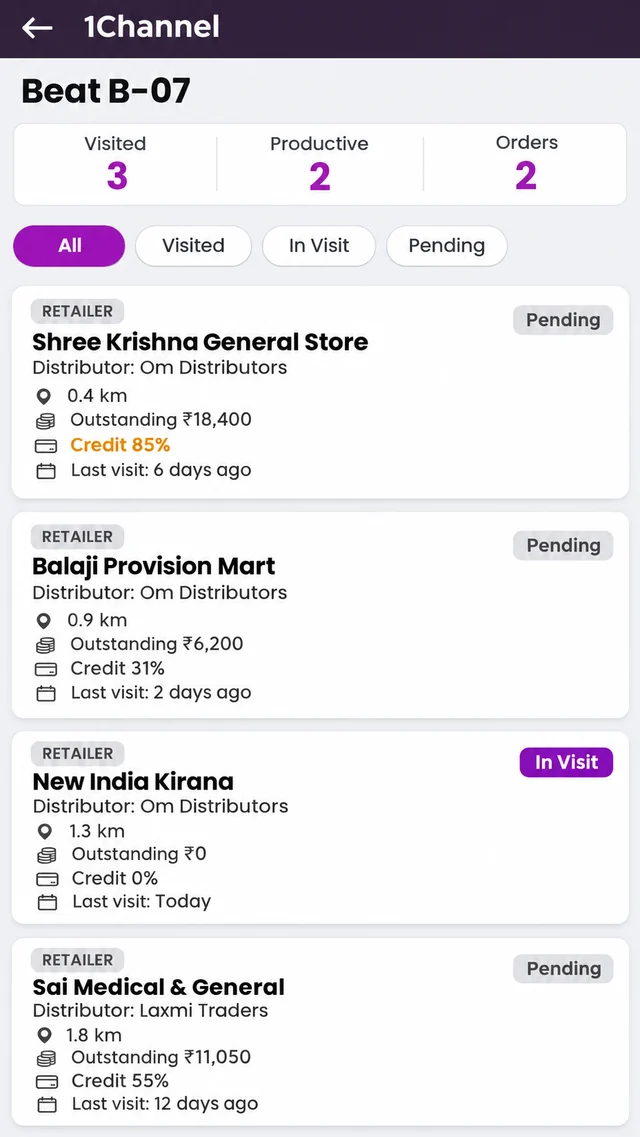
Each outlet card in the beat list shows the outlet's outstanding and how much of its credit is used, as Credit %.
Today's journey also adds up the payment due across every outlet on the route, so the rep can plan collections and orders together.
2. When It Last Ordered
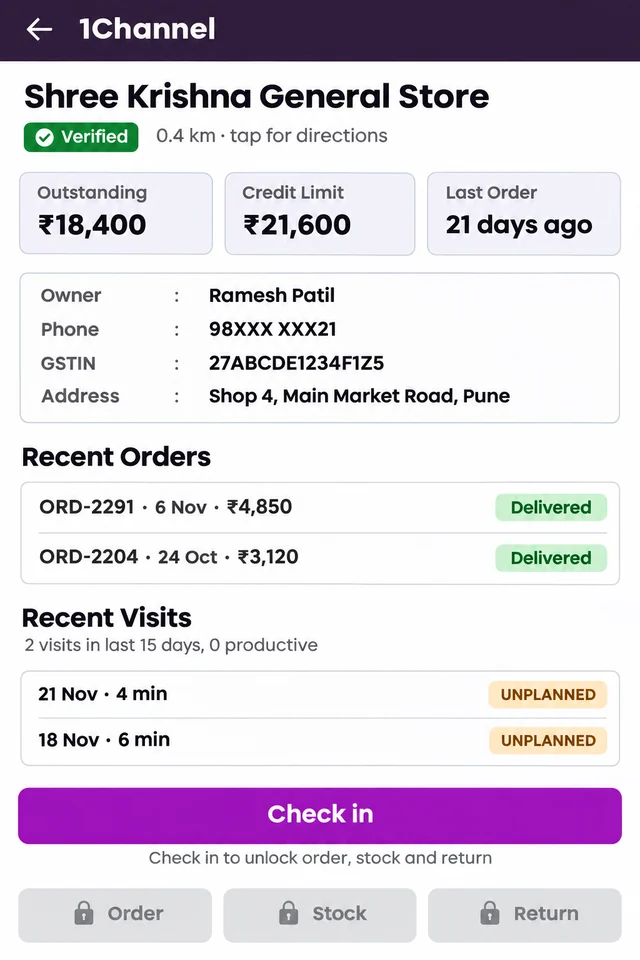
Open the outlet and the Last Order tile shows when it last bought. Recent Orders lists each order with its status, and tapping one opens its summary.
An order still on its way changes what the rep should push today.
3. How the Last Visits Went
Recent Visits gives a line such as "1 visit in last 15 days, 1 productive", with each visit tagged Productive or UNPLANNED and its duration.
Several short visits without an order say more about an outlet than any single order does.
4. What Happened Over the Past Few Weeks
The rep can also see a summary for a period the business chooses: volume, orders, activities and issues raised at the outlet.
That history stays with the outlet, not the rep. When a beat changes hands, the new rep starts from what the previous one did.
5. Who Supplies It
Each outlet card names the distributor mapped to it.
Where the business sets it up, field orders are limited to what that distributor has in stock, so every order booked can actually be supplied.
Know the Outlet Before You Walk In
1Channel's store management software keeps every outlet on one trusted store list, with store creation, GPS geofencing and beat plan compliance for field teams.
Explore 1Channel's Store Management Software →6. What Similar Outlets Are Buying
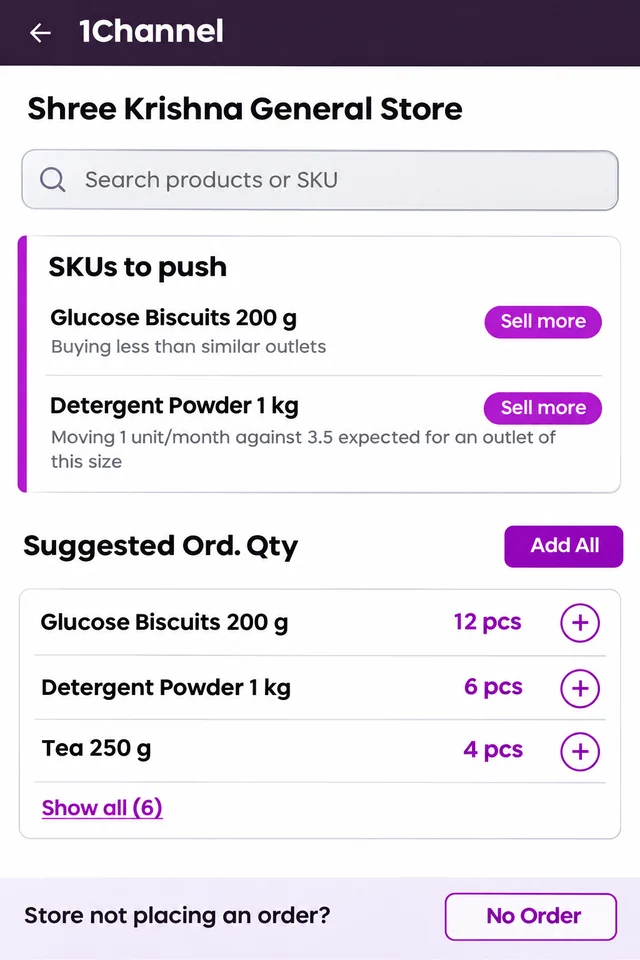
Outlets are compared with nearby peers that order in similar sizes. Products those outlets buy, and this one does not, become suggestions.
On the order screen, a "SKUs to push" card flags each one with its reason, such as "Buying less than similar outlets".
All Six at a Glance
| Detail | Where it shows | Use it to |
|---|---|---|
| What it owes | Outlet card, outlet details | Plan the collection |
| Last order | Outlet details | Check what is on its way |
| Recent visits | Outlet details | Spot unproductive patterns |
| Past few weeks | History summary | Pick up open issues |
| Distributor | Outlet card | Book what can be supplied |
| Similar outlets | Order screen | Choose what to push |
Order, stock and return actions stay locked until check-in, so these six are the preparation, not the visit itself.
Put Every Outlet's Story on the Rep's Phone
1Channel's sales force automation brings beat plans, outlet visits, order capture and AI product suggestions into one field app for Indian sales teams.
Explore 1Channel's Sales Force Automation Software →What This Looks Like in Practice
A rep takes over a beat on a Monday. Before checking in at a general store, the phone shows high dues, a last order three weeks old and two unplanned visits without an order.
The history summary lists an open issue about a damaged-stock return. So the rep raises the return first, collects part of the dues and books two products similar outlets are buying.
Frequently Asked Questions
1. Can a rep place an order before checking in?
No. Order, stock and return actions stay locked until the rep checks in at the outlet.
2. How far back does the outlet history go?
Each business sets the period. The summary covers volume, orders, activities and issues raised over that time.
3. Does a new rep see the previous rep's visits?
Yes. History stays with the outlet, so a rep who takes over a beat sees what the previous rep did there.
Note: Software screens may vary based on your business structure and configured outlet settings.