A new promoter is store-ready when they can greet a shopper, explain the range and run a demo without a senior standing beside them.
That takes more than a product sheet on day one. It takes a path that teaches, checks and then confirms, in that order.
Here are eight learning steps that build that path, whether the promoter sells consumer durables, electronics, cosmetics or FMCG products.

1. Start With a Journey Built for the Role
A learning journey is a set path of content, sessions and tests for one role. A new promoter follows one journey, not a loose list of courses.
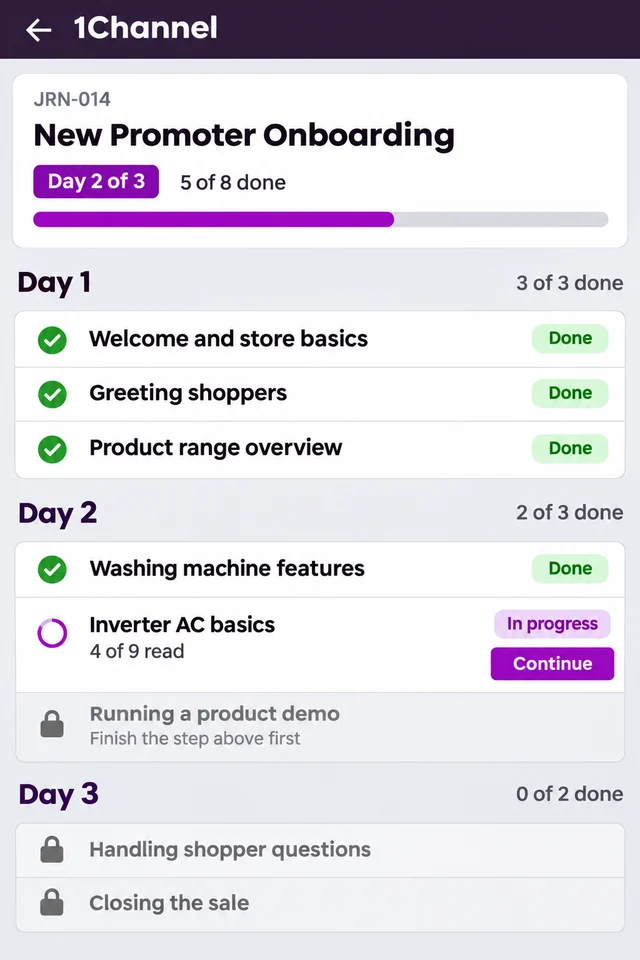
The journey shows which day the promoter is on, such as Day 2 of 3, how many steps are done and a progress bar.
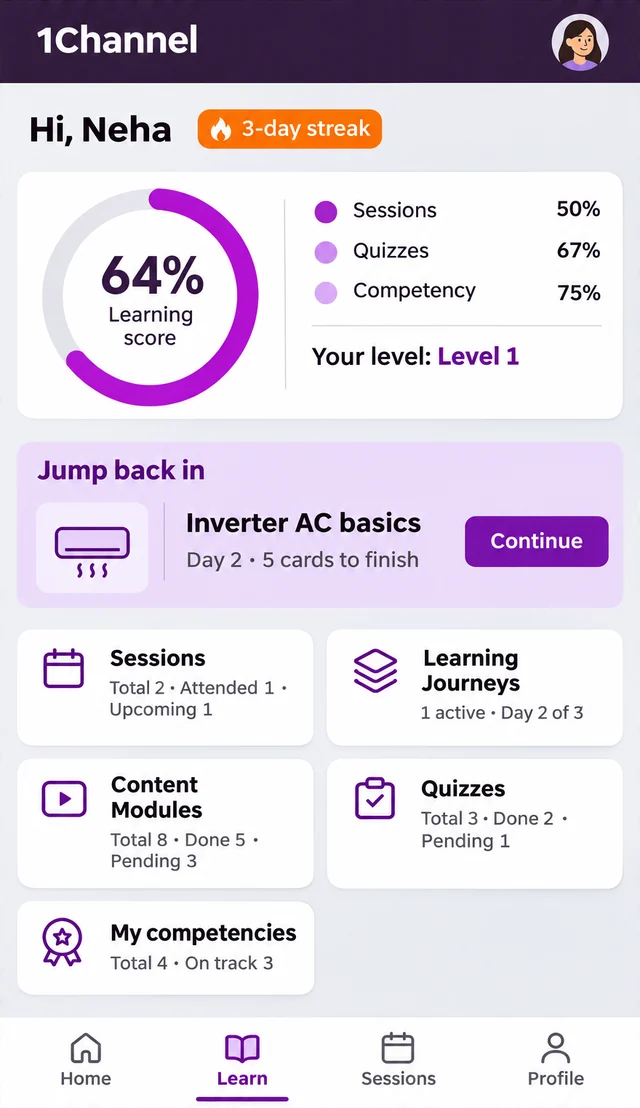
The home screen also has a card that jumps straight back into the last module.
2. Split the Journey Into Days
Group the modules by day. Day 1 might cover store basics and greeting shoppers, while Day 2 moves on to product features.
Each day carries its own done count, so the promoter can see exactly what is left for that day.
3. Keep the Order Locked
Later modules stay locked until the earlier step is finished. Tap one too early and the app says, "Finish the step above first."
That stops a promoter from jumping to the demo module before learning the product it demonstrates.
4. Teach in Short Cards
Each module plays as a set of cards, one at a time, with Back and Next buttons and a progress bar.
Finishing the last card shows Module complete, unlocks the next module and updates the progress on the home screen.
5. Check With a Quiz
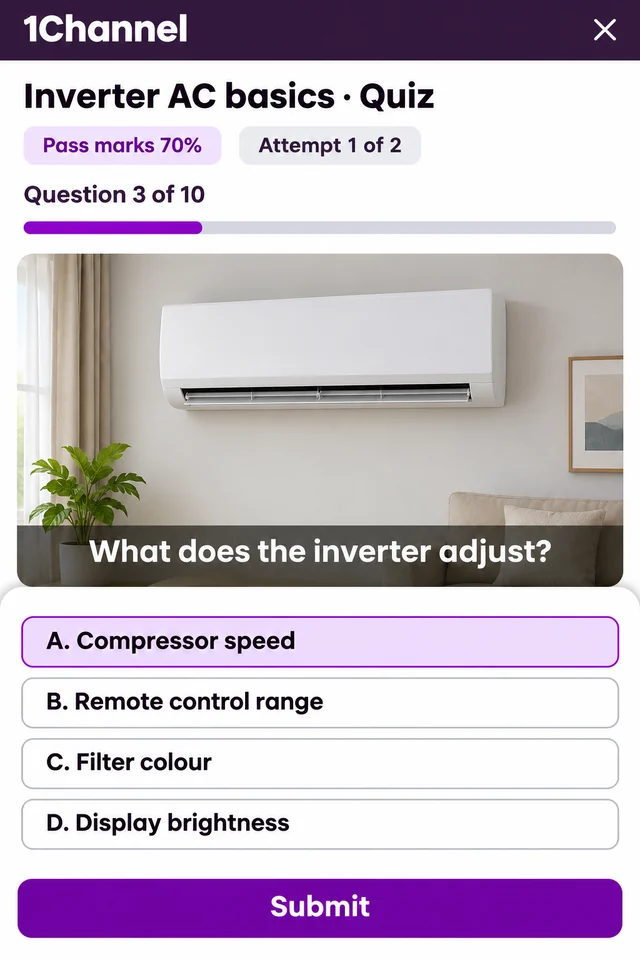
A quiz confirms what the cards taught. Set the pass marks, whether negative marking applies and how many attempts are allowed.
Questions and answer options can be shuffled, and results can show right after submission.
A gamified quiz builds each question on an image, which suits product questions.
Store-Ready Training for Durables and Electronics Teams
1Channel helps consumer durables and electronics brands train promoters and dealer staff on new models and features, with modules, quizzes, sessions and certificates.
Explore Consumer Durables Training Solutions →6. Add a Live Session With a Pre-Test and Post-Test
Some skills are better taught live, in a classroom or online, with the trainer, date and time on the session card.
Each session can carry a pre-test, a post-test and a survey, so there is a score from before the session and after it.
Attendance can be marked with a QR code.
7. Assess on the Store Floor
Knowing an answer and doing it at the counter are different things. So a trainer or manager assesses the promoter in the store.
Each question is rated from 1 to 5, with an optional note on what the assessor observed. Overall remarks are mandatory, so every assessment carries coaching notes.
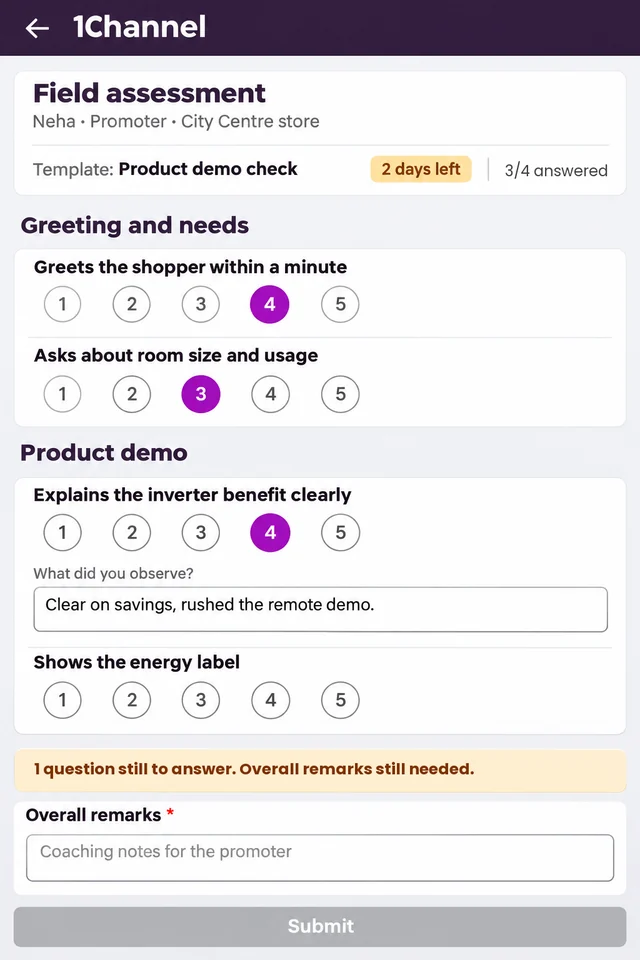
The form shows what is still left to answer, and the promoter later sees the assessment in their own app.
8. Close With a Certificate
Once the learning is complete, the promoter earns a certificate with its own ID, an issue date and a Valid status.
It can be downloaded as a PDF, and branded certificates come with public verification, so anyone can check one is genuine.
One LMS From the First Module to the Certificate
1Channel's LMS for sales teams runs modules, gamified quizzes, classroom, virtual and in-store sessions, and certificates on web and mobile, with analytics for managers.
Explore 1Channel's LMS for Sales Teams →How You Know a Promoter Is Ready
The promoter's learning score combines sessions, quizzes and competencies, next to a day streak and a leaderboard.
On the manager side, readiness reports, competency gaps and field assessments show who is ready and who needs more training first.
Frequently Asked Questions
1. Can a promoter skip ahead in a learning journey?
No. Later modules stay locked until the step before them is finished.
2. Can a quiz limit how many attempts a promoter gets?
Yes. Each quiz has its own pass marks and a maximum number of attempts, and negative marking can be switched on.
3. Who carries out a field assessment?
A trainer or manager, in the store. Each question is rated from 1 to 5, and overall remarks are required before the form is complete.
Note: Software screens may vary based on your business structure and configured learning journeys.