Training sessions are the core of learning for any sales team, and in a Learning Management System (LMS), sessions are basically training classes that help employees gain practical knowledge, attend structured programs, and track attendance easily.
Once a module is created, the next and most important step is to start the Session section of the software.
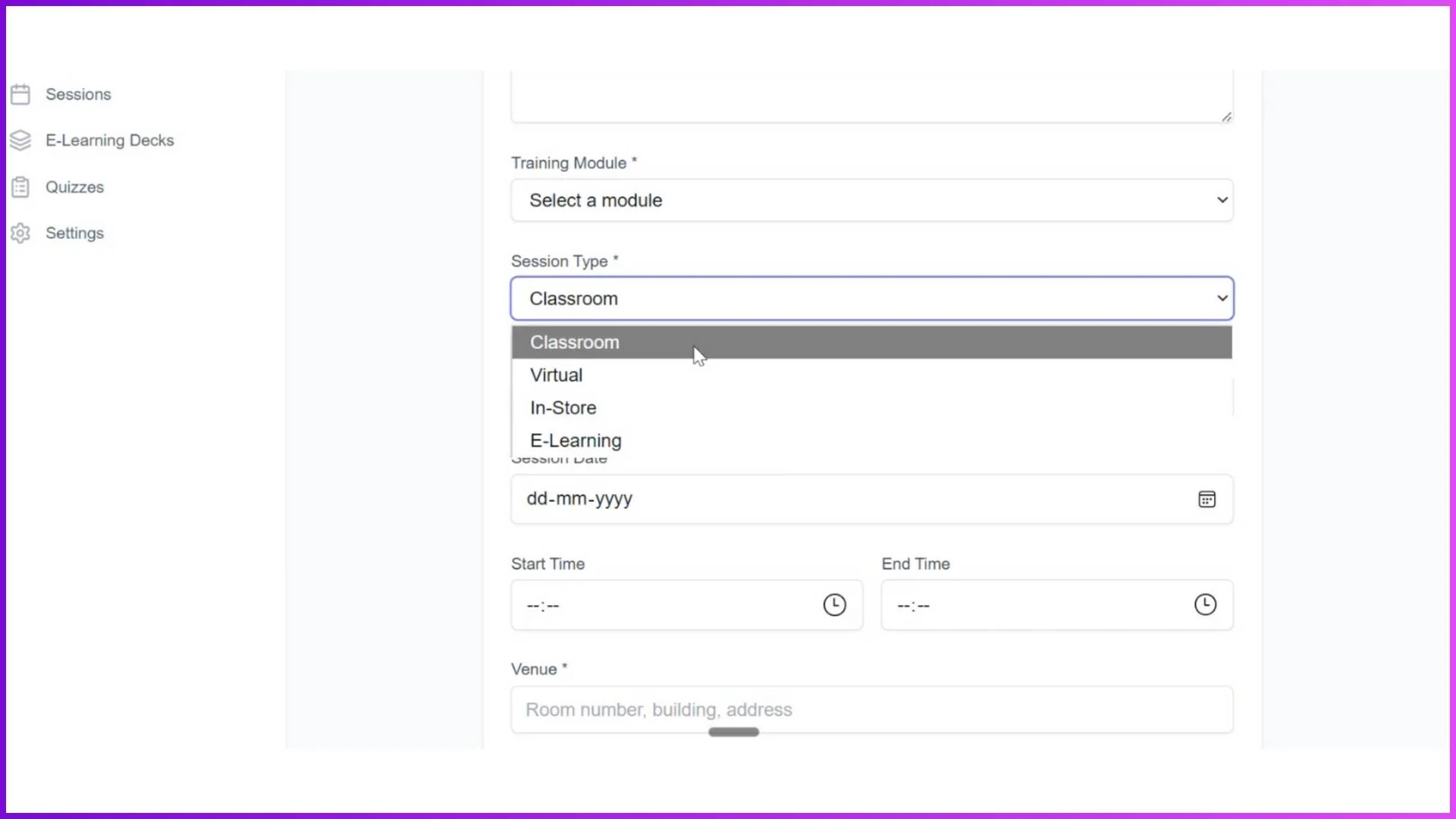
This LMS offers 4 types of training sessions, designed to cover almost all types of sales training requirements.

Why Sessions Matter for Sales Teams
With four different session types, this LMS provides versatility, complete attendance tracking, and smooth training delivery.
All session activities are reflected in the dashboard and analytics, helping admins track active sessions and employee participation.
Combined with notifications, automation, and easy access through mobile apps, training sessions become structured, measurable, and effective for sales teams.
Classroom Sessions for On-Ground Training
Classroom sessions are used when physical training is required at a specific location. For example, if 100 employees are working in a Kolkata location, the admin can create a classroom session with a defined venue, date, and time.
The trainer conducts the session at that place, and employees mark their attendance from the employee app by capturing a photo once they reach the venue.
This session type is ideal for product demonstrations, behavioural skills, and selling skills training.
Virtual Sessions for Online Sales Training
Virtual sessions are very similar to classroom sessions but are conducted online. Admin can use Google Meet, Teams, or Zoom by simply copying the meeting link and pasting it while creating the session in the LMS.
Employees assigned to that level can see the session date and meeting link in their app. Attendance can be marked before joining the session, and clicking the link redirects employees directly to the training meeting.
Virtual sessions help organizations train large sales teams without location limitations.
In-Store Sessions with Trainer-Led Attendance
In-store sessions are used for physical training at store or client locations. In this session type, the trainer logs in through the mobile app and marks attendance.
The trainer visits each store, provides live training, clicks pictures of the trainees, and marks attendance with geo-tagging. This session type is especially useful for field sales teams and retail staff.
E-Learning Sessions for Self-Paced Learning
E-learning sessions are created using the E-Learning Deck. These sessions include multiple deck cards such as PDFs, pictures, and embedded YouTube video links.
Employees can access these sessions from their own app login. Admin can also set criteria, such as reading or opening a PDF for 30 seconds, only then marking attendance as present. This ensures proper learning and tracking.
Frequently Asked Questions (FAQs) - Sessions
1. What are sessions in the LMS?
Sessions are basically training classes created after a module is completed. Sessions help employees attend training, mark attendance, and learn through classroom, virtual, in-store, or e-learning formats.
2. What types of training sessions are available?
The LMS provides 4 types of sessions: Classroom, Virtual, In-Store, and E-Learning. These session types cover almost all training requirements for sales teams, field staff, and trainers.
3. How does attendance work in classroom and virtual sessions?
In classroom sessions, employees mark attendance from their app by capturing a photo at the training venue. In virtual sessions, employees can mark attendance before joining the session and then click the meeting link, which redirects them to Google Meet, Teams, or Zoom.
4. Who marks attendance in in-store sessions?
In in-store sessions, the trainer marks attendance using the trainer login on the mobile app. The trainer visits stores, clicks pictures of trainees, and marks attendance with geo-tagging from their login only.
5. How is attendance tracked in e-learning sessions?
For e-learning sessions, Admin can set criteria such as opening or reading a PDF for 30 seconds. Once the employee completes the defined time, attendance is marked as present; otherwise, it is marked absent.