A competency is something you can watch a person do: greet a shopper, demonstrate a product, handle an objection.
A quiz can show what store staff know. It can't show whether the skill turns up on the shop floor.
For brands with promoters, beauty advisors and demonstrators in stores across India, in cosmetics, consumer durables, FMCG and modern retail, that gap is where training most often misses.

Why Quiz Scores Aren't Enough
Quizzes and certificates measure what someone remembers on the day of the test. They don't record how that person handles a real shopper a month later.
Without a record of skills seen in the store, training gets planned by role or by calendar, not by what each person actually needs.
1. Break Each Competency Into Sub-Skills
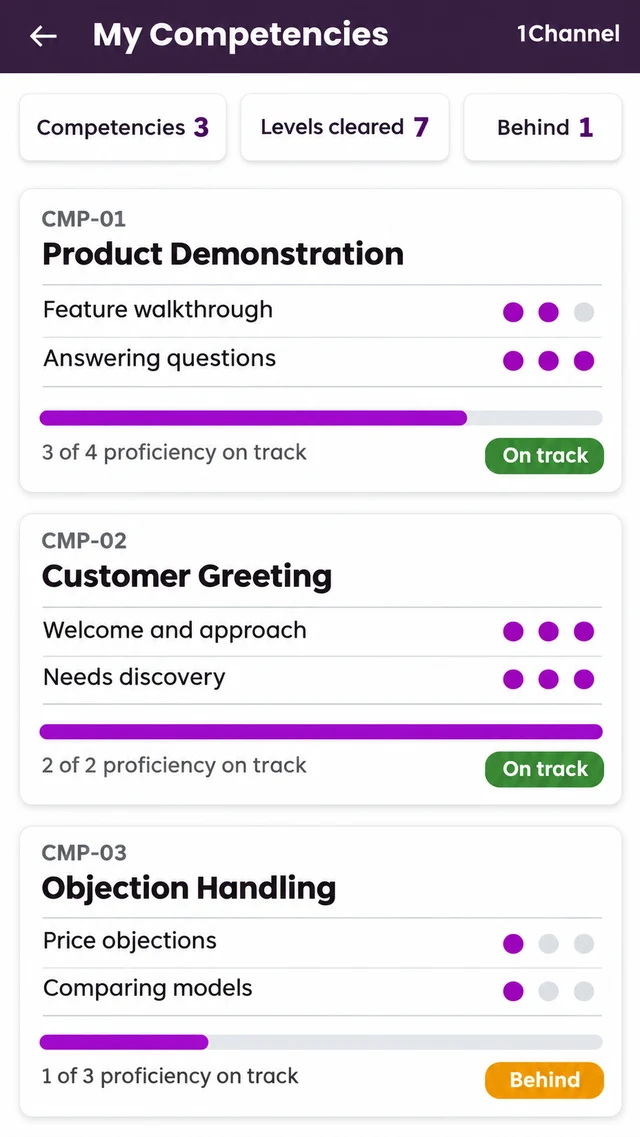
In the LMS app, each learner has a My Competencies screen. Every competency carries a code and a name, and is broken into sub-skills, each with level markers.
A progress bar shows how far the learner has come, with a line on how much of the proficiency is on track and a status chip such as On track.
Summary tiles at the top show how many competencies the learner has, how many levels are cleared and how many are behind.
2. Assess Staff Where They Work
Competencies are checked in the store, not only in a classroom. A trainer or manager opens Field Assessments and sees how many are still to carry out, with search by store, person or assessment.
Each card shows the person, the store, the days left, the assessment template, how many questions are answered and a status: To do, Resume or Submitted.
Each assessment follows a template, so the same skills are checked the same way in every store.
3. Rate What You See, Then Write It Down
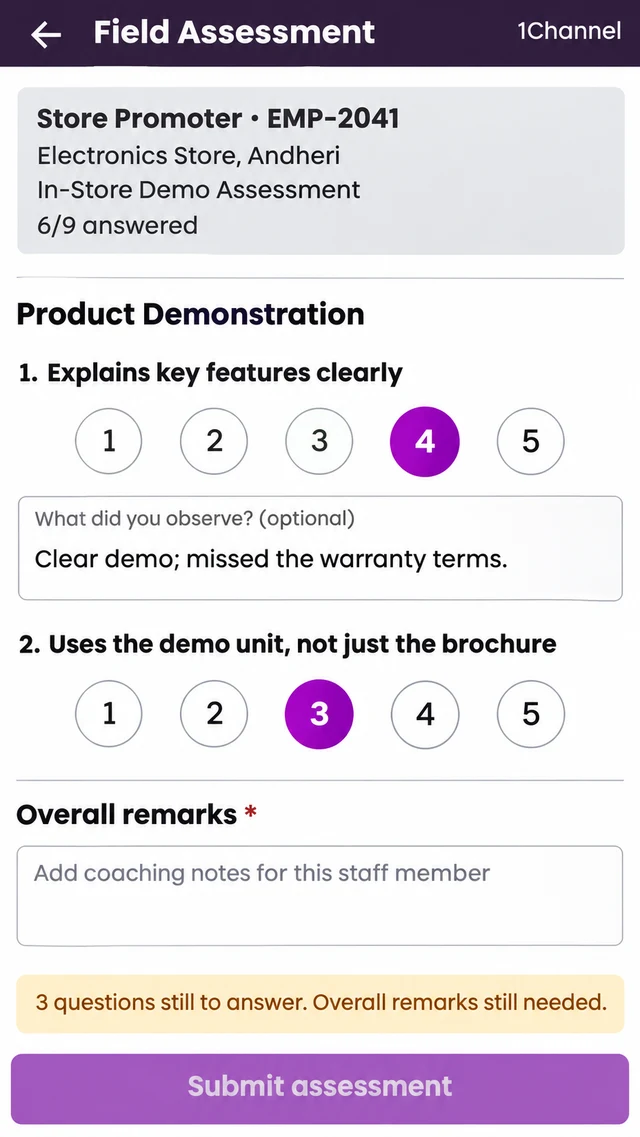
The assessment form groups questions into sections. Each question is rated from 1 to 5, with an optional “What did you observe?” note.
Overall remarks are mandatory, so every assessment ends with coaching notes, not just scores. A live check shows what is left, such as questions still unanswered or remarks still needed.
Know Which Skills Each Store Needs
1Channel's LMS breaks competencies into sub-skills, lets trainers and managers assess store staff on the shop floor, and shows each learner where they stand.
Explore 1Channel's LMS for Sales Teams →4. Let Staff See Their Own Results
Assessments don't stay with the manager. Under My Assessments, the learner sees the in-store assessments carried out about them.
Their overall learning score, shown with their level name, combines sessions attended, quizzes completed and competency progress. Certificates earned and their place on the learning leaderboard sit alongside it.
5. Point Training at the Gaps
Competency gaps and field assessments show who needs which training. Learning journeys then turn that into a plan.
A journey is a multi-day path of modules. Each step unlocks only after the one before it is finished.
Key Takeaways
- Quizzes test knowledge; competencies track skills seen on the job.
- Each competency is broken into sub-skills with level markers and progress.
- Field assessments rate staff from 1 to 5 in the store and always end with coaching remarks.
- Learners see their own assessments and a learning score that includes competency progress.
Frequently Asked Questions
1. What is a competency in an LMS?
A skill a person is expected to show on the job, broken into sub-skills with levels so progress can be tracked step by step.
2. Who carries out field assessments?
A trainer or manager, in the store where the staff member works.
3. Can store staff see their assessment results?
Yes. Assessments a manager carries out in store appear under My Assessments in the learner's app.
4. Are remarks required on every field assessment?
Yes. Overall remarks are mandatory, so each assessment carries coaching notes along with the ratings.
Note: Software screens may vary based on your business structure and configured workflows.