1Channel platform background pattern

Trusted By Leading Organizations

Why Choose Our Pricing Management Software?

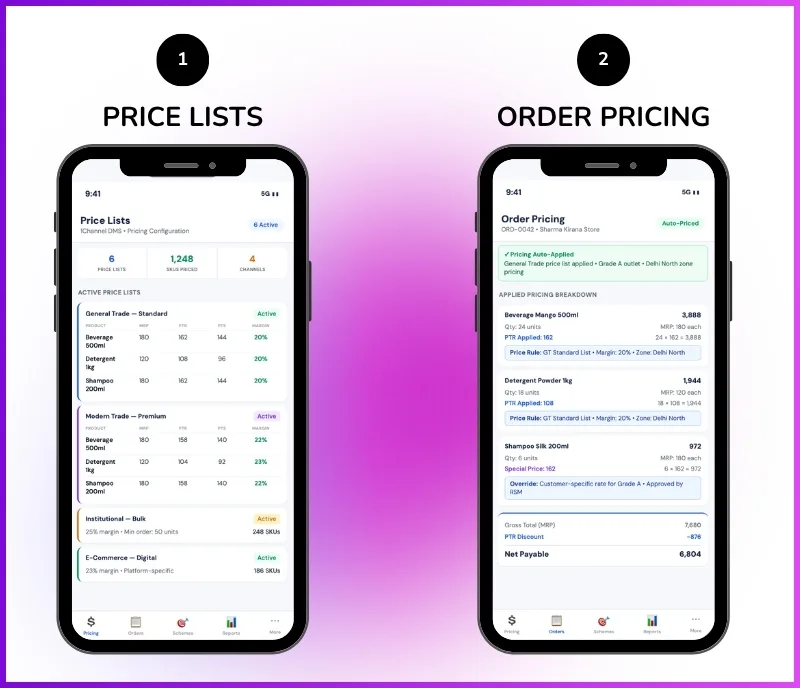
Manage multiple price lists across customers, geographies, and channel types. Configure product-wise pricing with validity dates and automatic application during order placement across your distribution network.
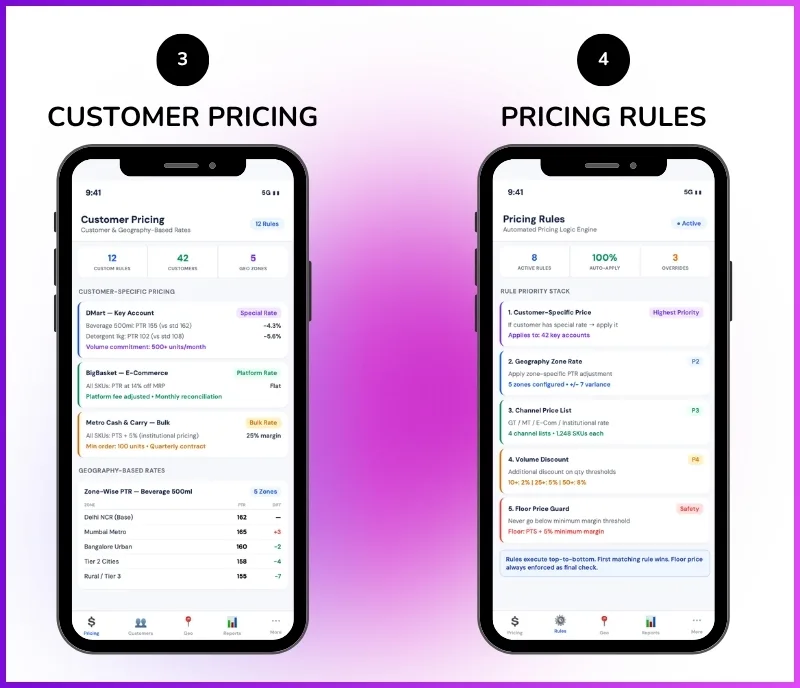
Customer-Specific Pricing – Configure separate price lists for individual customers with special agreement-based pricing. Some customers may have negotiated rates that differ from standard product pricing.
Customer-Type Pricing – Set different rates based on customer type. Super stockists may get one rate while distributors get another, and retailers get a third rate for the same product.
Geography-Based Price Lists – Configure region-specific pricing. For example, a product may sell for ₹100 in North India and ₹150 in South India with separate price lists per geography.
Product-Wise Pricing – Configure pricing at individual SKU level using the Brand → Category → Product → SKU hierarchy. Each product can have different prices across different price lists.
Validity Date Control – Set effective dates and expiry dates for each price list. When a price list expires, the system automatically falls back to default product pricing.
Auto Pricing at Order – When orders are placed, the system automatically checks applicable pricing rules, validates stock availability, and applies the correct price list, eliminating manual pricing errors.
Default Pricing Fallback – If no special price list is available for a customer or geography, the default product pricing is applied automatically during order placement.
Credit Limit Integration – Pricing works with credit limits. If a customer's credit limit is breached, orders can be stopped, allowed once, or blocked until outstanding dues are cleared.
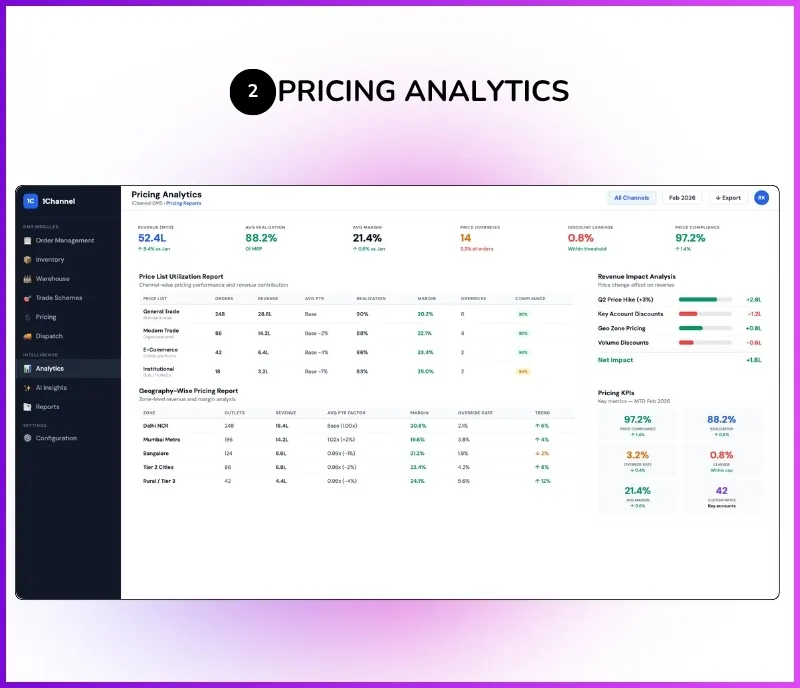
Pricing Analytics – Track pricing impact through 24+ reports with filters by warehouse, brand, status, or custom parameters. CSV export with 7-day cached access for team-wide sharing.
Approval Workflows – Configure up to 7-level approval hierarchies for pricing exceptions with role-based routing, escalation rules, and workflow versioning.

Comprehensive Pricing Management Features

The Admin Portal acts as the centralized control center for creating price lists, configuring pricing rules, managing customer-type and geography-based pricing, and monitoring pricing performance across the distribution network. Users can customize dashboard themes, set dark or light mode, and configure the system according to their preferences.

Pricing Dashboard & Overview

On the dashboard, users can see today's orders, revenue, total order count, active users in the system, and sales overview showing sales trends, total orders, and order status distribution. The pricing section provides visibility into active price lists, pricing rule utilization, and revenue impact across customer segments and geographies.

Pricing Dashboard Metrics

  • Active Price List Count & Status
  • Customer-Specific Price List Utilization
  • Geography-Wise Pricing Distribution
  • Customer-Type Pricing Coverage
  • Price List Revenue Impact
  • Default vs Custom Pricing Usage
  • Validity Status of Active Price Lists
  • Product-Level Pricing Coverage
  • Pending Pricing Approvals
  • Recent Pricing Activity Log

Price List Creation & Configuration

The Price Master is used when different pricing needs to be applied across customer types, geographies, or individual accounts. For example, a product may sell for ₹100 in North India and ₹150 in South India. Super stockists may get one rate while distributors get another. Some customers may have special agreement-based pricing. Separate price lists can be managed for all such cases.

  • Customer-Specific Price List Creation
  • Customer-Type Pricing (Super Stockist vs Distributor vs Retailer)
  • Geography-Specific Price Lists (₹100 North India vs ₹150 South India)
  • Product-Wise Pricing Configuration per Price List
  • Validity Dates & Status Control for Each Price List
  • Default Product Pricing Fallback When No Special List Exists
  • Separate Price Lists for Different Regions or Customer Segments
  • Bulk Price Upload & Management Support

Pricing Approval & Workflow Configuration

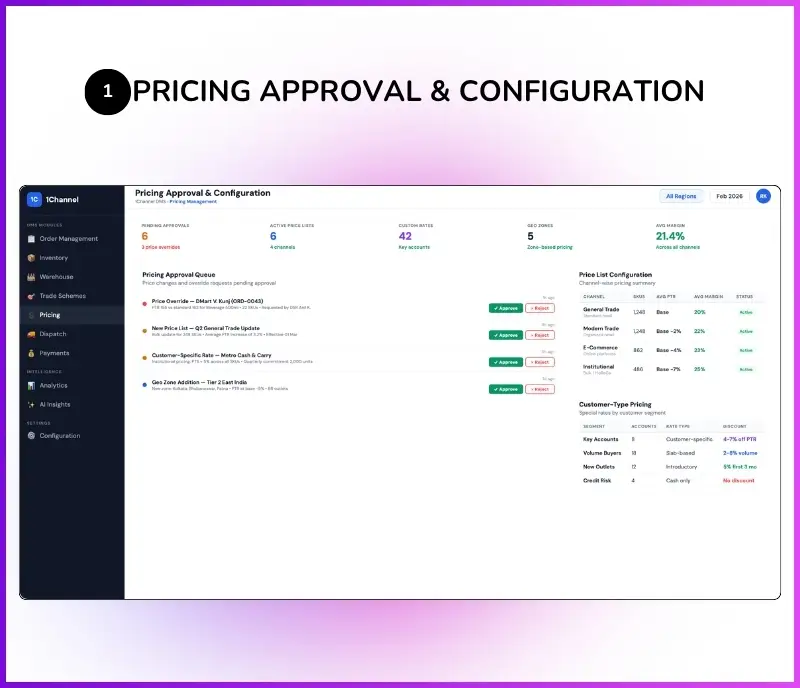
Similar to CRM workflows, users can create pricing approval workflows with conditions, real-time triggers, notifications, Email triggers, and WhatsApp messages. Approval workflows support up to 7 levels deep with role-based or hierarchy-based routing, escalation rules, and rejection handling. By default, there are no approvals until workflows are configured.

  • Multi-Level Pricing Approval Configuration (Up to 7 Levels)
  • Draft & Publish Workflow Versioning
  • Auto Approval or Manual Approval Logic
  • Role-Based & Hierarchy-Based Approval Routing
  • Email & WhatsApp Notification Triggers
  • Credit Limit Exception Approval for Pricing Overrides
  • Configurable Transaction Control Before Approval Completion
  • Workflow Versioning Without Impacting Live Configurations

Key Features & Benefits of Pricing Management Software

Discover how our price list management software helps businesses configure, manage, and apply pricing rules across customers, geographies, and channel types with automatic application during ordering.

Customer-Specific Pricing

Configure separate price lists for individual customers with special agreement-based pricing. Some customers may have negotiated rates that differ from standard product pricing.

Customer-Type Pricing

Set different rates based on customer type. Super stockists get one rate, distributors get another, and retailers get a third rate for the same product across the distribution chain.

Geography-Based Price Lists

Configure region-specific pricing using the configurable geography hierarchy. A product may sell for ₹100 in North India and ₹150 in South India with separate price lists per region.

Product-Wise Pricing

Configure pricing at individual SKU level using the Brand → Category → Product → SKU hierarchy. Each product can have different prices across different price lists.

Validity Date Control

Set effective dates and expiry dates for each price list with status control. When a price list expires, the system automatically falls back to default product pricing.

Auto Pricing at Order

When orders are placed through the portal or mobile app, the system automatically applies the correct price list based on customer, customer type, or geography, eliminating manual pricing errors.

Pricing Approval Workflows

Configure up to 7-level approval hierarchies for pricing exceptions and credit limit overrides with role-based routing, escalation rules, and workflow versioning.

Default Pricing Fallback

If no special price list is available for a customer or geography, the default product pricing is applied automatically during order placement across all channels.

Invoice Price Reflection

Applied pricing rules reflect directly in generated invoices with GST details, company branding, and configurable invoice templates (compact or detailed format).

Cloud & Mobile Access

Field teams and distributors can view customer-specific pricing and place orders with auto-applied price lists from the mobile app. Supports offline mode with auto-sync.

24+ Reports & Export

Access price list utilization reports, geography-wise pricing analytics, and revenue impact dashboards with CSV export and 7-day cached exports for team-wide access.

Fully Configurable Architecture

Customize product hierarchies, geography levels, pricing rules, customer types, approval workflows, and reporting configurations. Every organization configures the system according to their business structure.

Who Uses Pricing Management Software?

Built for businesses managing complex pricing structures across multi-tier distribution networks in India and globally. Whether you need customer-specific pricing, geography-based price lists, or channel-type pricing for distributors and retailers, our price list management software automates the complete pricing lifecycle.

  • FMCG & CPG Companies – Manage geography-specific pricing across India's distribution network. Configure separate price lists for super stockists, distributors, and retailers with automatic pricing application during order placement
  • Beverage & Alcohol Brands – Configure customer-type pricing for on-trade and off-trade channels. Manage region-specific price lists with validity dates and automatic fallback to default pricing when special lists expire
  • Consumer Durables – Set up dealer-specific and distributor-specific pricing with agreement-based rates. Apply product-wise pricing at SKU level across modern and general trade channels
  • Personal Care & Cosmetics – Manage dynamic pricing across beauty retail and kirana networks in India. Field teams view customer-specific pricing and place orders with auto-applied price lists from the mobile app
  • Pharmaceuticals – Configure stockist and distributor pricing with geography-based differentiation (e.g., ₹100 in North India vs ₹150 in South India). Manage validity-based price lists with multi-level approval workflows
  • Food & Snacks Brands – Manage customer-type pricing for super stockists vs distributors vs retailers across distribution territories. Auto-apply correct price lists during field team order placement
  • Building Materials & Cement – Configure dealer-specific and region-based pricing rules with credit limit integration. Track pricing impact on revenue across channel partners in India
  • Electronics & Appliances – Manage distributor pricing with product-wise rate configuration at SKU level. Apply customer-specific and geography-based price lists with approval-based exceptions

PRICING

Flexible pricing based on your price list requirements, user roles, approval workflows, and channel configurations. From basic price list management to a complete pricing management system with analytics and multi-level approvals.
Every plan includes Cloud Hosting, Web & Mobile Access, Role Management, Setup & Onboarding, Standard Reports, Technical Support, and Workflow Configuration.

Monthly Plan

Flexible Month-to-Month Billing
Talk to an Expert

Customers Speak

Rewards and Recognition

Our recognitions constantly motivate us to push the envelope of excellence and empower our customers with winning ideas each day.

G2 Badge for High Performer 2025
G2 Badge for Best Support 2025
G2 Badge for Easiest to Use 2025
G2 Badge for Best ROI 2025

Celebrating Growth Milestones on Play Store, App Store, & G2

Google Play Store icon Rating star
4.8
Apple App Store icon Rating star
4.7
G2 review platform logo Rating star
4.9

Frequently Asked Questions (FAQs)

What is pricing management software?

What types of price lists can be configured?

How does customer-specific pricing work?

Can different customer types have different pricing?

How does geography-based pricing configuration work?

Does the system auto-apply pricing during order placement?

What happens when no special price list exists for a customer?

Can approval workflows be configured for pricing exceptions?

What analytics and reports are available for pricing?

Is the pricing management software cloud-based?

Free Demo
Book Free DemoChat Expert