In distributor-led sales operations, stock visibility is one of the most critical factors for maintaining smooth product movement across territories, outlets, and beats. Stock-in management helps sales teams and distributors track incoming inventory, current stock levels, stock movement, and sales-linked depletion in real time.
When multiple distributors, regions, and retail outlets are involved, manual stock tracking often leads to stock mismatches, delayed replenishment, and missed sales opportunities. This is where a structured Sales Force Automation (SFA) workflow becomes essential.
Stock-in management ensures that every product entering distributor inventory is recorded, monitored, and aligned with secondary sales performance, collections, and beat execution.
Understanding Stock-In Management
Stock-in management refers to the process of recording and managing inventory that enters a distributor's warehouse or operational stock point.
This includes:
- opening stock
- incoming stock quantity
- SKU-level stock updates
- distributor-wise stock value
- closing stock
- low stock alerts
- stock linked to secondary sales
- stock movement across beats and outlets
The SFA document clearly includes Distributor Stock-In, Download Stock-In, and Distributor Stock Upload under distributor management, which directly supports stock-in workflows.
In simple terms, it helps businesses answer:
- How much stock is currently available?
- Which SKUs are running low?
- How much stock came in today?
- How much stock moved out through secondary sales?
- Which beat or distributor needs replenishment?
Why Stock-In Management Matters in Distributor Sales
In distributor sales operations, products move from the company to distributors and then to retailers through field teams and beat plans.
Without stock-in visibility:
- distributors may run out of fast-moving SKUs
- sales reps may visit outlets without available inventory
- beat productivity drops
- collection cycles get impacted
- sales targets become difficult to achieve
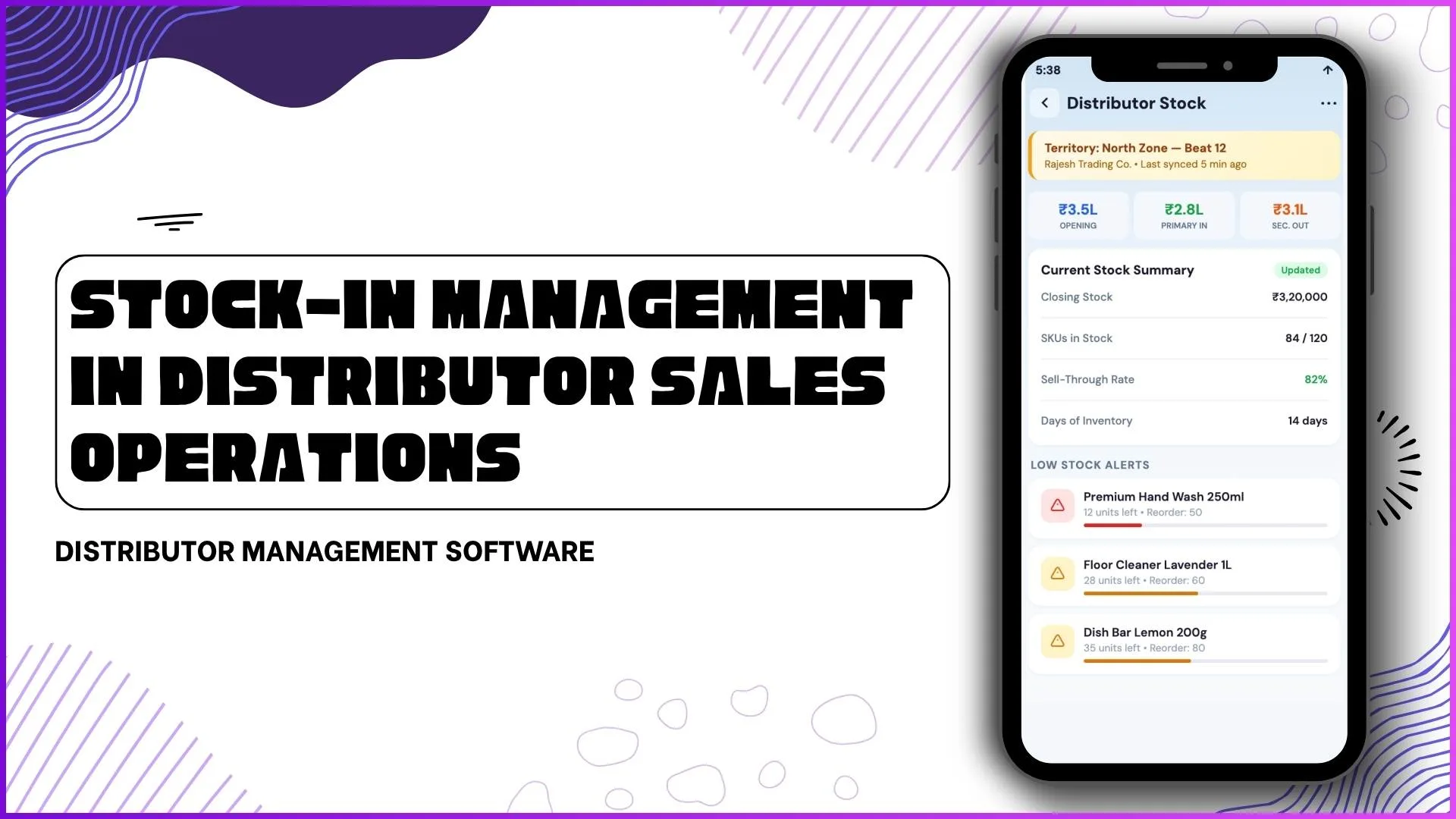
The screenshot workflow strongly supports this with live visibility such as:
- Opening Stock
- Current Stock Summary
- Closing Stock
- SKUs in Stock
- Sell-Through Rate
- Days of Inventory
- Low Stock Alerts
This creates a direct connection between stock and actual field sales execution.
Streamline Distributor Operations
1Channel's Distributor Management Software provides real-time stock visibility, secondary sales tracking, ledger integration, and beat-wise performance monitoring to help businesses improve distributor sales operations.
Explore Distributor Management Software →Key Elements of Stock-In Management in Sales Operations
1. Opening and Closing Stock Tracking
The first step is capturing the distributor's opening stock at the beginning of the cycle and the closing stock after sales movement.
For example, the stock dashboard shows:
- Opening stock value
- Current stock summary
- Closing stock
- stock value in lakhs
- days of inventory
This helps teams understand daily or weekly stock consumption patterns.
A clear stock cycle helps managers measure:
Opening Stock → Stock In → Secondary Sales Out → Closing Stock
2. SKU-Level Inventory Visibility
Stock-in management is incomplete without SKU-level tracking.
The screenshots show alerts like:
- Premium Hand Wash 250ml
- Floor Cleaner 1L
- Dish Bar Lemon 200g
This means the system tracks product-level stock instead of only overall stock value.
The SFA document also supports SKU-based stock reporting and sales reporting.
This helps businesses identify:
- fast-moving SKUs
- slow-moving products
- dead stock
- stock-out risks
3. Secondary Sales Linked Stock Movement
One of the most important parts of distributor stock-in management is connecting inventory with secondary sales.
The software screens clearly combine:
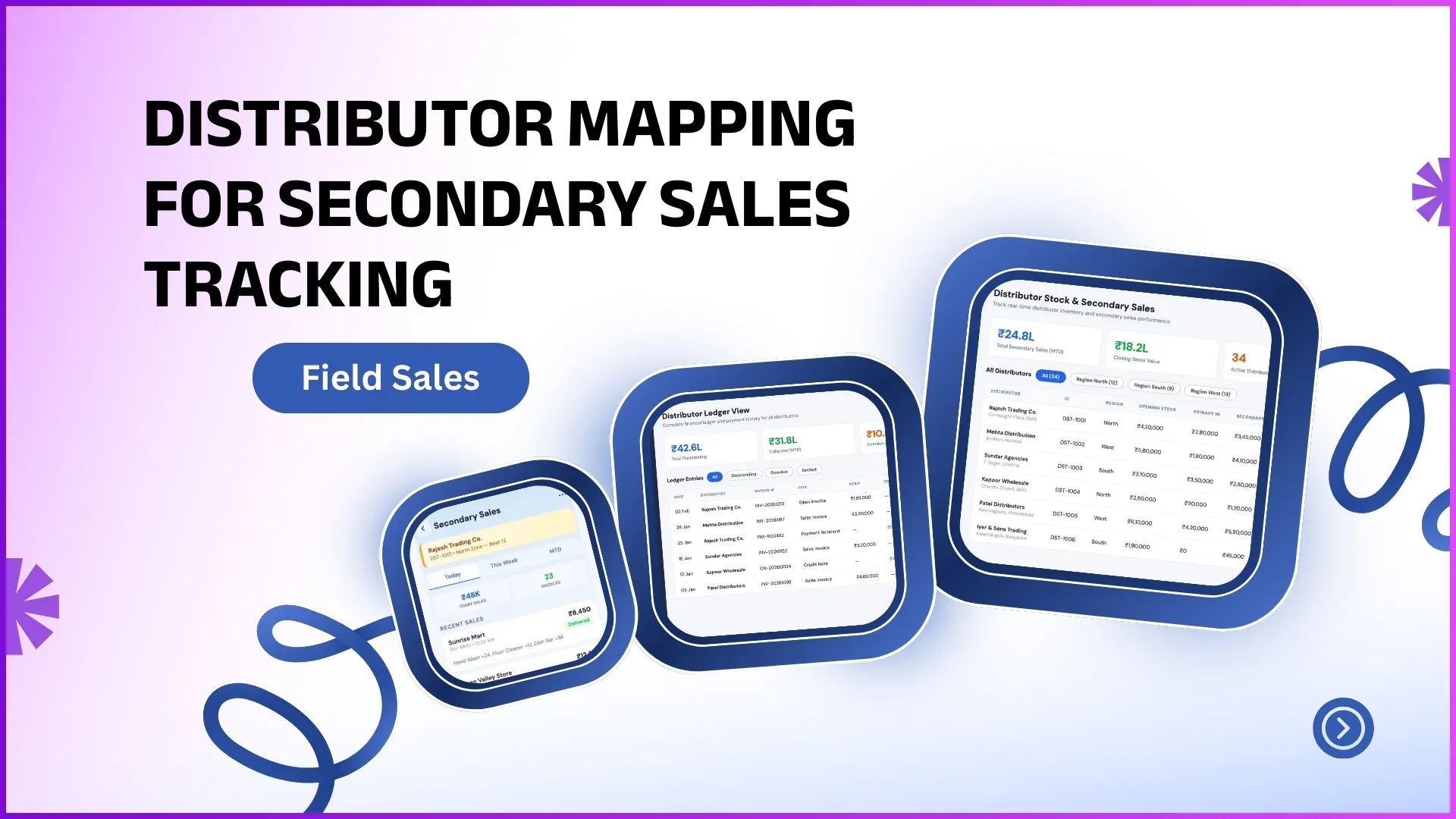
Distributor Stock & Secondary Sales
This means whenever sales happen at retailer level, stock gets adjusted automatically.
For example:
- Hand Wash +24
- Floor Cleaner +12
- Dish Bar +36
These transactions reduce distributor stock in real time.
The SFA content document explicitly includes MTD Secondary Sales reports and Secondary Sales Report.
This helps prevent discrepancies between sales claims and actual inventory.
4. Low Stock Alerts and Replenishment Planning
A major benefit of stock-in management is proactive replenishment.
The dashboard highlights low stock alerts, allowing teams to identify which SKUs require immediate restocking.
Instead of discovering stock-outs during market visits, teams can act early.
This improves:
- outlet fill rates
- beat productivity
- sales continuity
- distributor satisfaction
Low-stock alerts are especially useful for high-frequency FMCG and consumer goods sales operations.
5. Distributor Ledger Integration
A powerful stock-in workflow also connects with the distributor ledger.
The screenshots show:
- outstanding balance
- payments
- invoices
- running balance
- credit limits
This means stock movement can be linked with financial exposure.
For example:
high stock but low collections may indicate slow market movement.
The document clearly supports this through ledger and financial reporting workflows.
This gives sales managers both inventory and payment visibility from one system.
6. Collection Tracking with Stock Health
The collection tracker screen adds another layer of operational control.
It shows:
- receivables
- collected amount
- ageing buckets
- overdue invoices
- pending collections
This helps teams correlate stock movement with recovery cycles.
For example:
if stock is moving but collections are delayed, the system can flag risk.
This improves distributor credit control and working capital efficiency.
7. Beat-Wise Stock Performance
The beat performance screens make stock-in management more action-driven.
Sales managers can see:
- beat achievement %
- outlet coverage
- productive calls
- sales target vs achieved
- stock movement by territory
This helps answer:
Which beat is consuming more stock?
Which beat needs push inventory?
Which distributor is underperforming?
The SFA document's beat planning and beat compliance sections align directly with this flow.
How Stock-In Management Improves Distributor Sales Operations
A structured stock-in system helps improve:
Better Sales Planning
Sales teams can align field visits with stock availability.
Faster Replenishment
Low stock alerts reduce lost sales.
Improved Forecasting
Opening and closing stock trends improve demand planning.
Better Distributor Relationships
Clear stock visibility reduces disputes.
Higher Beat Productivity
Reps can focus on selling instead of manual stock verification.
How 1Channel SFA Helps Streamline Stock-In Management
1Channel SFA helps businesses manage distributor sales operations with real-time stock visibility, secondary sales tracking, ledger monitoring, collection workflows, and beat-wise performance insights.
The platform supports distributor stock-in workflows through:
- distributor stock upload
- stock-in downloads
- SKU-level stock visibility
- secondary sales integration
- collection tracking
- distributor mapping
- beat performance monitoring
This helps businesses maintain tighter control over stock movement and improve distributor sales execution across territories.
Improve Distributor Sales Execution
1Channel Sales Force Automation provides complete distributor stock management with real-time inventory tracking, secondary sales integration, collection monitoring, and beat-wise analytics to optimize field operations.
Explore Sales Force Automation →FAQs
What is stock-in management in distributor sales?
It is the process of recording and monitoring incoming distributor inventory along with stock movement and sales-linked depletion.
Why is stock-in management important?
It prevents stock-outs, improves replenishment, and ensures better secondary sales visibility.
Does stock-in management support SKU-level tracking?
Yes, it tracks stock by SKU, helping identify fast and slow-moving products.
How does stock-in connect with secondary sales?
Every sales transaction reduces distributor stock automatically for accurate inventory tracking.
Can stock-in management help improve collections?
Yes, when integrated with ledger and collection tracking, it helps connect stock movement with receivables.