1Channel platform background pattern

Trusted By Leading Organizations

Why Choose 1Channel Expense Management Software in India?

Complete expense management solution combining expense heads, claim policies, mobile submission, receipt uploads, approval workflows, and automated reimbursement in one system.
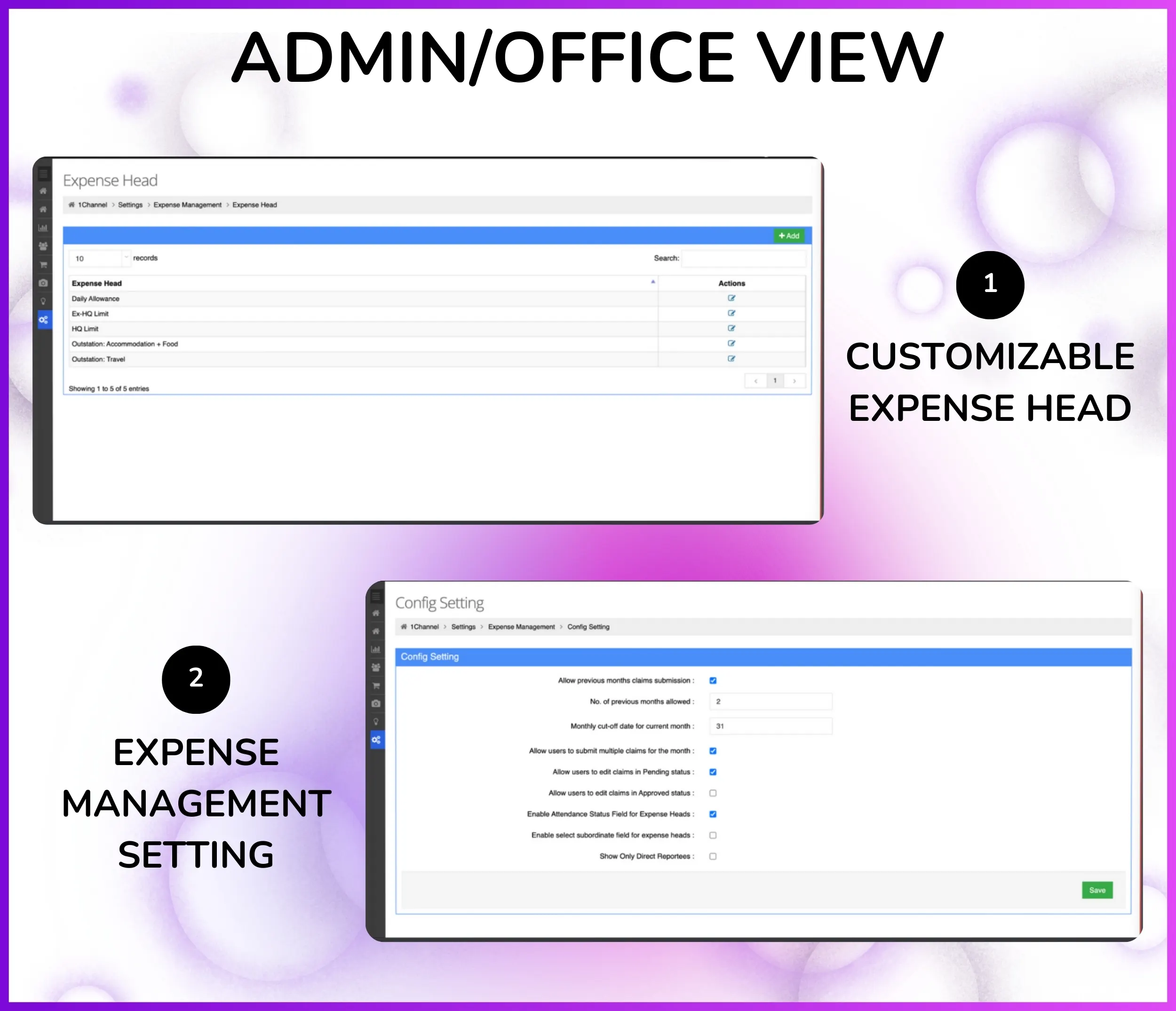
Define Expense Heads – Create custom expense categories (Travel, Fuel, Meals, Accommodation, Communication, etc.) from Settings → Expense Management → Expense Head.
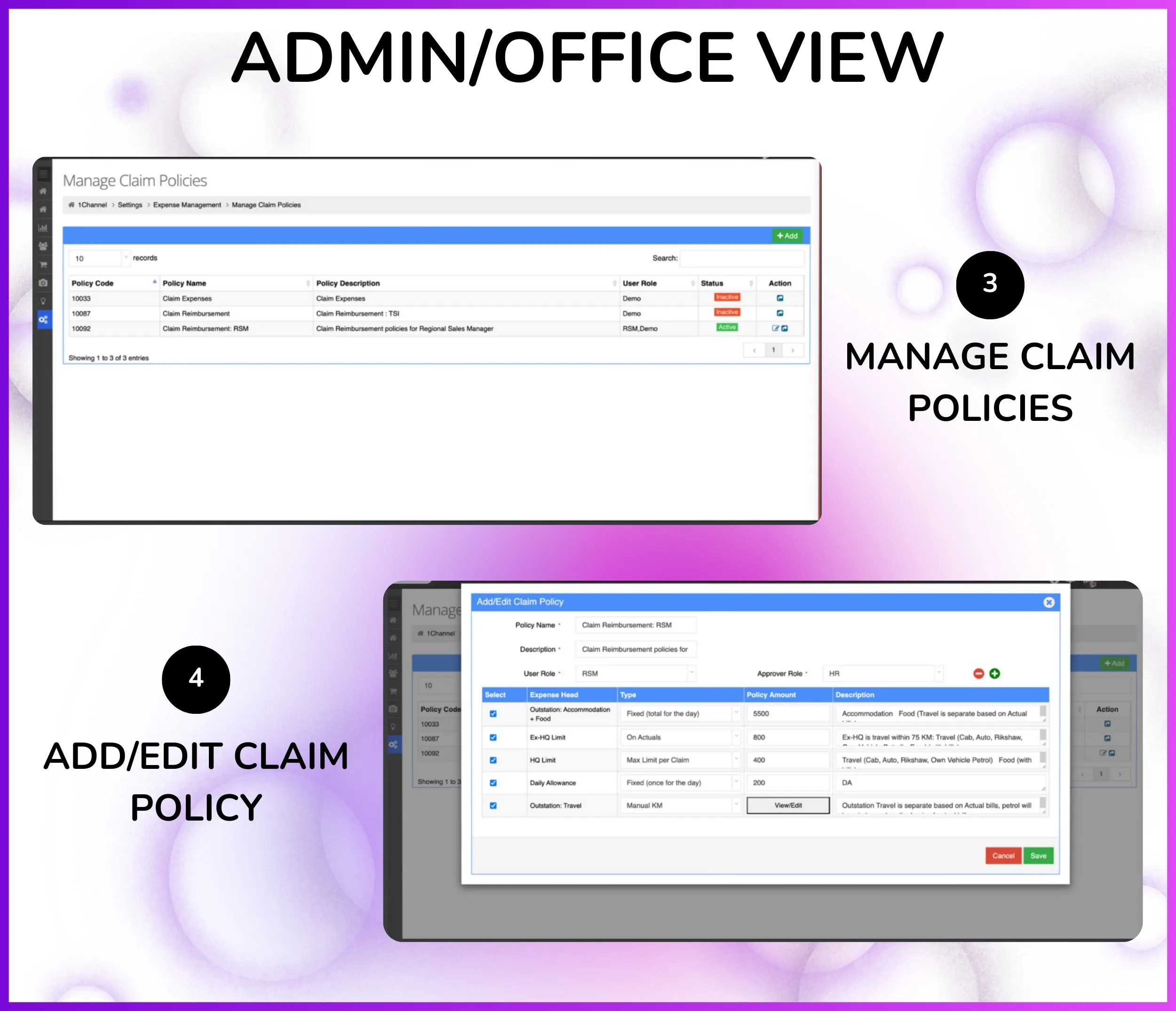
Configure Claim Policies – Set expense limits, approval requirements, and reimbursement rules per expense head from Manage Claim Policies based on company policy.
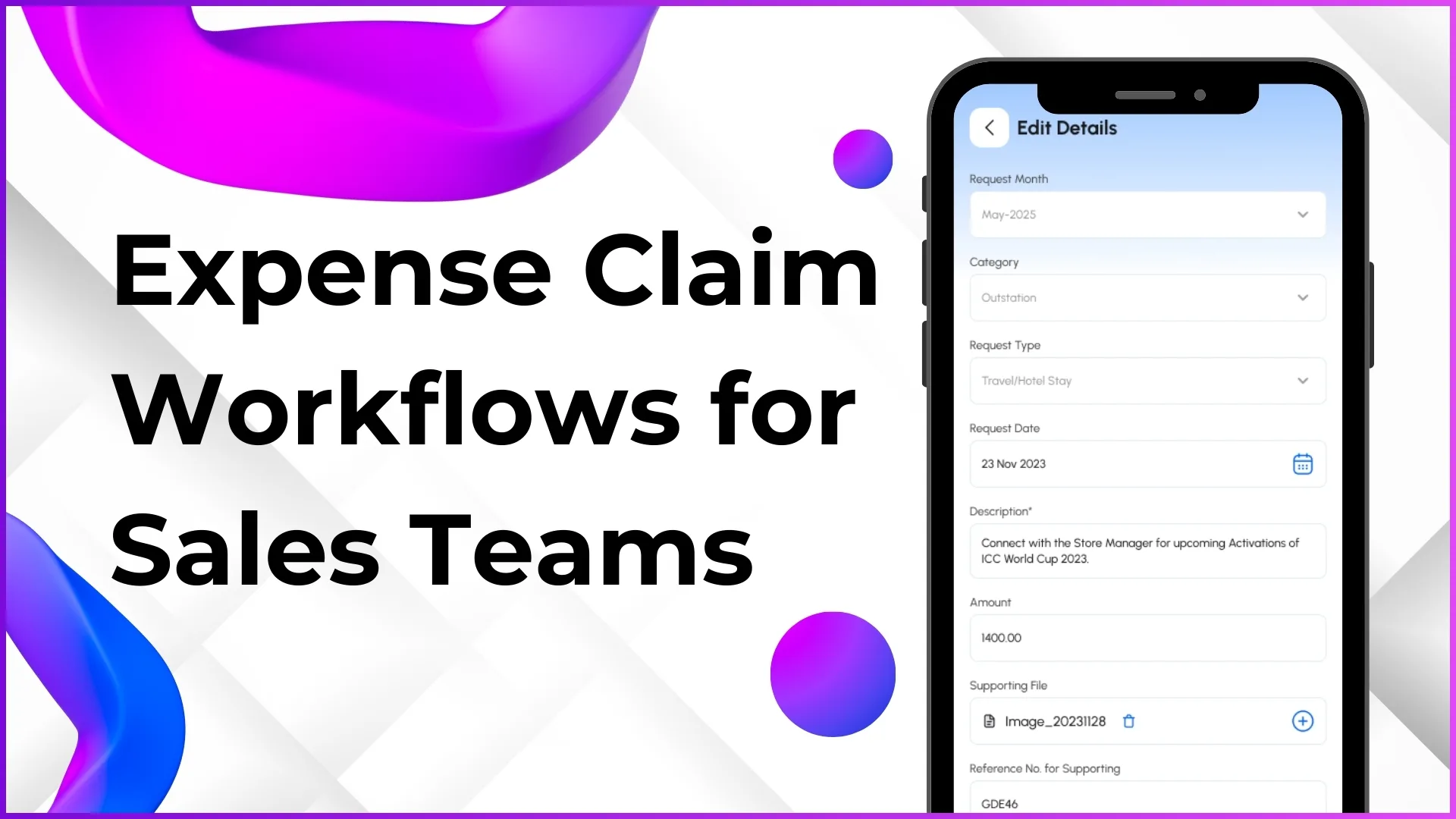
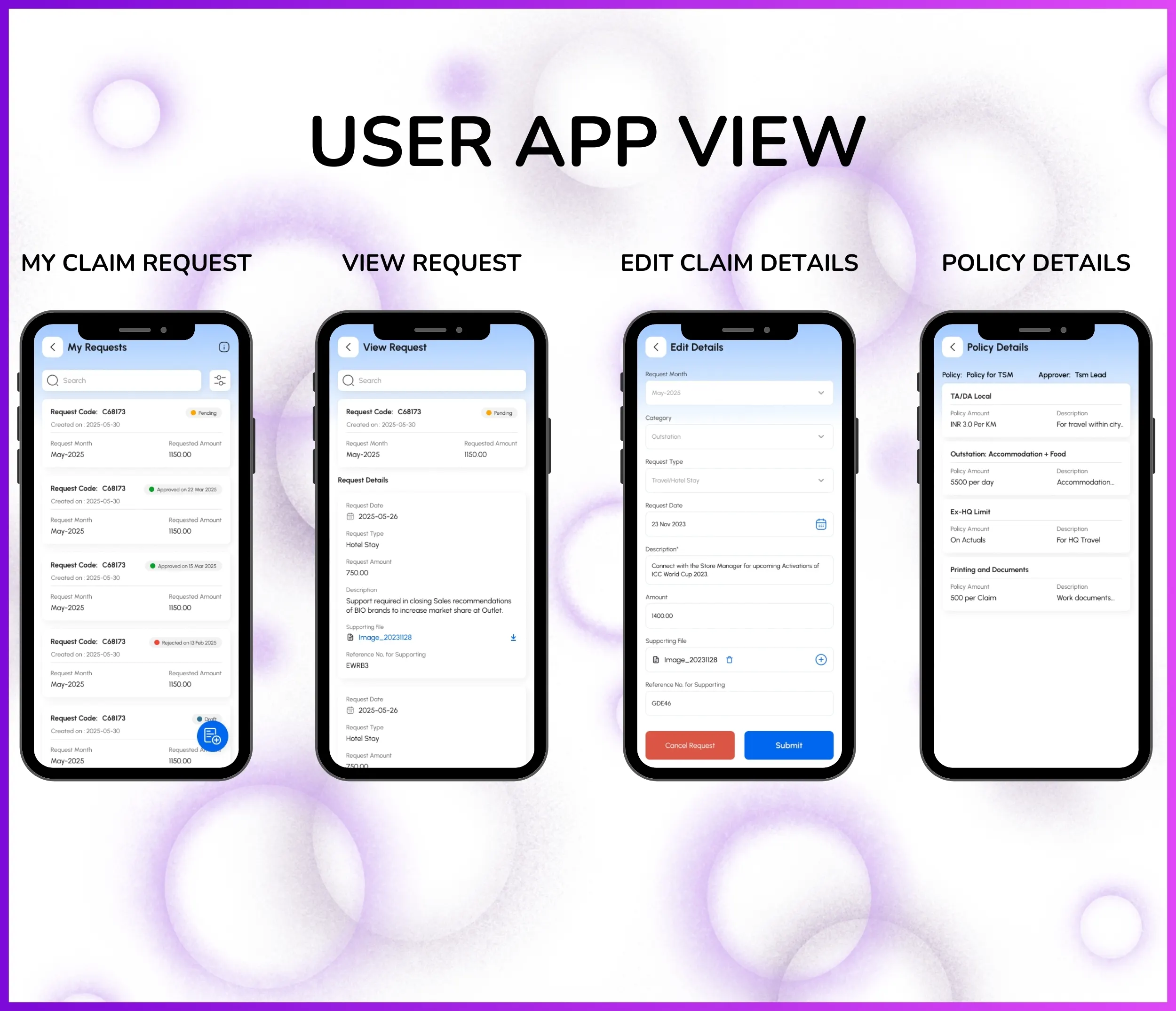
Mobile Claim Submission – Employees submit expense claims from mobile app with Request Code, Request Month, Date, expense head, requested amount, and description.
Receipt & Document Upload – Attach bills, invoices, and receipts to claims using Document Management system for verification and audit trail.
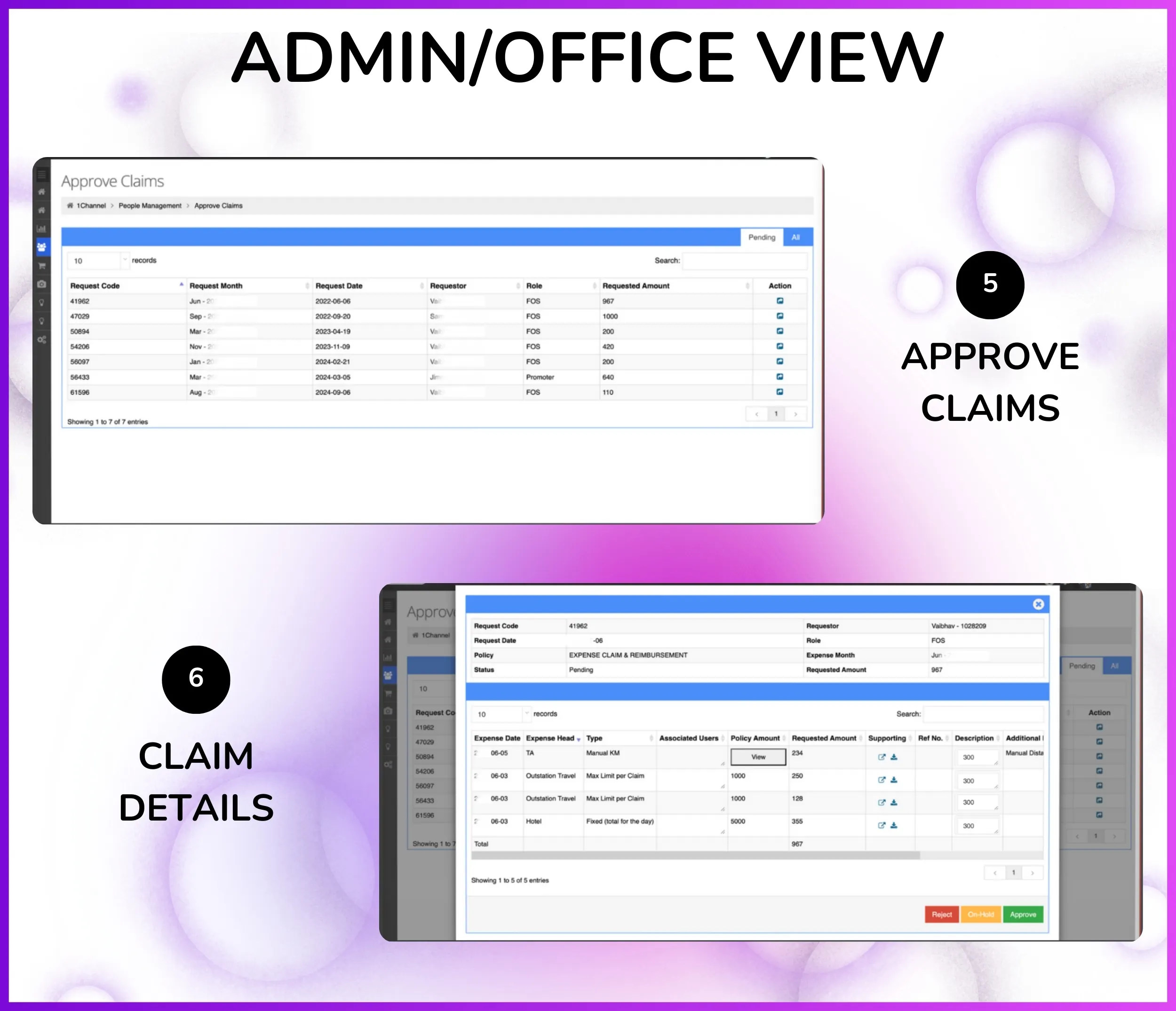
Hierarchical Approval Workflow – Claims automatically route to reporting head based on Organization Tree hierarchy for approval with multi-level approval support.
Automated Reimbursement – Once approver approves from portal, reimbursement amount processed automatically—no manual intervention or follow-ups needed.
Expense Reports & Analytics – Download detailed expense reports from Report Catalog showing expense breakdown by head, employee, department, and time period.
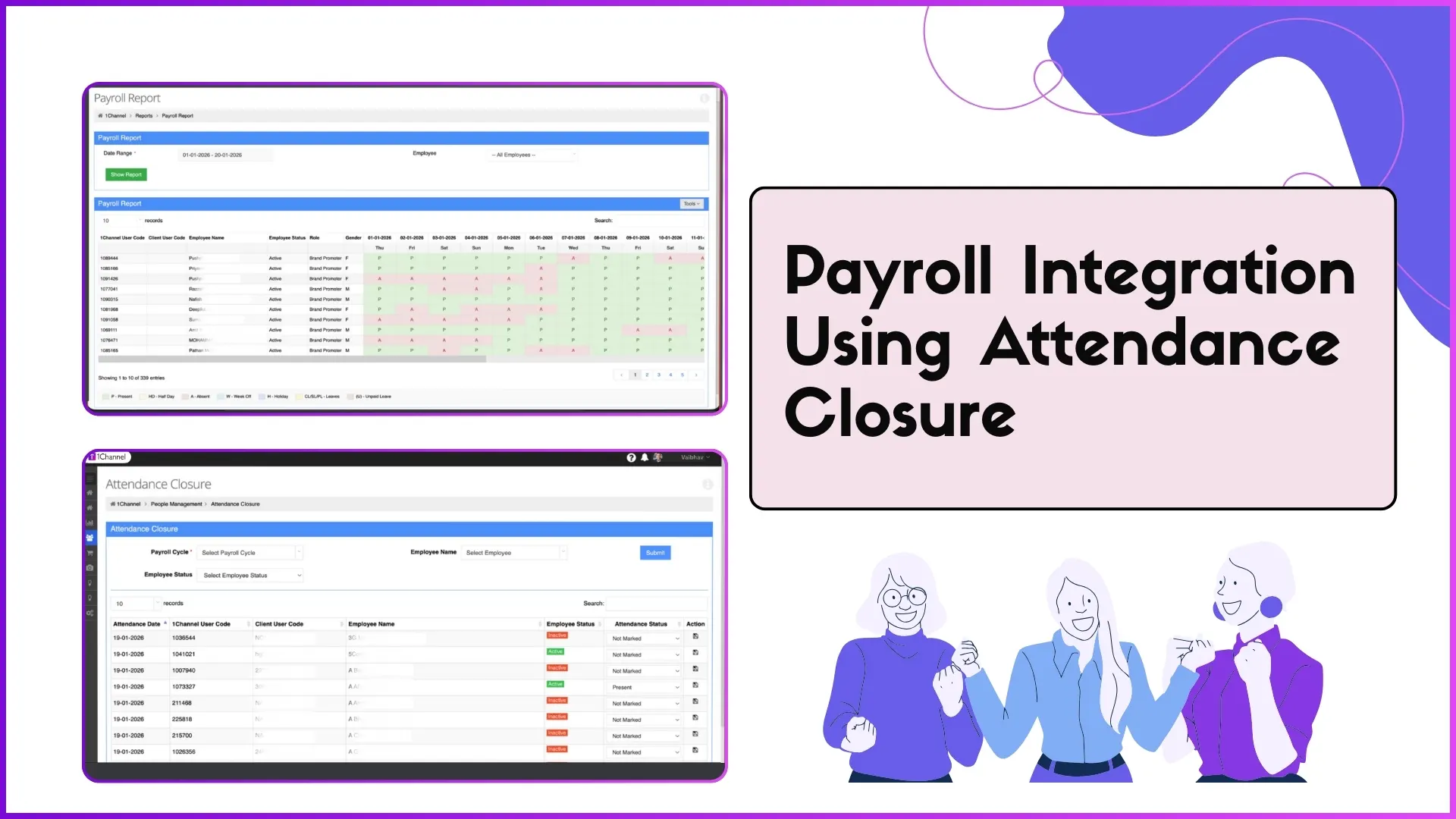
Payroll Integration – Approved reimbursements sync with Attendance Closure system for salary processing—useful for payroll calculation and disbursement.

Define Expense Heads

Admin creates custom expense categories from Settings → Expense Management → Expense Head where expenses are classified. "You can create an expense head, OK where your expense went"—defines categories for travel, fuel, meals, accommodation, and other business expenses.

How It Works:

  • Admin goes to Settings → Expense Management → Expense Head
  • Creates expense head with name (e.g., "Travel Expense", "Fuel & Vehicle", "Client Entertainment")
  • Defines expense category code for reporting and tracking purposes
  • Sets whether expense head requires receipt upload (mandatory/optional)
  • Configures approval requirements and reimbursement rules per expense head
  • Expense heads become available in mobile app for employees to select when submitting claims

Common Expense Heads for Field Sales Teams:

  • Travel Expense — "work related trip sponsored by the company" including train, flight, bus fares for client visits and field work
  • Fuel & Vehicle — fuel costs, vehicle maintenance, toll charges for employees using own vehicles for business travel
  • Accommodation — hotel stays during outstation field visits, lodging expenses for sales meetings and events
  • Meals & Food — daily food allowance during field visits, client meal expenses during business meetings
  • Client Entertainment — expenses for client meetings, business dinners, and relationship building activities
  • Communication — mobile recharge, internet data charges for field employees staying connected with office and clients
  • Daily Allowance (Per Diem) — fixed daily allowance for outstation duty covering miscellaneous expenses
  • Miscellaneous — other business-related expenses not covered by standard categories

Note: Expense head definitions fully configurable per organization's expense policy and business requirements. From Settings, admin creates expense heads aligned with company's reimbursement structure.

Key Features & Benefits

Discover what makes 1Channel Expense Management Software the best solution for distributed field teams — combining automation, policy compliance, and enterprise-grade reliability.
💡 Fully Customizable: All features, expense heads, claim policies, and approval workflows can be tailored to your organization's specific requirements.
Get Started

Mobile Claim Submission

Field employees submit expense claims directly from mobile app with Request Code, Request Month, Request Date, and Requested Amount. Offline drafts auto-sync when internet is available. No need to visit office for reimbursement requests.

Expense Head Configuration

Admin creates custom expense categories from Settings → Expense Head: Travel, Fuel, Meals, Accommodation, Communication, Daily Allowance, Client Entertainment, and Miscellaneous. Expense heads immediately available in mobile app for employee selection.

Claim Policy Management

Configure expense limits, approval requirements, and reimbursement rules per expense head via Manage Claim Policies. Set maximum claim amounts, mandatory receipt thresholds, and single or multi-level approval policies. System validates all claims against policy limits at submission time.

Receipt & Document Upload

Employees attach bills, invoices, and receipts directly to expense claims using Document Management. Supports JPG, PNG, PDF formats. Approvers verify receipts in the approval screen. Eliminates lost paper receipts and provides permanent audit trail for compliance.

Hierarchical Approval Workflow

Claims automatically route to reporting heads based on Organization Tree hierarchy. Manager sees pending claims in People Management → Approve Claims with complete requestor details, amount, and attached receipts. One-click approve or reject with optional comments sent to employee in real-time.

Automated Reimbursement

"Reimbursement exactly reimbursement" — once manager approves, reimbursement is processed automatically without manual follow-ups. Employee sees complete status lifecycle (Submitted → Approved → Processing → Disbursed) in mobile app with no delays or payment tracking needed.

Real-time Claim Tracking

Employees see real-time status of all submitted claims in mobile app: Request Code, Request Month, Requested Amount, and Current Status. Complete claim history with approval timeline, approver comments, and reimbursement confirmation visible at a glance.

Expense Reports & Analytics

Comprehensive expense analytics from Report Catalog showing breakdown by expense head, employee, department, and time period. Download detailed Excel/CSV reports for finance team analysis, budget tracking, and reconciliation. Visual dashboards show top spenders and expense trends.

Payroll Integration

Approved expense reimbursements sync with Attendance Closure system for accurate payroll calculation and salary disbursement. Expense data broken down by employee for payroll reconciliation. Taxable vs non-taxable reimbursement classification for Form 16 compliance.

Policy Compliance Validation

System validates all claims against configured policy limits before submission. Mobile app shows expense limits to prevent policy violations. Receipt upload enforced automatically when mandatory threshold is exceeded. Policy violation alerts flag non-compliant claims for reviewer attention.

Multi-level Approvals

Configure single or multi-level approval chains based on claim amount and expense head. High-value claims route to both reporting head and department head for dual approval. Bulk claim approval for faster processing of multiple requests. Real-time notifications keep employees informed throughout.

Enterprise-Grade Scalability & Support

Supports 200,000+ users across 40+ countries with high-performance architecture and minimal downtime. Complete onboarding, training, and dedicated ongoing support with rapid issue resolution for your expense management rollout across large distributed field teams.

Who Uses Expense Management Software in India?

Perfect for organizations managing field employee expenses across industries requiring mobile claim submission, receipt uploads, approval workflows, and automated reimbursement processing.

  • Field Sales Teams – Expense management for 25,000+ distributed promoters with travel, fuel, daily allowance claims and hierarchical approvals
  • Retail Chain Operations – Multi-store expense tracking for 5,000+ outlet managers with client entertainment, communication, and accommodation claims
  • FMCG & CPG Companies – Territory-wise expense claims for sales teams with "work related trip sponsored by the company" reimbursements
  • Pharmaceutical Sales – Doctor visit expenses, sample distribution costs, and conference travel claims with receipt verification
  • Real Estate Brokers – Site visit expenses, client meeting costs, and vehicle maintenance claims with payroll integration
  • Logistics & Distribution – Driver fuel expenses, vehicle toll charges, and loading/unloading costs with bulk reimbursement processing
  • Service & Installation Teams – On-site service expenses, spare parts procurement, and transportation claims with instant mobile submission
  • Insurance Agents – Field visit expenses, client meeting costs, and marketing material expenses with policy-based approval workflows

PRICING

We understand that every organization has unique expense management requirements. Our Expense Management Software offers flexible pricing based on your selected features, user count, and deployment model. No hidden charges - you only pay for what you need.
Every plan includes secure cloud hosting, mobile apps for Android & iOS, and complete training & support at no additional cost.

Monthly Plan

Flexible Month-to-Month Billing
Talk to an Expert

Other 1Channel Solutions for Sales Teams

Sales Force Automation Software

Complete field sales management with order booking, distributor management, and beat planning.

Explore

CRM Software

Manage customer relationships, track interactions, and automate sales pipelines.

Explore

Loyalty Management Software

Channel partner and influencer loyalty programs with rewards and points redemption.

Explore

Retail Execution Software

Merchandising, shelf audits, planogram compliance, and retail visibility tracking.

Explore

LMS for Sales Teams

Training, onboarding, certification, and knowledge assessments for field teams.

Explore

Workforce Management Software

Beat planning, attendance closure, leave management, and claim approvals for distributed teams.

Explore

Sales Analytics & Reporting

Real-time dashboards, custom reports, and business intelligence for sales teams.

Explore

Store & Outlet Management

Outlet database, visit tracking, and store-level performance monitoring.

Explore

Leave Management Software

Leave requests, approvals, regularization workflows, and auto-allocation for field teams.

Explore

HR Management Software

Employee data management, role assignments, organization hierarchy, and HR compliance.

Explore

Field Activity & Questionnaire

Custom forms, surveys, audits, and field data collection tools.

Explore

Sales Scheme Management Software

Promotional schemes, incentives, discounts, and trade marketing campaigns.

Explore

Attendance & Time Tracking Software

GPS attendance marking, photo validation, AI face recognition, and payroll integration.

Explore

Route Planning Software

Beat plan creation, GPS-validated route compliance, and visit scheduling for field sales teams.
Explore

Distributor Management Software

Distributor onboarding, store mapping, secondary sales tracking, and channel analytics.

Explore

Customers Speak

Rewards and Recognition

Our recognitions constantly motivate us to push the envelope of excellence and empower our customers with winning ideas each day.

G2 Badge for High Performer 2025
G2 Badge for Best Support 2025
G2 Badge for Easiest to Use 2025
G2 Badge for Best ROI 2025

Celebrating Growth Milestones on Play Store, App Store, & G2

Google Play Store icon Rating star
4.8
Apple App Store icon Rating star
4.7
G2 review platform logo Rating star
4.9

Frequently Asked Questions

What is Expense Management Software?

Why Expense Management Software is Essential?

Can we customize expense heads and claim policies?

How does mobile claim submission work?

How does the approval workflow work?

Can employees see their claim status and reimbursement tracking?

How long is implementation and what's included?

Free Demo
Book Free DemoChat Expert