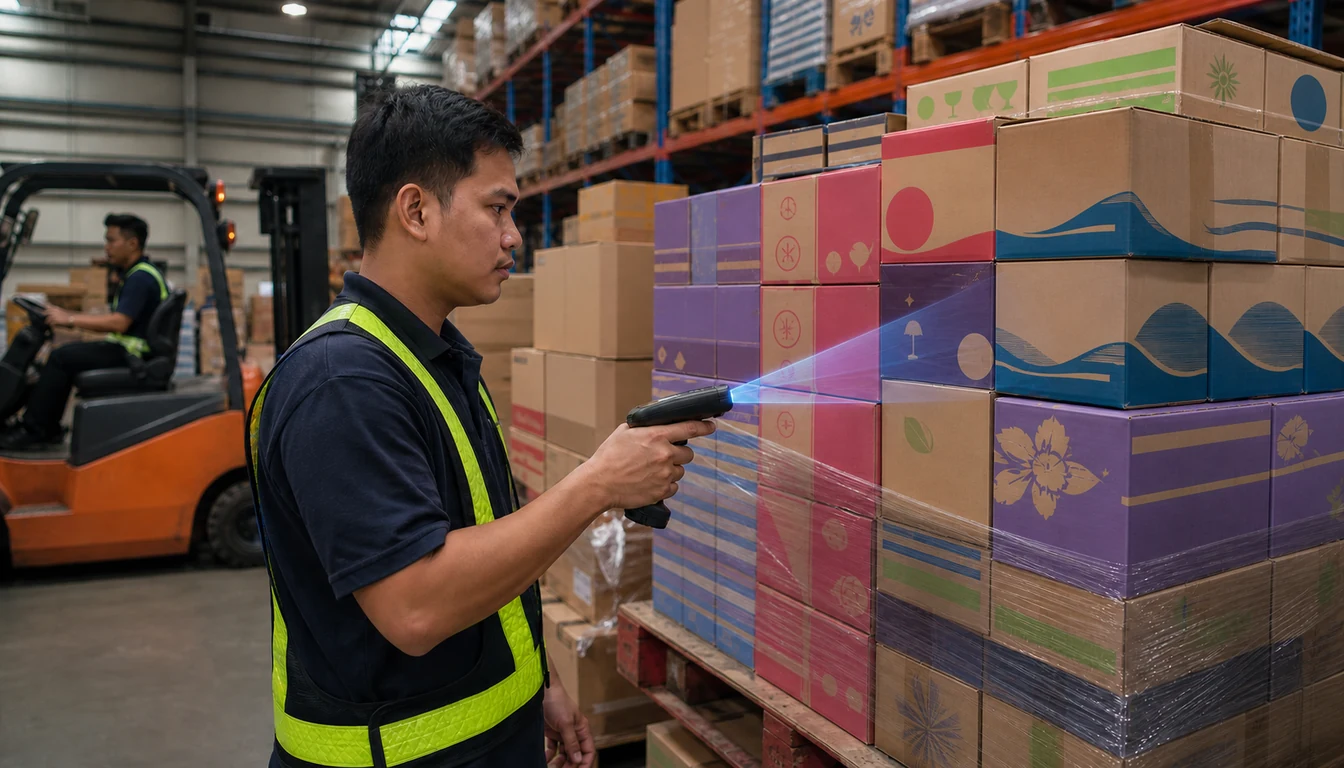
About 20 tropical cyclones enter the Philippine Area of Responsibility in an average year, according to PAGASA. Roughly 70% of them form between July and October.
Across the Philippines, each one can stop the ferries that carry stock between islands. Sea trips in an area are suspended once a wind signal is raised there.
For a depot on Bohol or Leyte restocked from Cebu, a reorder point set for calm weeks can empty the shelves before the next boat sails.
The risk is sharpest for Pharma & Healthcare distributors, whose drugstore customers cannot wait out a storm.
FMCG, Agriculture & Agro-Chemicals and Building Materials & Hardware depots on island routes face it too.
This guide builds a free typhoon reorder sheet in EtherCalc in six steps, with no sign-up. It then covers the sheet's limits and how 1Channel handles replenishment.

Why a Calm-Week Reorder Point Fails in Typhoon Season
A standard reorder point covers the days between placing an order and receiving it, plus a small safety margin. It quietly assumes the boat leaves on time.
When a signal goes up, the order may already be placed while the stock waits at the pier in Cebu. Meanwhile the depot keeps selling down its cover.
Late-season storms count too. In November 2025, Typhoon Uwan and Tropical Depression Verbena both led to suspended sea trips to or across parts of the Visayas.
The fix is simple to state: during the peak months, add the days a route usually stays closed, the storm hold, to the reorder point.
What You Need Before You Start
- Average daily sales per SKU — from the last 60 to 90 days of invoices, in the unit you order in.
- Stock on hand per SKU — from the most recent physical count.
- Normal lead time — days from placing an order to receiving it at the depot.
- Storm hold days per route — how long sea trips on that route usually stayed suspended in past storms, taken from your own delivery records.
- Remaining shelf life — so short-dated lines are not over-stocked.
All figures below are illustrative, for a pharma depot in Tagbilaran, Bohol, that is restocked by sea from Cebu.
How to Build the Typhoon Reorder Sheet
Step 1: Open a New Sheet
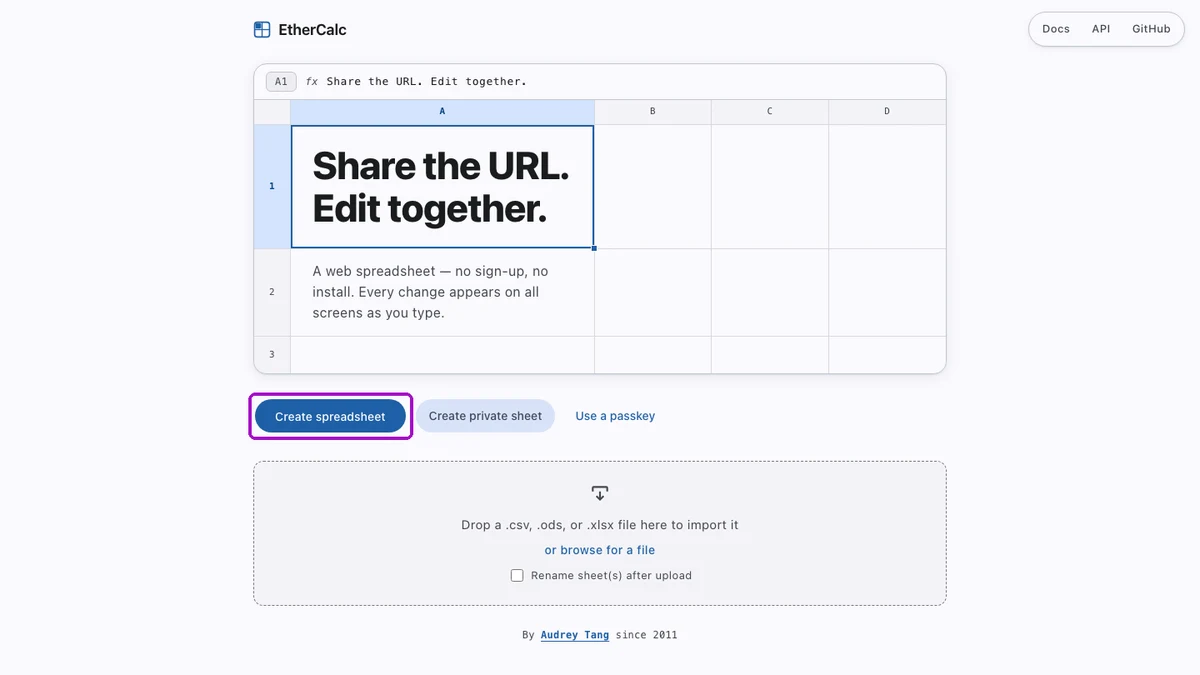
Go to ethercalc.net and click Create spreadsheet. A blank sheet opens at its own web address, with no account and nothing to install.
Anyone holding that address can open and edit the sheet, so keep it to stock figures and leave customer or pricing details out.
Step 2: List SKUs, Daily Sales and Stock on Hand
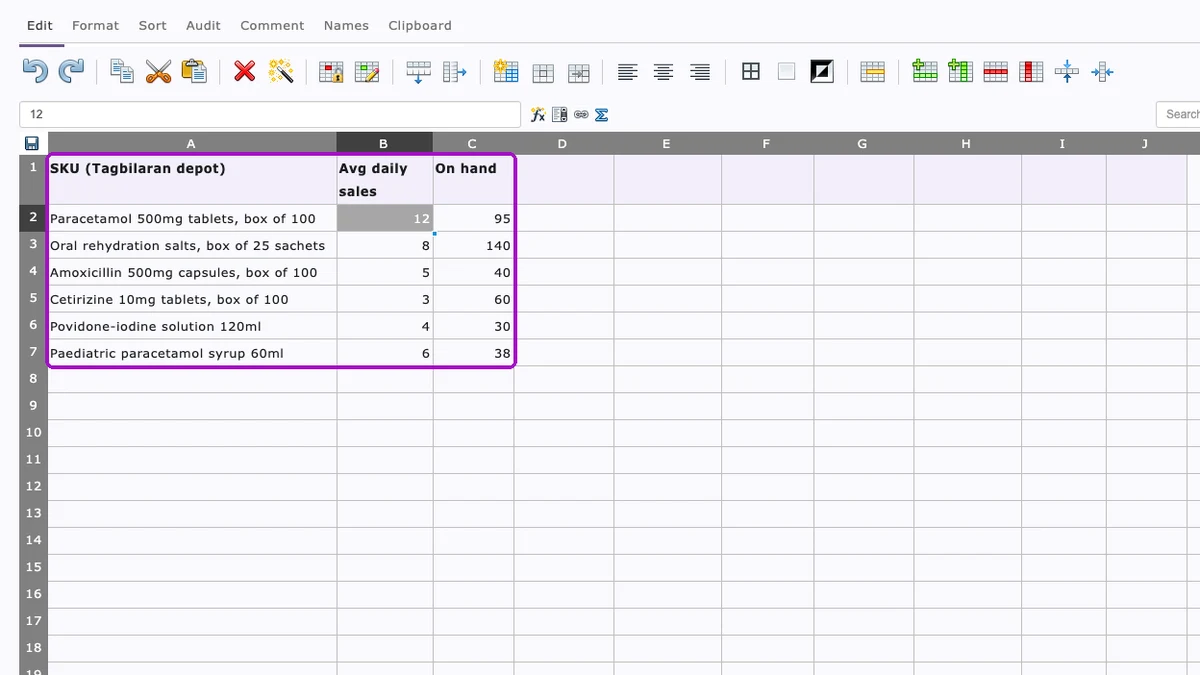
In row 1, type three headings: SKU, Avg daily sales and On hand. Enter one SKU per row below them, using the same unit for sales and stock.
In this depot, Paracetamol 500mg tablets sell 12 boxes a day, and 95 boxes are on the shelf.
Step 3: Add Lead Time, Storm Hold and Safety Days
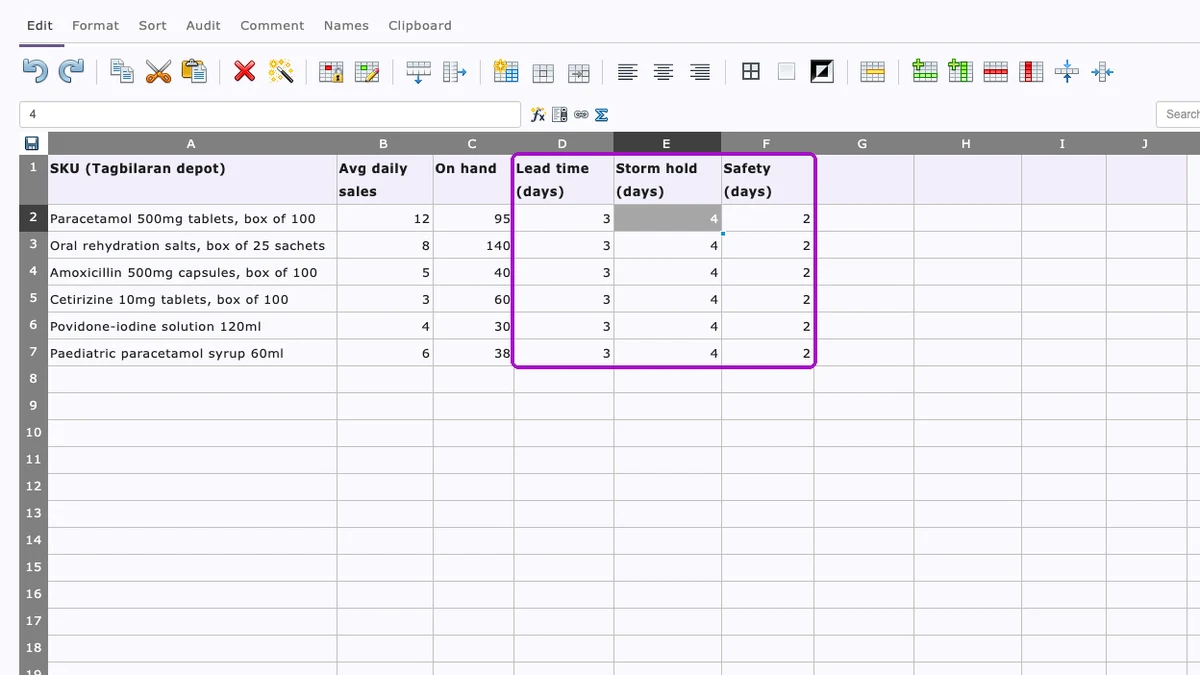
Columns D to F hold the three time buffers. Lead time is the normal days from order to arrival, and safety days absorb ordinary swings in demand.
Storm hold is the new column. Set it per route from your own records, 4 days here, and lower it once the season eases.
Step 4: Calculate the Reorder Point
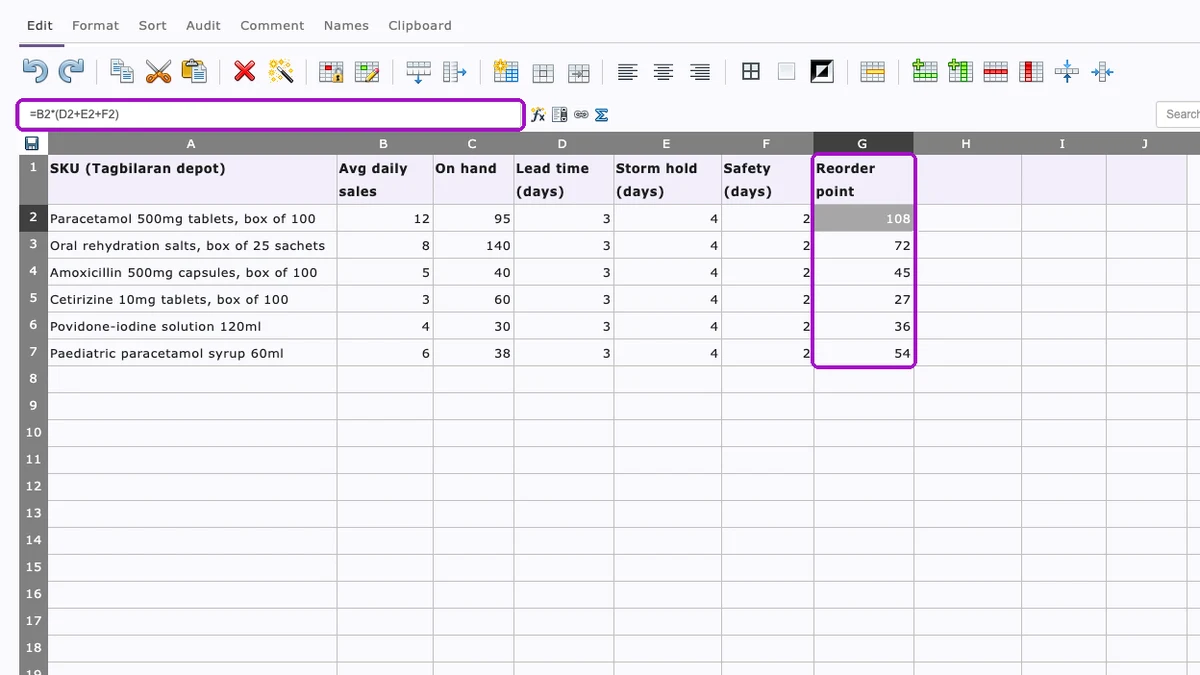
In G2, type =B2*(D2+E2+F2) and copy it down. The result is the stock level at which the depot must order to stay covered through a storm hold.
For paracetamol, 12 boxes a day across 9 days gives a reorder point of 108 boxes.
Step 5: Cap the Buffer by Shelf Life
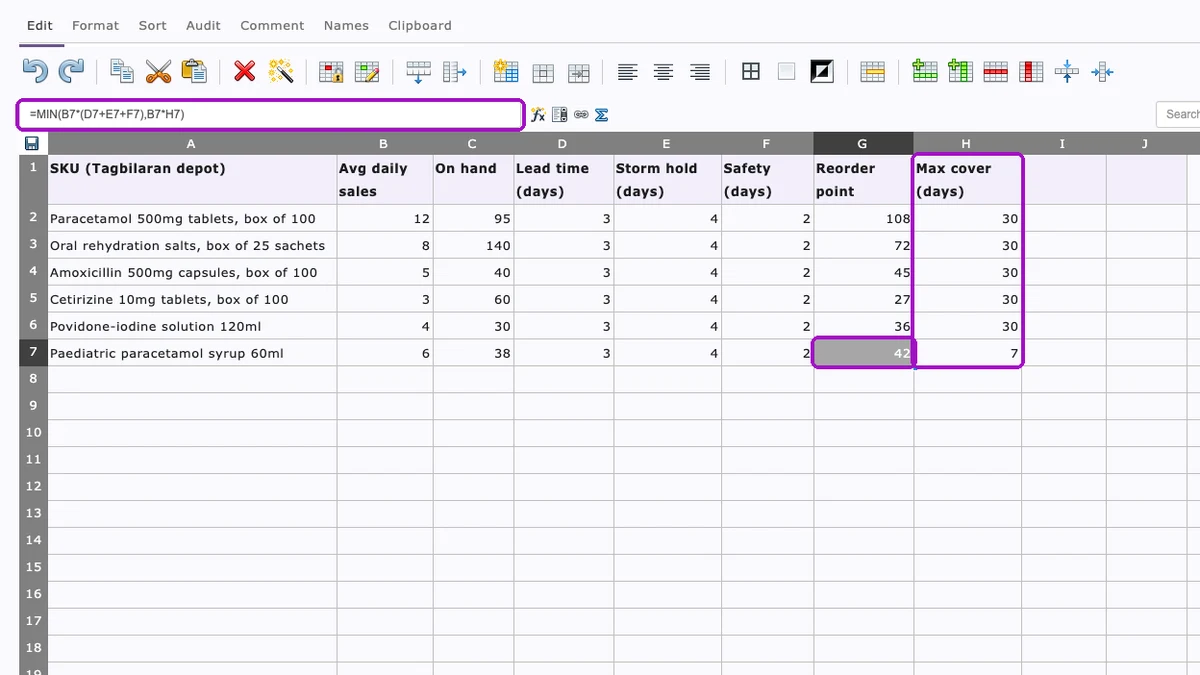
A bigger buffer is a problem for short-dated medicines. Add Max cover (days) in column H: the most days of stock you will hold for each line.
Then change G2 to =MIN(B2*(D2+E2+F2),B2*H2) and copy it down. For the paediatric syrup, a 7-day cap brings the reorder point down from 54 to 42 units.
A capped line needs its own plan, such as asking the supplier for a fresher batch or sending it on an earlier boat.
Step 6: Flag Reorders and Order Quantities
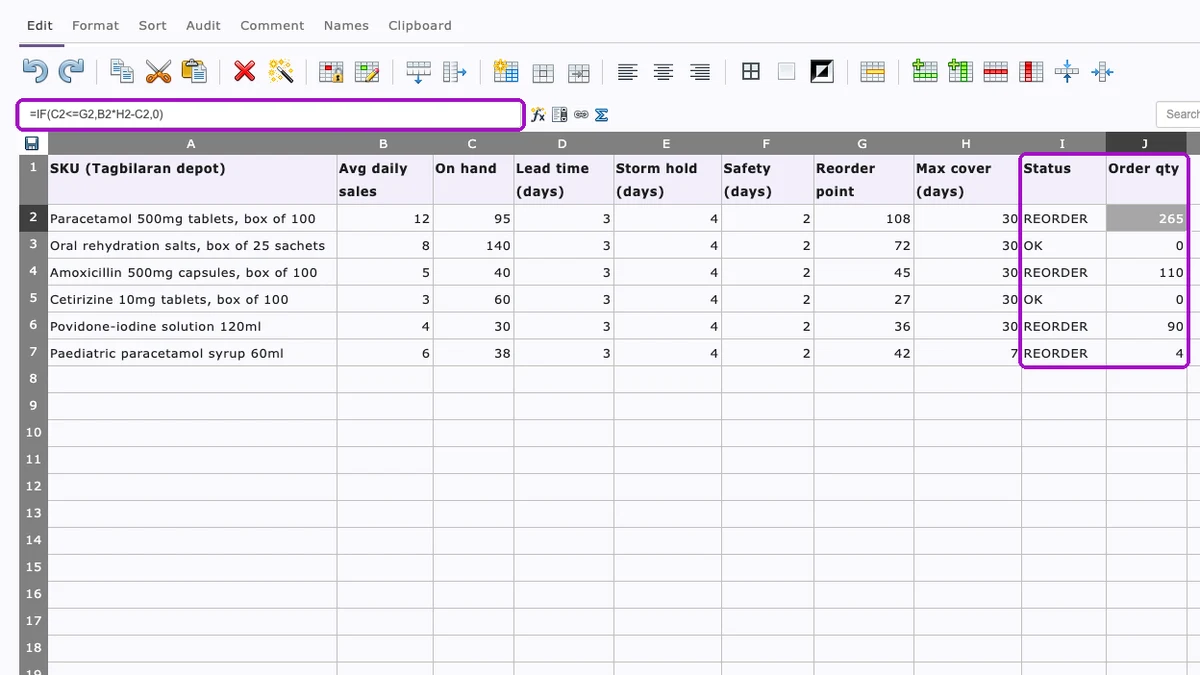
In I2, type =IF(C2<=G2,"REORDER","OK"). In J2, type =IF(C2<=G2,B2*H2-C2,0), which orders back up to the maximum cover.
Copy both down. Four of the six lines now read REORDER, with paracetamol at 265 boxes.
What the Storm Hold Changes for One SKU
Take the paracetamol line, with 95 boxes on hand, and run it through a calm-week sheet and a typhoon-season sheet.
| Paracetamol 500mg, 12 boxes a day | Calm-week sheet | Typhoon-season sheet |
|---|---|---|
| Days in the reorder point | 3 lead + 2 safety = 5 | 3 lead + 4 hold + 2 safety = 9 |
| Reorder point | 60 boxes | 108 boxes |
| With 95 boxes on hand | OK, no order today | REORDER 265 boxes today |
| If a signal is raised as the order goes in | 60 boxes last 5 days; stock arrives in 7 | 95 boxes last about 8 days; stock arrives in 7 |
| Result | About 2 days with no stock | Covered through the hold |
The calm-week sheet only orders once stock falls to 60, about three days later. If a storm arrives then, the drugstores it serves go without for two days.
Where the Manual Sheet Falls Short
- Stale stock figures — on hand is only as fresh as the last count someone typed in.
- Someone has to look — nothing is ordered if the person who reads the flags is off sick or out on a delivery.
- Manual storm settings — the buffer rises only when someone remembers to change the storm hold column.
- One sheet per depot — each island keeps its own copy, and head office never sees them side by side.
- Open editing — anyone with the link can change any cell, formulas included.
- Rough shelf life — the cap is one number per line, not the actual batches sitting in the rack.
Where 1Channel Takes Over From the Sheet
In 1Channel's distributor management system, each SKU carries a minimum available-stock threshold. When stock falls below it, the system places a replenishment order itself.
A check-frequency setting, such as once a day, decides how often stock is compared with thresholds. Orders go through on Auto Approve or wait With Approval.
Orders route up the chain: a distributor's auto-order goes to its super stockist, and a super stockist's goes to the company.
Stock comes from the system's own movements, goods receipts and counts. Batch-level stock with FEFO picking replaces the rough shelf-life cap.
On top of the thresholds, the AI-powered DMS monitors stock against them, cues replenishment and raises low-stock alerts, flagging patterns a manual review would miss.
The threshold is still a figure your team sets. Raise it for island routes before the peak months, as you would add storm hold days to a sheet.
| Task | Free sheet | 1Channel |
|---|---|---|
| Stock on hand | Typed in after each count | From stock movements, goods receipts and counts |
| Reorder trigger | Someone reads the REORDER flag | Threshold checked on a set frequency, order placed automatically |
| Approval | Phone call or chat message | Auto Approve or With Approval, set per tier |
| Shelf life | One max-cover number per line | Batch and expiry tracking with FEFO picking |
| Visibility | One sheet per depot | Low-stock alerts plus a Stock Aging Report by warehouse and SKU |
Turn Reorder Points Into Automatic Replenishment
Set stock thresholds per SKU, let replenishment orders go out on schedule, and keep batch and expiry in view across every depot.
Explore Inventory Management Software →Points to Remember
- Set storm hold days per route from your own suspension records, before the July to October peak.
- Cap buffers on short-dated lines, and plan those lines batch by batch.
- Update stock on hand before reading the flags, or the sheet answers yesterday's question.
- Share the sheet's link only with the team that owns replenishment.
Note: Since the manual method was only tested once, consult a technical expert before running bulk operations.